






Learn How to Remove SCCM Cloud DP Distribution Point ConfigMgr
In this post, I will explore How to Remove SCCM Cloud DP Distribution Point ConfigMgr. From SCCM 1806 onwards, you don’t have to have Cloud DP. SCCM Clients can use SCCM CMG to download content.
As I explained in the previous post, you can use SCCM CMG as cloud DP. However, I recommend removing cloud DP once you have completed testing the content download functionality of SCCM CMG.
By removing SCCM cloud DP, you can reduce the costs of the Azure PaaS server, dedicated IP, and Certificate and the complexity of your SCCM environment.
This post explains the steps to remove SCCM Cloud DP.

Can’t Delete or Remove Azure AD Apps (used for Cloud Services) from SCCM Console? Here is the guide to removing those from MEMCM using WMI | WBEMTEST https://www.anoopcnair.com/remove-azure-ad-apps-from-sccm-using-wmi-delete/
Table of Contents
Wait … Are you Ready to Remove SCCM Cloud DP?
Are you sure whether you are ready to remove Cloud DP? Have you gone through the SCCM CMG content download verification steps (#4), as I mentioned in the post How to Setup SCCM Cloud Management Gateway as cloud DP?
Ensure your SCCM CMG setup is working as expected before removing the SCCM cloud DP. I also recommend removing all the packages from the Cloud DP before deleting them.
Video Tutorial – How to Remove SCCM Cloud DP
Before removing Cloud DP, make sure you have already completed the SCCM CMG setup as Cloud DP, as I explained in the video tutorial.
Delete SCCM Cloud Distribution Point (CDP)
Don’t remove the Azure PaaS server and blob storage before deleting the CDP from the SCCM console. You can follow the below steps to remove SCCM cloud DP from your SCCM environment.
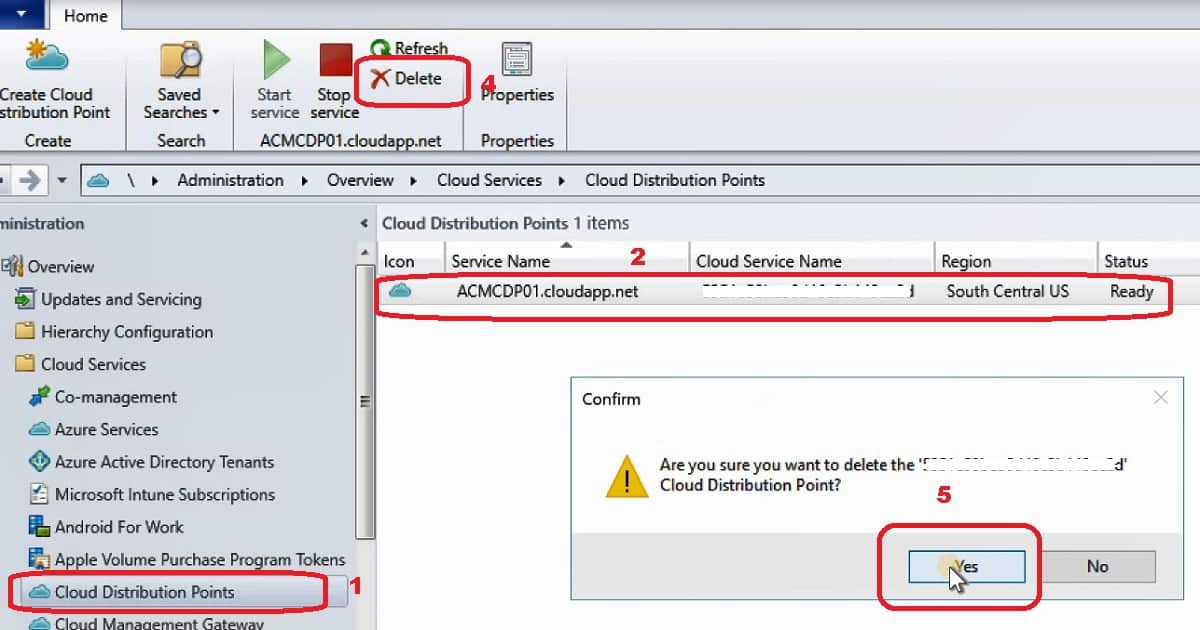
- Navigate to \Administration\Overview\Cloud Services\Cloud Distribution Point
- Select the Cloud DP, go to properties, and select Content. Then, make sure no packages are distributed to that DP.
- Click on the Delete button from the ribbon menu to remove SCCM cloud DP
- Click on the Yes button from the confirmation windows to initiate the cloud DP deletion process
The above steps will begin the Cloud DP removal process from Azure. I would recommend waiting 5-10 minutes to complete the removal process from Azure.
Verify the Removal of SCCM Cloud DP
You can verify the removal or deletion of SCCM cloud DP from the Azure portal.
- Navigate to Azure Portal – Subscriptions
- Ensure that the Azure Cloud Service (classic) associated with cloud DP is removed (check the service name to confirm).
- Ensure the Azure Blob Storage Account (Classic) associated with cloud DP is removed from the Azure portal.
Resources
SCCM cloud distribution point (CDP) details
We are on WhatsApp. To get the latest step-by-step guides and news updates, Join our Channel. Click here –HTMD WhatsApp.
Author
Anoop C Nair is Microsoft MVP! He is a Device Management Admin with more than 20 years of experience (calculation done in 2021) in IT. He is a Blogger, Speaker, and Local User Group HTMD Community leader. His primary focus is Device Management technologies like SCCM 2012, Current Branch, and Intune. He writes about ConfigMgr, Windows 11, Windows 10, Azure AD, Microsoft Intune, Windows 365, AVD, etc.




Discussion