






SCCM Upgrade Strategy for Infra Upgrade
SCCM updates and Servicing have drastically changed in the last few years. I heard feedback from many SCCM admins that they don’t like the four(4) months upgrade cycle of SCCM. Let’s define the SCCM Upgrade strategy for your organization.
It’s time to define a new process or revamp your existing process within your organization to remove the frustration about the SCCM upgrade. This post will share my experience with SCCM Deployment Rings – SCCM Release Management Process.
SCCM infra upgrade used to happen once in one (1) year or two (2) years. Some organizations still use SCCM 2007 under an extended support agreement with Microsoft.
The release cycle of a new version of SCCM 2012 used to happen once every two years. In the latter part of this post, you will learn more about the sample SCCM Release Management Process.

Table of Contents
What Changed in SCCM Servicing?
Microsoft started releasing new versions of SCCM every four(4) months to cope with Windows 10 servicing requirements. Microsoft released three(3) versions of SCCM in a year and two(2) versions of Windows 10.
SCCM updates and servicing are big changes for all organizations. They should redefine their internal release management process (SCCM Upgrade strategy).
Advantages of SCCM Updates & Servicing
As Brad Anderson mentioned in his post, the world is moving to SaaS (software as a service). SCCM receives continuous updates via the SaaS model. The key to making SCCM a SaaS product is updates and a servicing model.
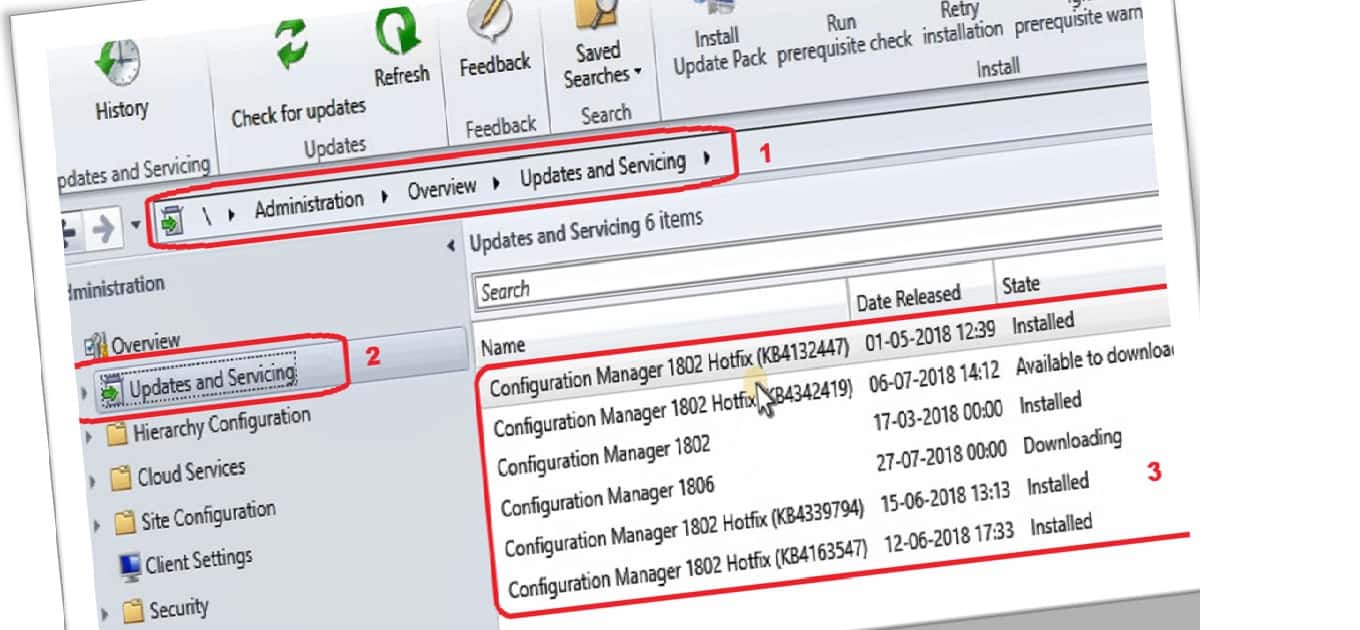
New Features—This regular update provides regular updates to customers. SCCM is a modern device management solution with many new features released monthly. The new features are the most significant plus point of SCCM servicing.
Intelligent Update Availability and Automatic Download – With the new updates model, there is no need to download prerequisite files and updates from the Microsoft website, unlike SCCM 2012 and 2007.
All the required updates (source files) for your SCCM infra will automatically be downloaded to the SCCM server.
Continuous Improvement to Prerequisite checks – SCCM prerequisite checks are essential to reduce upgrade failures in the production environment.
Prerequisite checks are the real secret behind the excellent success rate of regular SCCM upgrades. I think SCCM PG works based on feedback and telemetry data to improve prerequisite checks. SCCM Upgrade strategy.
My Personal Experience of SCCM Updates and Servicing (Define SCCM Upgrade Strategy)
I’m part of a team that manages a 60K+ client base SCCM environment, and we perform SCCM upgrades every six(6) months.
The SCCM servicing/upgrade experience is very smooth, and we never faced any significant issues with frequent SCCM upgrades (SCCM Upgrade Strategy).
I have created a sample SCCM deployment ring for the SCCM admin’s reference. I hope this will help SCCM admins proceed with SCCM upgrades with much more confidence.
A proper SCCM release management process for infra and client upgrades is required.
SCCM Upgrade Strategy – SCCM Release Management Process
Five (5) deployment rings follow the sample SCCM release management process. You should adjust SCCM deployment rings depending on your infrastructure and client requirements.
When you don’t have a development environment, you can upgrade the pre-prod (staging) environment with the SCCM fast ring.
Once the pre-prod environment is upgraded successfully, wait for the SCCM slow ring release to boost the production environment.
(Define SCCM Upgrade Strategy)
| Deployment rings | Servicing Branch | Total Weeks of Delay |
|---|---|---|
| Ring 0 – Preview | SCCM CB TP (Technical Preview) versions | Every month (Isolated personal SCCM) + 2 Days |
| Ring 1 – Dev | SCCM CB Prod Version (CMCB) – Fast Ring | CMCB Prod Version Fast Ring Release + 1 Week |
| Ring 2 – Pre-Prod (Staging) Infra | SCCM CB Prod Version – Slow Ring | CMCB GA Slow Ring Release Date + 1 Week |
| Ring 3 – Pre- Prod – Client Upgrade | SCCM CB Prod Version – Slow Ring | CMCB GA Slow Ring Release Date + 2 Weeks |
| Ring 4 – Production Infra | SCCM CB Prod Version – Slow Ring | CMCB Slow Ring Release Date + 4 Weeks |
| Ring 5 – Production – Client Upgrade | SCCM CB Prod Version – Slow Ring | CMCB Slow Ring Release Date + 4 Weeks onwards |
We are on WhatsApp. To get the latest step-by-step guides and news updates, Join our Channel. Click here –HTMD WhatsApp.
Author
Anoop C Nair is Microsoft MVP! He is a Device Management Admin with more than 20 years of experience (calculation done in 2021) in IT. He is a Blogger, Speaker, and Local User Group HTMD Community leader. His primary focus is Device Management technologies like SCCM 2012, Current Branch, and Intune. He writes about ConfigMgr, Windows 11, Windows 10, Azure AD, Microsoft Intune, Windows 365, AVD, etc.




We are in an offline environment and got hosed by 1806 and the disconnected Patching bug. Then we had trouble getting the hot fix in a timely manner since we are disconnected. Too much work for the amount of releases and hot fixes that you need to get back to a stable platform.
StaffThank you for sharing!