






Advantages of Using Cloud Attached SCCM and Intune
Let’s discuss the Advantages of Using Cloud Attached SCCM and Intune. This post is based on what is new in the SCCM (BRK3035) ignite session by Rob York and Dune Desormeaux (also Jeffrey, Karim, and Avi).
If you have not seen the recording, I would highly recommend watching the session recording. I will cover my notes about the advantages of the Cloud Attached SCCM.
This year’s ignite theme provided more insights into the added value of connecting on-prem infrastructure to the cloud.
The conference increasingly concentrates on transitioning from on-prem to cloud at a slower pace (or your own pace).

Table of Contents
Cloud Attached SCCM Advantages
The following table shows most of the presentations at Ignite 2018. Microsoft is trying to make people aware of the advantages of starting to use device management Powered by the M365 Cloud.
- Unified Endpoint Management – Windows, iOS, macOS, Android
- Modern Access Control – Compliance, Conditional Access
- Modern Provisioning – Autopilot, DEP, Zero Touch, KME
- Modern Security – Hello, Attestation, ATP, Secure Score
- Modern Policy – Security Baselines, Guided Deployments
- Modern App Management – Office365 Pro Plus, Store, SaaS, VPP
- Full Microsoft Integration – Analytics, Graph, Console, RBAC, Audit
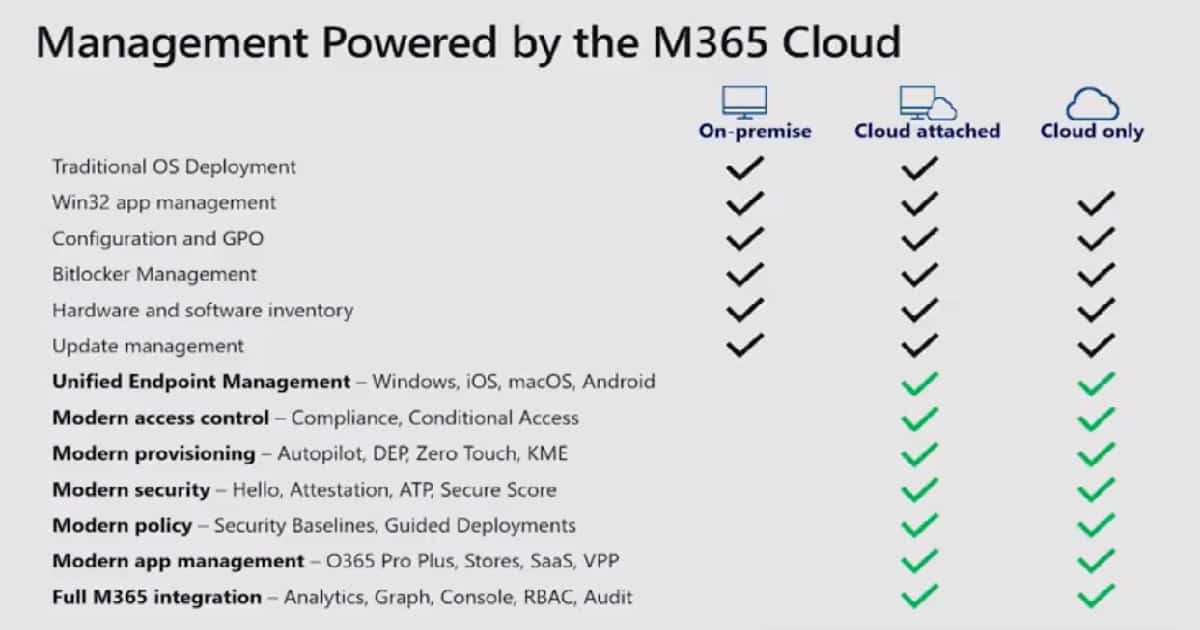
Once you attach your SCCM on-prem infra to the cloud (Microsoft Intune in this case), Intune Remote Actions will also be enabled for Co-managed SCCM client devices.
- Restart any Internet-connected device
- Wipe any Internet-connected device
- SCCM Client Health Details in Intune portal
- Enable Conditional Access and Compliance Policies to increase patch compliance rate (Credits to Djaam)
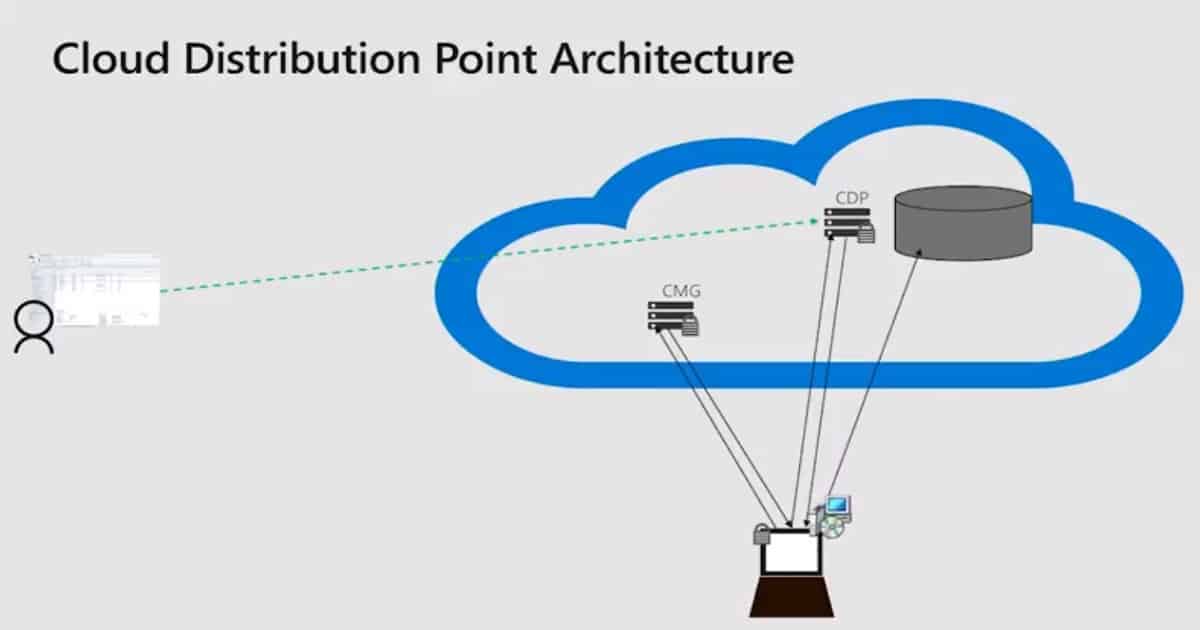
SCCM Cloud DP Architecture
The actual content is not being downloaded from the Cloud DP VM. The SCCM Cloud DP VM provides the URL of blob storage and an access token to the SCCM client.
The SCCM client downloads content from Azure Blob storage, which increases CDP’s scalability. This is one of the advantages of Cloud-Attached SCCM.
- Cloud DP site Affinity for multi-hierarchy
- In-place upgrade of Windows 10 over CMG
- Cloud-Sourced Pull DPs
- Device Authentication of Azure Active Directory
- OSD over CMG – planned – Coming Soon
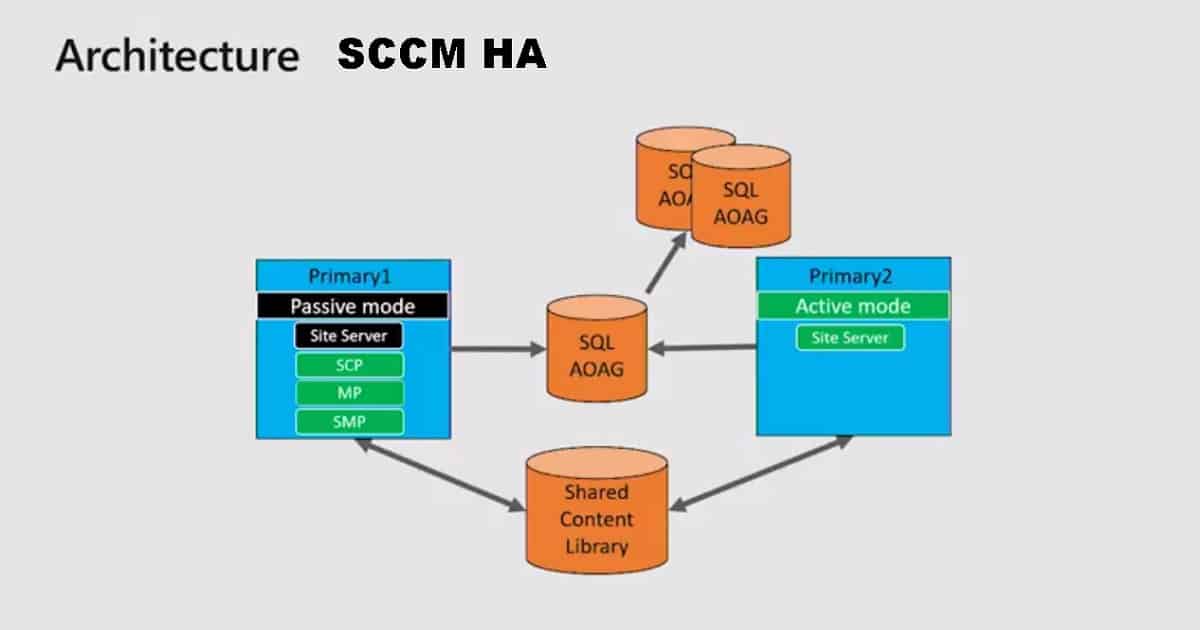
SCCM Site Server High Availability
In this section, Karim explained SCCM’s high availability and DR options. I have also posted about SCCM High Availability Redundancy DR Options.
Why – High Availability?
Many customers consider SCCM a mission-critical service
Enabled simplification for customers that chose hierarchy for fault tolerance
A smooth move from Azure to a new hardware/OS (This is one of the advantages of Cloud Attached SCCM)
How – SCCM HA?
SQL Always on Availability Group (Recommended)
Shared Content Library
No Dependency on Windows or hardware-based clustering
Future Goals of SCCM High Availability
Hierarchy Support (CAS and Primary Sites)
Active/Active Site Servers
Desktop Analytics and SCCM Integration + Office Customization Tool
Desktop Analytics
Desktop Analytics is an extension of Windows Analytics. This desktop analytics can be used for Office Suite and Windows. This analytics helps with app compatibility. You can get more details about UAT planning and piloting something like “Recommended New Pilot Devices” from the Desktop Analytics portal.
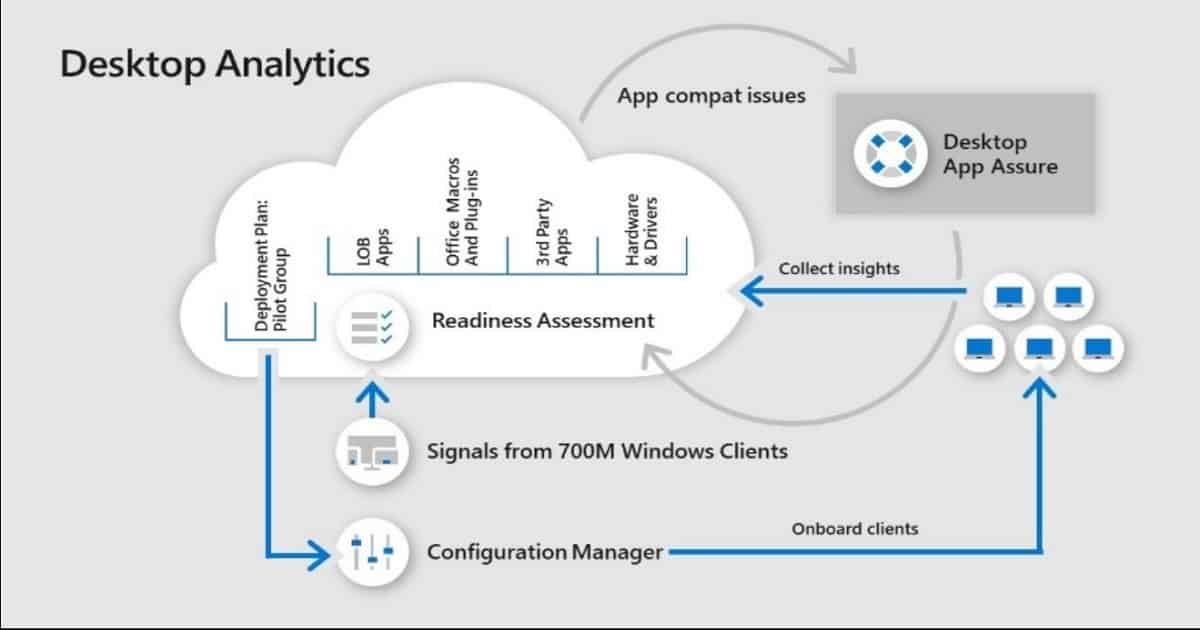
Each deployment plan from desktop analytics is synced down to the SCCM console, and the SCCM admin can use this deployment plan to schedule the deployment.
Desktop analytics and phased deployments can help stop or continue critical deployments (automatically). This is one of the advantages of Cloud Attached SCCM.
- Full view into Office Assets
- Deployment Monitoring and Diagnosis
- Data Driver Pilot Ring Creation
- Pilot Success and Post-Upgrade Health Insights
New Office 365 Client Installation – Office Customization Tool
New changes in the SCCM application for Microsoft Office 365 Client Installation follow. This Office 365 client installation wizard includes an online Office Customization Tool.
This tool needs an internet connection as this office customization tool is launched as a web-based tool.
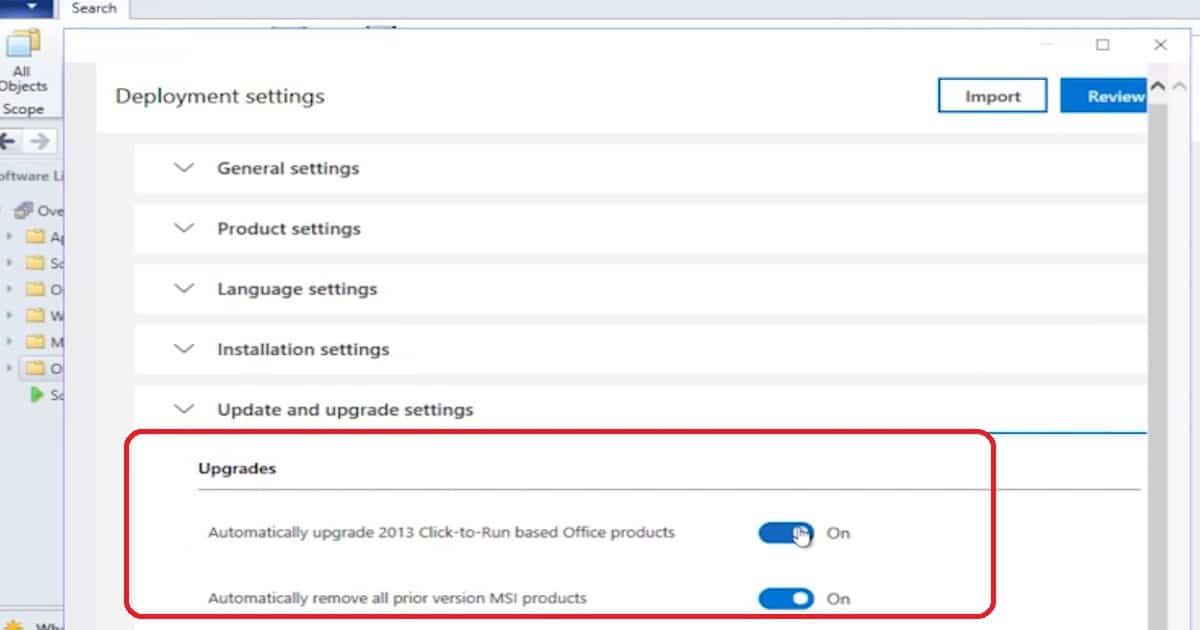
This tool is updated independently of SCCM versions. Automatically upgrade Office 2013, click to run based apps, and remove previous MSI versions of Office.
SCCM is not Slow Moving Server
IT Admins need real-time data in a Constantly Changing device management environment. SCCM is integrated with Real-Time Actions and fast Channel architecture.
This architecture is also known as a Client notification system. CMPivot, Run Scripts, and Device Presence run on top of this real-time architecture.
30 queries are included in the latest version of SCCM TP CMPivot. I have a video post explaining the CMPivot Tool SCCM Subset of the Azure Log Analytics. This is one of the advantages of Cloud Attached SCCM.
Resources
We are on WhatsApp. To get the latest step-by-step guides and news updates, Join our Channel. Click here –HTMD WhatsApp.
Author
Anoop C Nair is Microsoft MVP! He is a Device Management Admin with more than 20 years of experience (calculation done in 2021) in IT. He is a Blogger, Speaker, and Local User Group HTMD Community leader. His primary focus is Device Management technologies like SCCM 2012, Current Branch, and Intune. He writes about ConfigMgr, Windows 11, Windows 10, Azure AD, Microsoft Intune, Windows 365, AVD, etc.




Discussion