






How to Turn On Verbose SQL NAL Logging SCCM Server-Side Logging
Let’s understand How to Turn On Verbose SQL NAL Logging SCCM Server-Side Logging. One old topic and an old post. A great post from Ismail-TS is on logging (offline now).
I think many topics are covered in all the parts related to ConfigMgr logging.
Some of them are still relevant for Configuration Manager CB. I have not checked and confirmed all the registry keys. Please carry out these changes in a staging environment.
This post will give us more details about “SCCM ConfigMgr How to Turn On Verbose SQL NAL logging.”

Table of Contents
How to Turn On Verbose SQL NAL Logging SCCM Server-Side Logging
SCCM does not see much information here. You can check the logs for him having trouble with Verbose / Debug, or NAL may need to turn on logging. This logging will give you much more detailed information and help you find the source of the problem.

Server verbose logging
- 1 – open means
- 0 – off means
SCCM and Components
HKEY_LOCAL_MACHINE\SOFTWARE\Microsoft\SMS\Tracing\ENABLED = 1 – (REG_DWORD – General SCCM turn on Logging)
HKEY_LOCAL_MACHINE\SOFTWARE\Microsoft\SMS\Tracing\ xxxxxxx\ Enabled = 1 – (REG_DWORD – The Role SCCM’de If you change the compositions according to him)
HKEY_LOCAL_MACHINE\SOFTWARE\Microsoft\SMS\Tracing\xxxxxxx\ MaxFileSize = 3000000 – (REG_DWORD – 3 MB large – NAL and Debug Logging for growth with more than it is worth)
Enable Verbose Logging for SCCM Server Components
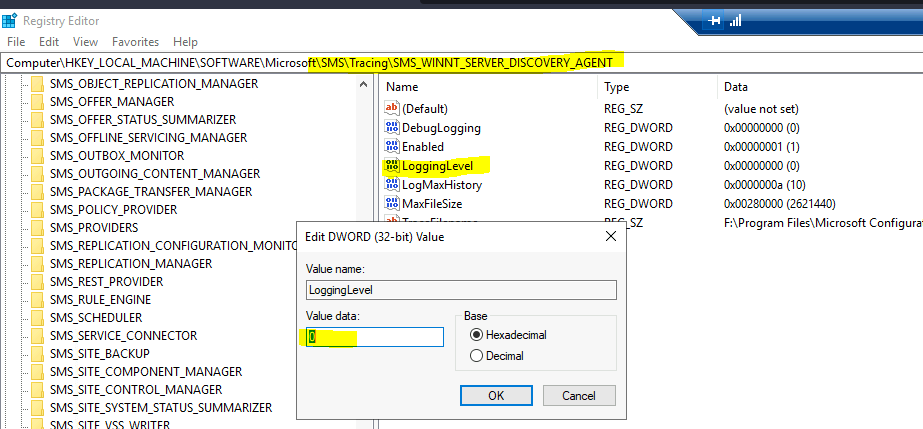
Follow the method mentioned below to Enable Verbose Logging for SCCM Server Components. You must enable the logging level to be verbose by changing the value to 0.
LoggingLevel = 0
Computer\HKEY_LOCAL_MACHINE\SOFTWARE\Microsoft\SMS\Tracing\SMS_WINNT_SERVER_DISCOVERY_AGENT
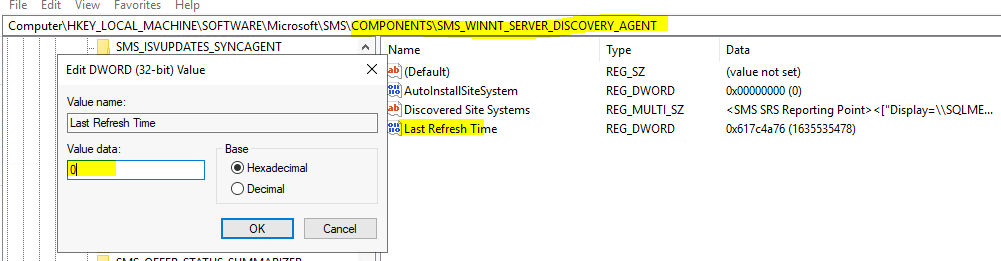
And make sure you reset the refresh time of that component from the following registry key
Reset Refresh time of the component – Last Refresh Time = 0
Computer\HKEY_LOCAL_MACHINE\SOFTWARE\Microsoft\SMS\COMPONENTS\SMS_WINNT_SERVER_DISCOVERY_AGENT
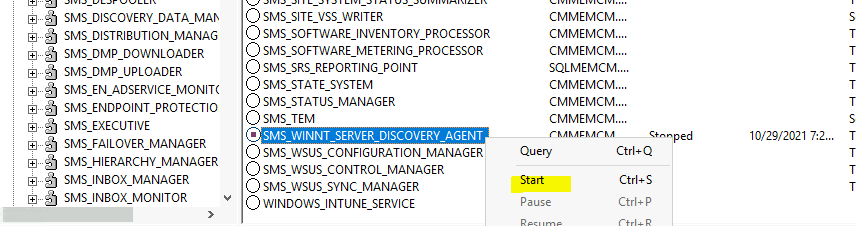
You can go to Service Manager and restart that component Where Is Tools ConfigMgr Service Manager Option In SCCM Console (anoopcnair.com)
Important Components to be Linked to SQL for SQL Logging, open the key
HKEY_LOCAL_MACHINE\SOFTWARE\Microsoft\SMS\Tracing\Sqlenabled = 1 – (REG_DWORD)
Component of SQL and SCCM logs, including
- ciamgr.log – SMS_CI_ASSIGNMENT_MANAGER
- Colleval.log – SMS_COLLECTION_EVALUATOR
- compsumm.log – SMS_COMPONENT_STATUS_SUMMARIZER
- Dataldr.log – SMS_INVENTORY_DATA_LOADER
- ddm.log – SMS_DISCOVERY_DATA_MANAGER
- Distmgr.log – SMS_DISTRIBUTION_MANAGER
- Hman.log – SMS_HIERARCHY_MANAGER
- objreplmgr.log – SMS_OBJECT_REPLICATION_MANAGER
- offermgr.log – SMS_OFFER_MANAGER
- Offersum.log – SMS_OFFER_STATUS_SUMMARIZER
- policypv.log – SMS_POLICY_PROVIDER
- sinvproc.log – SMS_SOFTWARE_INVENTORY_PROCESSOR
- Sitestat.log – SMS_SITE_SYSTEM_STATUS_SUMMARIZER
- smsdbmon.log – SMS_DATABASE_NOTIFICATION_MONITOR
- statesys.log – SMS_STATE_SYSTEM
- Statmgr.log – SMS_STATUS_MANAGER
- swmproc.log – SMS_SOFTWARE_METERING_PROCESSOR
- wcm.log – SMS_WSUS_CONFIGURATION_MANAGER
- wsyncmgr.log – SMS_WSUS_SYNC_MANAGER
SMS Provider
- HKEY_LOCAL_MACHINE\Software\Microsoft\SMS\Providers\Logging Level = 1 – (REG_DWORD)
- HKEY_LOCAL_MACHINE\Software\Microsoft\SMS\Providers\SQL Cache Logging Level = 1 – (REG_DWORD)
- HKEY_LOCAL_MACHINE\Software\Microsoft\SMS\Providers\Log Size MB = 1 – (REG_DWORD)
SCCM Log with the Logging Provider are as follows
- Smsprov.log
NAL logging
Sometimes, it may be enough, and NAL logs verbose information in the pop-up. Caution: The NAL log file is too big for him. Keeping detailed logs has benefits.
HKEY_LOCAL_MACHINE\SOFTWARE\Microsoft\NAL\Logging
- DataType: REG_DWORD – Log To = 3
- DataType: REG_DWORD – Verbosity = 7
NAL logging, set the values:
- NAL_LOG_VERBOSITY_LEVEL_1 = Errors
- NAL_LOG_VERBOSITY_LEVEL_2 = Warnings
- NAL_LOG_VERBOSITY_LEVEL_4 = Information
- NAL_LOG_VERBOSITY_LEVEL_7 = Errors, Warnings, Information
SCCM loglarımız with NAL logging are as follows:
- compsumm.log – SMS_COMPONENT_STATUS_SUMMARIZER
- Distmgr.log – SMS_DISTRIBUTION_MANAGER
- inboxmgr.log – SMS_INBOX_MANAGER
- ntsvrdis.log – SMS_WINNT_SERVER_DISCOVERY_AGENT
- sitecomp.log – SMS_SITE_COMPONENT_MANAGER
- Sitestat.log – SMS_SITE_SYSTEM_STATUS_SUMMARIZER
- smsexec.log – SMS_EXECUTIVE
IMPORTANT: Registry changes to work:
- Stop the SMS_SITE_COMPONENT_MANAGER
- Stop the SMS_EXECUTIVE
- Start the SMS_EXECUTIVE
- Start SMS_SITE_COMPONENT_MANAGER
SCCM Agent (Workstation):
CCM for the verbose logging:
For Administrator Key, “full rights” to provide the necessary – there is no default.
HKEY_LOCAL_MACHINE\SOFTWARE\Microsoft\CCM\Logging\@GLOBAL
Set of the following values:
- LogEnabled = 1
- LogLevel = 0
- LogMaxSize = 40000000
- LogDirectory = c: \windows\system32\ccm\logs (If you want to print the logs to a different location)
- LogMaxHistory = 1 (Although the size of the logs is filled with incense,> here is one: will be holding an old log. Example: Execmgr.log and will execmgr.lo_.
Verbose logging is not enough DebugLogging CCM:
This is necessary to create the reg KEYI:
HKEY_LOCAL_MACHINE \SOFTWARE\Microsoft\CCM\Logging\DebugLogging
- DataType: REG_SZ – Enabled = TRUE
WMI
SCCM agent is based entirely on WMI WMI is useful to turn verbose logging:
- HKEY_LOCAL_MACHINE\SOFTWARE\Microsoft\WBEM\CIMOM\Logging = 0 – (REG_SZ – Disabled)
- HKEY_LOCAL_MACHINE\SOFTWARE\Microsoft\WBEM\CIMOM\Logging = 1 – (REG_SZ – Error only)
- HKEY_LOCAL_MACHINE\SOFTWARE\Microsoft\WBEM\CIMOM\Logging = 2 – (REG_SZ – Verbose)
HKEY_LOCAL_MACHINE\SOFTWARE\Microsoft\WBEM\CIMOM\Log File Max Size = 4000000 – (REG_DWORD – If you need to WMI 2)
IMPORTANT: To study the changes in the registry and WMI
Restart the Computer
Other Important Components are WSUS + SCCM Component
- Set HKLM\SOFTWARE\Microsoft\SMS\Components\SMS_WSUS_SYNC_MANAGER
- DataType: REG_DWORD – LogLevel = 3
LOG_SUMMARY = 1; - LOG_DETAIL = 2; default
- LOG_VERBOSE = 3;
- LOG_DEBUG = 4;
We are on WhatsApp. To get the latest step-by-step guides and news updates, Join our Channel. Click here –HTMD WhatsApp.
Author
Anoop C Nair has been Microsoft MVP from 2015 onwards for 10 consecutive years! He is a Workplace Solution Architect with more than 22+ years of experience in Workplace technologies. He is also a Blogger, Speaker, and leader of the Local User Group Community. His main focus is on Device Management technologies like SCCM and Intune. He writes about technologies like Intune, SCCM, Windows, Cloud PC, Windows, Entra, Microsoft Security, Career, etc..




HKEY_LOCAL_MACHINE \ SOFTWARE \Wow6432Node\ Microsoft \ SMS \ Tracing
On 64 bit Servers… The “The Tracing” reg location is little different 🙂