






Install SCCM Console on Remote Windows 10 Windows 11 Devices | ConfigMgr
Let’s check how to Install SCCM Console on Remote Windows 10 Windows 11 Devices. The SCCM admin console is always installed on the CAS or a primary site server.
You can also install the console on Windows 11 or Windows 10 devices. The SCCM current branch doesn’t support installing more than a single Admin console on a Windows 11 device.
You can use different console versions, such as Citrix or some other publishing mechanisms.
I have seen many organizations publish the SCCM admin console on Citrix servers. You must ensure that the SCCM infrastructure versions support the admin console version.

Table of Contents
The admin console with the N-1 version is supported, where N is the site server version.
Install SCCM Console on Remote Windows 10 Windows 11 Devices
You can install the SCCM console on Windows 10 or Windows 11 devices and perform all the admin tasks from your local machine. I would recommend using a remote SCCM console rather than the site server console.
- Walkthrough of SCCM Console
- How to Promote Pre-Production SCCM Client to Production
- What is Collection? How to Create SCCM Static Collections
This post will teach how to install the SCCM console remotely on Windows 10. You can also use the same method to install the console on Windows 11 devices.
Source Files for SCCM Console Installation
As a best practice, start the SCCM console installer from a site server rather than from the SCCM installation media.
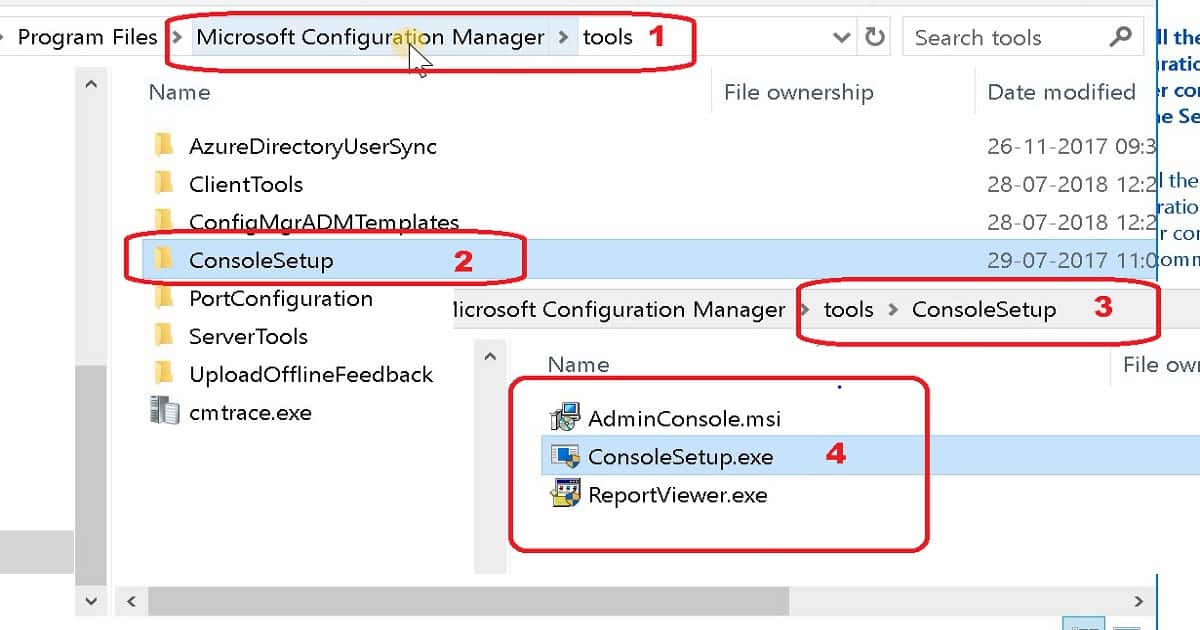
When you install a site server, it copies the SCCM console installation files and supported language packs for the site to the ToolsConsoleSetup subfolder. In this post, I’ll show you the English version of the console installation.
<SCCM site server installation path>\Tools\ConsoleSetup
Please remember that installing the SCCM console from the installation media always requires installing the English version. Even if the site server supports different languages or the target computer’s OS is set to a different language.
I recommend installing the same console version as the site server version, even though the console version can be an n-1 version of the site server.
Video Guide – Install SCCM Console on Remote Windows 10 Windows 11 Devices
Install SCCM Console Using Setup Wizard
When installing the SCCM console from a command prompt, the English version is always installed. This behavior occurs even if the target computer’s OS is set to a different language.
So if you want to install any other language version of the SCCM console, you need to run the setup using the console setup wizard.
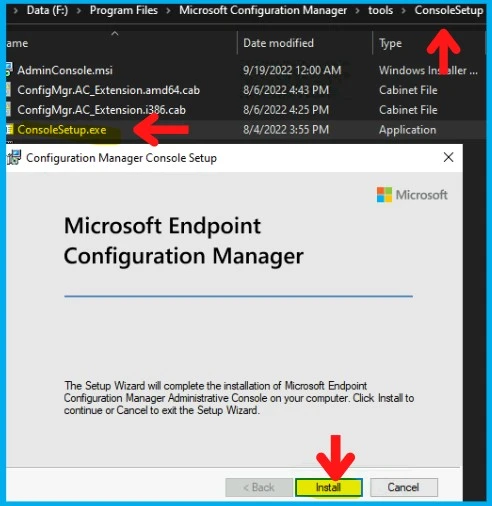
- Open the SCCM Console Setup Wizard, double-click consolesetup.exe
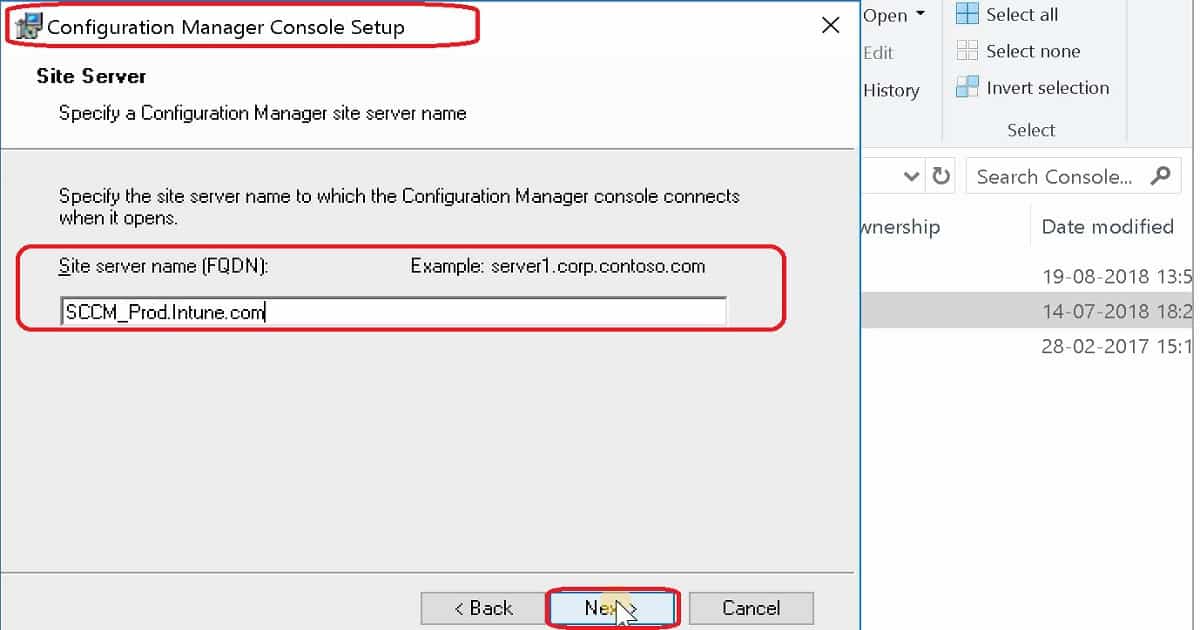
- On the Site Server page, enter the fully qualified domain name (FQDN) of the site server to which the SCCM console connects.
- On the Installation Folder page, enter the installation folder for the SCCM console.
- On the Ready to Install page, select Install to install the SCCM console
[Related Posts – Walkthrough of SCCM Console, How to Promote Pre-Production SCCM Client to Production, and What is Collection, How to Create SCCM Static Collections]
Don’t Install Console Using AdminConsole.msi
Always install the SCCM console using consolesetup.exe. Although you can install the SCCM console by running adminconsole.msi, this method doesn’t run prerequisites or dependency checks, so the installation might not be correct.
Install the SCCM console from a command prompt
If you want to install the English version of the SCCM console, you can use the command prompt to install the console. Otherwise, you can install the console using the wizard.
Type consolesetup.exe from the console installation file files folder at the command prompt.
The LangPackDir parameter of consolesetup.exe specifies the path to the language files folder. You can use Setup Downloader to download the language files.
If you do not use this option, Setup looks for the language folder in the current folder. If the language folder is not found, Setup only installs English. I would recommend reading the Setup Downloader documentation for more details.
Choose from the following command-line options:
Admin Console English Version = ConsoleSetup.exe /q TargetDir="%ProgramFiles%\ConfigMgr Console" DefaultSiteServerName=My Server FQDN

Admin Console non English Version = ConsoleSetup.exe /q TargetDir="C:\Program Files\ConfigMgr Console" DefaultSiteServerName=My Server FQDN LangPackDir=C:\Downloads\ConfigMgr

Communication Ports for SCCM Console Remote Connectivity
I recommend reading my previous post and downloading the List of SCCM Firewall Ports for more information. The following are the connectivity requirements for SCCM console remote connectivity.
- SCCM console to SMS Provider
- SCCM console to the internet
| Description | UDP | TCP |
|---|---|---|
| SCCM console — > Client | ||
| Remote Control (control) | — | 2701 |
| Remote Assistance (RDP and RTC) | — | 3389 |
| Console — > Internet | ||
| HTTP | — | 80 |
| HTTPS | — | 443 |
| Console — > Reporting services point | ||
| HTTP | — | 80 |
| HTTPS | — | 443 |
| Console — > Site server | ||
| RPC Handshake | — | 135 |
| SCCM console — > SMS Provider | ||
| RPC Endpoint Mapper | 135 | 135 |
| RPC | — | 1024 – 65,535 |
We are on WhatsApp. To get the latest step-by-step guides and news updates, Join our Channel. Click here –HTMD WhatsApp.
Author
Anoop C Nair is Microsoft MVP! He is a Device Management Admin with more than 20 years of experience (calculation done in 2021) in IT. He is a Blogger, Speaker, and Local User Group HTMD Community leader. His primary focus is Device Management technologies like SCCM 2012, Current Branch, and Intune. He writes about ConfigMgr, Windows 11, Windows 10, Azure AD, Microsoft Intune, Windows 365, AVD, etc.




Nice post – lots of important details
StaffThank you Andrew
Hi Anoop, is it possible to run remote control viewer standalone with a site server in the network?
StaffI think you can use https://github.com/SweJorgen/CMRemote-Tools
Thanks Anoop, I mean without a site server, sorry about that :). I typed it wrong the first time. We have an Azure AD without on prem AD. We are not planning to run SCCM but like to use the remote viewer.
Hi There, I am going Console Install for a new Windows 10 workstation. Installing the console from SiteServerToolsConsolesetup.exe. However, keep getting error Configuration Mgr can not connect to the site server. It’s working from my old PC. I need to setup a new PC.
The log file is showing this error below. I have tired uninstalling and re-installing it multiple times/
[1, PID:320416][07/25/2022 12:41:58] :Insufficient privilege to connect, error: ‘Access is denied.
Please help.
StaffHave you tried this https://www.anoopcnair.com/configmgr-sccm-how-to-verify-wmi-permission-for-console-access/ ?
I don’t see the SMS listed
Hello Anoop Sir,
Very nice article and I already follow your posts regarding SCCM.
I have a question, I have configured the Distribution server and installed console setup in it, now we want that on the remote location where the distribution server was installed, how does the administrator push updates to the client from the distribution server?
For distribution server, how to set boundaries or any other configuration required. kindly I would like to request you make a complete video for the distribution server including console setup and how to push patches through the distribution server to the client. Do we make a separate collection of devices and how to segregate the systems from device collection?
Tthanking you,
StaffI think I have covered this https://www.anoopcnair.com/free-sccm-training-37-hours-of-latest-technical/ have you seen this please?
Thank you so much for your quick response.
Unfortunately, I could not go through it when I was installing the distribution server.
I will check it out and will share the finding.
Thanks!
Hello Anoop Sir.
As per your advice, I have set the following boundaries with the IP range.
1. 10.10.10.10 – 10.10.10.39 (Main Office Boundary Group)
2. 10.10.10.40 – 10.10.10.50 (Remote Office Boundary Group)
DP was Installed successfully, and I have also pushed deployment packages to the DP server from the site server.
Kindly tell me, how to segregate the DP & site server devices in the console, because I have copied the console setup from the site server: \Tools\ConsoleSetup and installed it on DP but all devices showing in the site server and DP server same.
Thanks!
How can i install SCCM console on windows 10? if possible can i get the .exe file
StaffHi Deepak, You can check the installer available here on your SCCM Server. \Tools\ConsoleSetup
Hi, This is Dinesh, i need your help on this, we have SCCM 2211 installed on a Dedicated server. And also have published the same on the Citrix Server, The CM is on Dedicated server has no issue in launcing, but one which is installed on the Citrix server it is taking time to open.