






SCCM is Expired – Now What? Fix
SCCM is expired. What are the options to fix the issue? My SCCM preview version expired, and I wanted to get back on track with SCCM preview versions.
One SCCM Preview version is valid only for 90 days or 3 months. This version should NOT be installed in the production environment. The SCCM preview version supports a maximum of TEN(10) clients.
I recommend a working preview lab environment to test all new changes in SCCM versions.
In my experience, if you are not close to preview releases for a few months, you miss many new features in SCCM, and you don’t know which features other admins are talking about.

Table of Contents
How to Find out if the SCCM version is Expired?
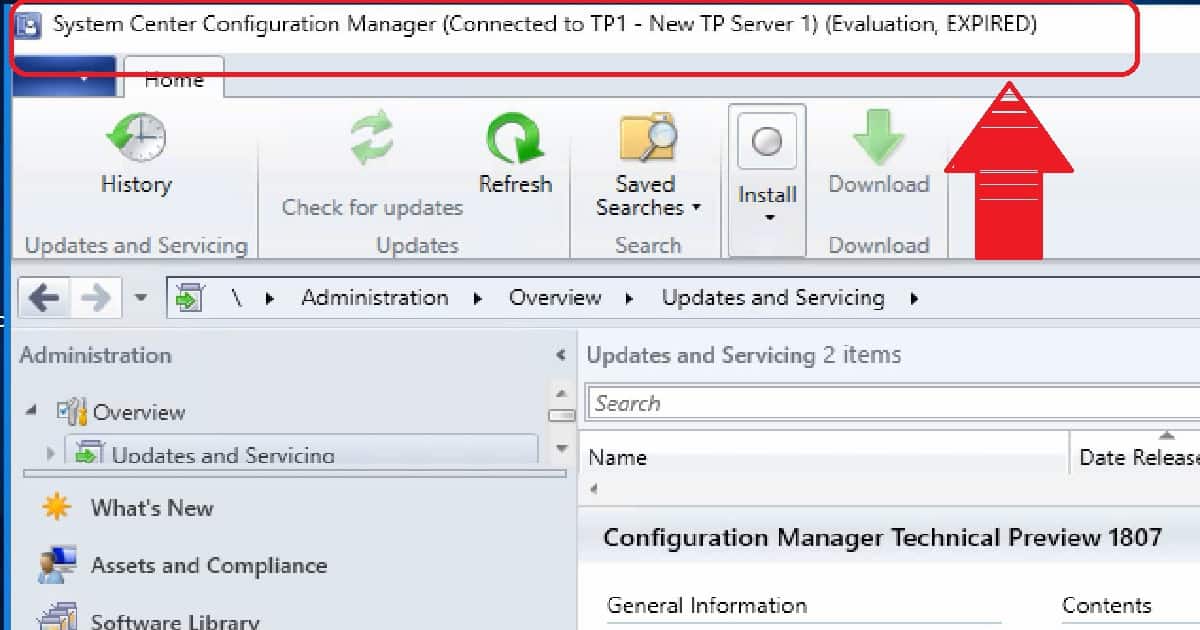
You can confirm whether the version is expired from the SCCM console itself. The SCCM console heading bar shows that your SCCM is EXPIRED.
SCCM executive service will automatically be stopped if your SCCM has expired.
- Is SCCM Dying? HTMD Blog (anoopcnair.com)
- End Of Support Dates For SCCM CB Current Branch ConfigMgr SCCM End Of Life
How to Fix Expired Version of SCCM?
There is no solution to fix the expired version of SCCM. I recommend creating a new virtual server and building a new SCCM preview environment.
Download the latest SCCM Preview baseline version 1810.2 from the Microsoft evaluation center.
In the video tutorial below, I tried uninstalling the SCCM expired version and installing the new version. You can also try that, but I can’t guarantee this will work for you.
Video Tutorial SCCM is Expired – Now what?
The following topics are explained in the video tutorial.
- Uninstall SCCM Console
- Uninstall SCCM Primary server
- Make sure SQL DB got deleted
- Install the latest SCCM Preview baseline version
The technical preview introduces new functionality that Microsoft is working on. It introduces new features that aren’t yet included in the current branch of SCCM.
These features might eventually be included in an update to the CB. Before we finalize the features, we want you to try them out and give feedback.
We are on WhatsApp. To get the latest step-by-step guides and news updates, Join our Channel. Click here –HTMD WhatsApp.
Author
Anoop C Nair is Microsoft MVP! He is a Device Management Admin with more than 20 years of experience (calculation done in 2021) in IT. He is a Blogger, Speaker, and Local User Group HTMD Community leader. His primary focus is Device Management technologies like SCCM 2012, Current Branch, and Intune. He writes about ConfigMgr, Windows 11, Windows 10, Azure AD, Microsoft Intune, Windows 365, AVD, etc.




Hi – Thanks for sharing above video. I too wanted to install Preview edition on a virtual machine in home lab. I am currently running CB1806 Production. Do you think preview will work in the following settings:
Single Domain Controller
DHCP IP Address Range – 192.168.0.0
DNS – 192.168.0.2
CB1806 Primary Site – 192.168.0.3 with site name PRI
SQL 2017
StaffHi, If your home lab has hard disk capacity to host one more 100 GB sevrer, then that is more than enough.
Thanks Anoop.
Planning to revamp home lab next month with 2019 Products (Windows Server, Exchange, SharePoint, Office, Skype for Business, AGPM, OM, VMM, DPM, ORCH, SM, CB1806, APP-V and vSphere 6.x). Will try to include TP1810 to the project as well. Will keep you posted,
I was able to install TP1810 on Windows Server 2019 yesterday. The install went without any issue. Now, I might need your help with Boundary configuration.
My production CB1806 boundary is configured with IP Subnet range 192.168.0.0. I have configured TP1810 boundary with IP Address range 192.168.1.1 to 192.168.1.254. I am not sure, if, I need to configure New Scope on the DHCP server so that 1 or 2 workstation gets ip address from range 192.168.1.x in order for me to test TP1810 new features. I don’t want to mess up current workstation that are in production range which is 192.168.0.x. Appreciate your input.
Staff1810 supports only 2019 server for site systems. Not supported as a site server.
My CAS license expired. Do i need to renew for existing package deployment? On 15 PC already deployed but 225 PC failed. All PC are in different region. Please guide me