






Enabling Third-party Custom Catalogs for Patching in SCCM
Let’s discuss about Enabling Third-party Custom Catalogs for Patching in SCCM. It wasn’t that long ago when Microsoft applications were the only ones facing cyber-attacks, but that’s no longer the case. Failing to patch third-party (3rd party) applications can expose IT infrastructure to cyber-attacks.
In fact, the latest reports suggest that the most expensive data breaches start with third-party applications. Hence Third-party patching is important.
For over two decades, Microsoft System Center Configuration Manager (SCCM) has been a popular choice among IT administrators for patching large groups of computers.
But SCCM has always had a gap when it comes to third-party patching. Microsoft has tried to fill this gap by enabling third-party updates with custom catalogs in the recent SCCM version 1806 update.

What are the Major Advantage of Custom Catalogs Options -Enabling Third-party Custom Catalogs
The major advantage of custom catalogs is that third-party updates can be patched from the SCCM console. With that said, you may be wondering whether Microsoft has enabled third-party updates in SCCM completely.
The answer is no. Third-party patching directly from SCCM is pretty new, and they are still in development mode.
- Third-Party Updates – Non Microsoft Application Patching
- Setup SCCM Third-Party Patching Video Experience
- SCUP 2017 Preview Installation And Configuration Video Guide
- List of Free SCCM Catalogs for Third-Party Software Updates
Microsoft has only made updates from HP and Dell available as pilot catalogs. Aside from those, most third-party applications don’t have software catalogs offered in SCCM. But I hope this will come sooner than later.
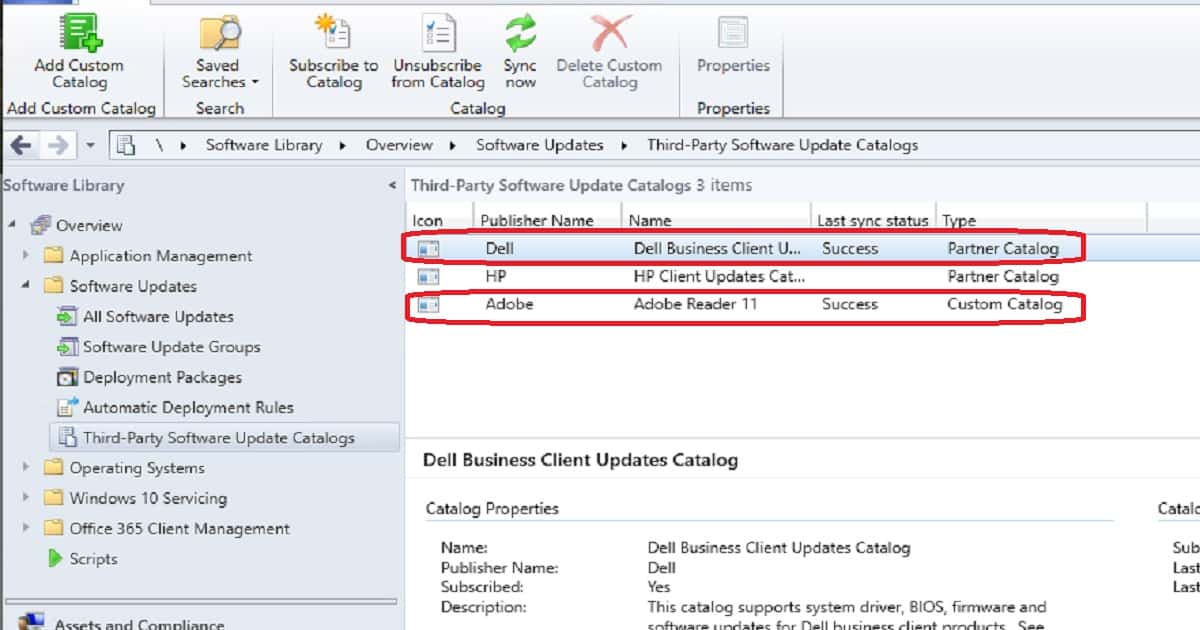
If you completely rely on Microsoft’s catalogs but you have many third-party applications to update, the lack of native support might be frustrating. You can always add custom catalogs to SCCM, but doing so has its own set of complexities:
- You have to manually add the software catalogs for every application that needs to be patched.
2. Catalogs can’t be edited once added.
3. Subscribing to custom catalogs can take anywhere between 20 and 30 minutes, depending on the size of the catalog.
Patch Connect Plus Add-On for SCCM – Enabling Third-party Custom Catalogs
To make the process simpler, ManageEngine has introduced a separate Catalog edition in Patch Connect Plus, its add-on for SCCM.
This edition automatically imports catalogs into the SCCM server and comes with the assurance that all software catalogs will be supported within 24 hours of their release.
This add-on is great to help with the Third-party patching process.
Start patching select third-party applications in SCCM by trying the free Catalog edition of Patch Connect Plus.
If you’re having trouble adding custom catalogs to SCCM, watch this video guide on adding custom catalogs to SCCM. Get access to over 170 third-party software catalogs within SCCM now!
We are on WhatsApp. To get the latest step-by-step guides and news updates, Join our Channel. Click here –HTMD WhatsApp.
Author
Anoop C Nair is Microsoft MVP! He is a Device Management Admin with more than 20 years of experience (calculation done in 2021) in IT. He is a Blogger, Speaker, and Local User Group HTMD Community leader. His primary focus is Device Management technologies like SCCM 2012, Current Branch, and Intune. He writes about ConfigMgr, Windows 11, Windows 10, Azure AD, Microsoft Intune, Windows 365, AVD, etc.




Discussion