






MS Intune Stop Supporting User Enrollment with Company Portal for iOS iPadOS
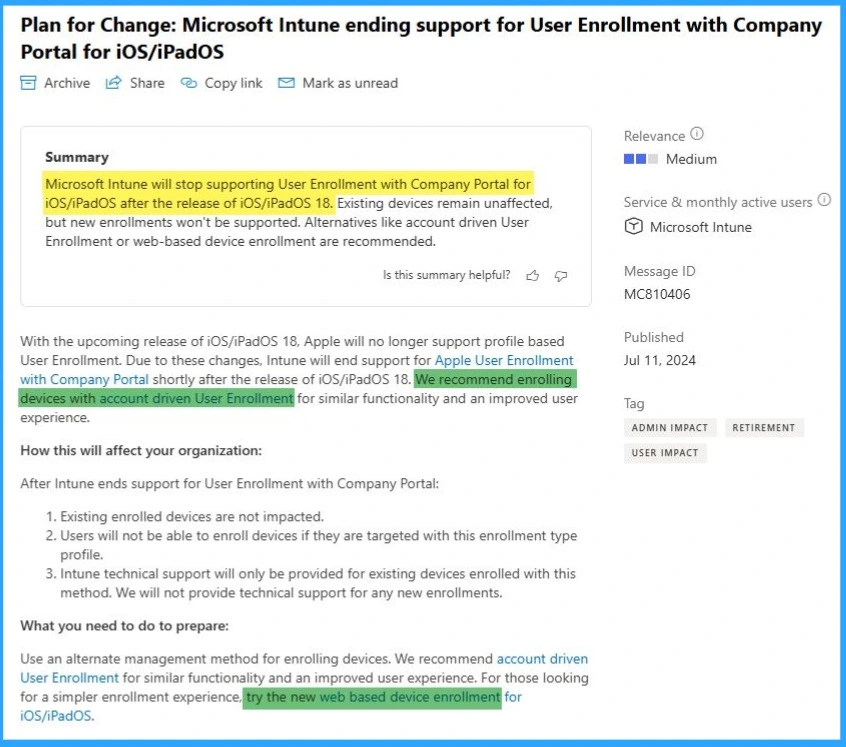
Let’s discuss the recent announcement that MS Intune stopped supporting user enrollment with company portal for iOS and iPadOS. Microsoft Intune will Stop Supporting User Enrollment with the Company Portal for iOS and iPadOS after the release of iOS and iPadOS 18.
With this new iOS/iPadOS 18 release, Apple will no longer support profile-based User Enrollment. Microsoft will shortly end the support of Apple user enrollment with Company Portal. The exciting device remains unaffected after the release of iOS/iPadOS 18.
As you know, Apple User Enrollment allows users to access limited devices but an appropriate set of device management settings and actions. It helps users protect work data without affecting the device user’s data or apps.
This practice will soon end with the Company Portal. Instead, Microsoft recommends users use alternatives like account-driven User Enrollment or web-based device enrollment. In this blog post, I will explain this new update.

| Index |
|---|
| MS Intune Stop Supporting User Enrollment with Company Portal for iOS/iPadOS |
| How this Change Affects Your Organization |
| Things to be Prepared to Adopt These Change |
- Onboard iOS/iPadOS Devices to Microsoft Defender for Endpoint
- Intune Shared Device Mode for Android and iOS Devices
- Intune Minimum Supported iOS iPadOS version changes
- Update iOS Apps with MAM Policies for iOS/iPadOS 17 Upgrade
- Troubleshoot and Fix Company Portal Enrollment Your Device Is Already Connected Error
MS Intune Stop Supporting User Enrollment with Company Portal for iOS/iPadOS
As I mentioned above, the launch of iOS/iPadOS 18 Intune stopped supporting user enrollment with the company portal for iOS/iPadOS. By using account-driven User Enrollment or web-based device enrollment, users can enhance their experience.
How this Change Affects Your Organization?
With this new change, users must consider or know some points before adopting these changes to their Organization. You can consider these points to adopt new changes to your Organization quickly. The table below shows some of the points to consider.
| Factors that Affect your Organization |
|---|
| Factors that Affect Your Organization |
| Users will not be able to enroll devices if they are targeted with this enrollment type profile |
| Intune technical support will only be provided for existing devices enrolled with this method. We will not provide technical support for any new enrollments. |
Things to be Prepared to Adopt These Change
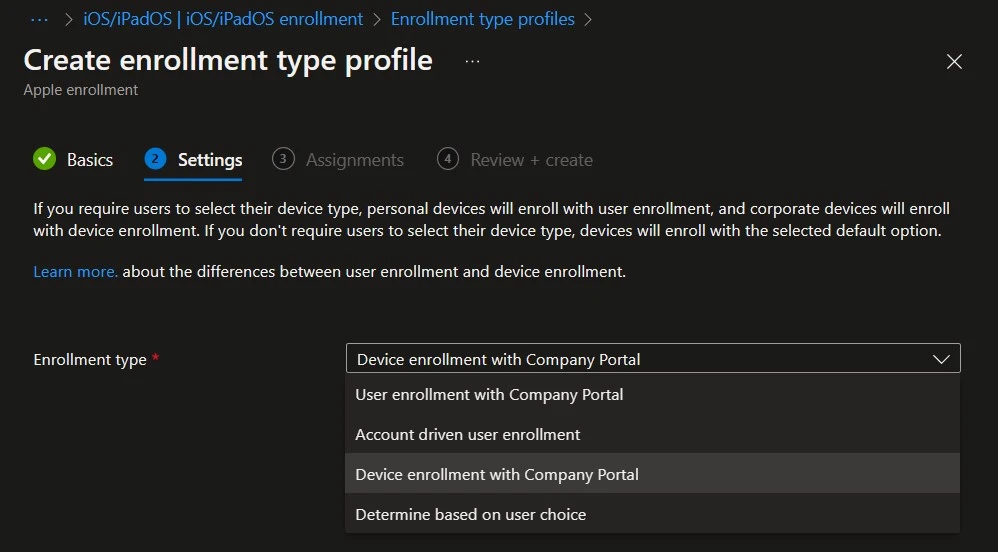
One way users can prepare to adopt these changes is to use alternative methods. I already mentioned that Microsoft recommended account-driven enrollment for similar functionality. You can also use web-based device enrollment for iOS/iPadOS.
- Easiest Method to Configure iOS MacOS Devices Patching Schedule Using Intune
- Prevent iOS Managed Apps Removable using Intune
- New Windows App available in iOS MacOS iPadOS Android Devices
- New Intune Settings for iOS iPadOS Web Clip App Deployment
We are on WhatsApp. To get the latest step-by-step guides and news updates, Join our Channel. Click here for HTMD WhatsApp.
Author
Anoop C Nair is Microsoft MVP! He is a Device Management Admin with more than 20 years of experience (calculation done in 2021) in IT. He is a Blogger, Speaker, and Local User Group HTMD Community leader. His primary focus is on Device Management technologies like SCCM 2012, Current Branch, and Intune. He writes about ConfigMgr, Windows 11, Windows 10, Azure AD, Microsoft Intune, Windows 365, AVD, etc.


Discussion