






Fix SCCM Software Updates ReDownload Issue Hotfix ConfigMgr
In this post, I am exploring Fix SCCM Software Updates ReDownload Issue Hotfix ConfigMgr. ConfigMgr administrators have struggled with patch re-download issues since the end of October 2012.
Fix SCCM Software Updates ReDownload Issue Hotfix ConfigMgr

Do we need to install the hotfix KB 2783466? Is it a Temporary fix?
Yes, you need to install the Hotfix. It’s not a Temporary fix, as per Microsoft. It’s more of a damage control fix (more details below)
- FIX SCCM Update Download Issue With Update Reset Tool
- Fix SCCM Client-Side Patching Or Software Updates Issues Troubleshooting Tips
After you apply this hotfix, an update that changes only to metadata and not to file contents will not cause the update to be displayed as invalid. How can you explain this?
Microsoft initiated two types of changes as part of the process, which are explained HERE.

Scenarios – Fix SCCM ConfigMgr Software updates ReDownload Issue Hotfix
- An update that contains only Metadata change.
- An update that contains Metadata and File Content change.
Before Applying the hotfix KB 2783466, in either Scenario 1 or 2, the update will be termed/shown as “Invalid”, and you need to re-download the content (redistribute the package to DPs).
After applying the hotfix KB 2783466, if an update contains only metadata changes (scenario 1), it won’t be marked as an “invalid” update, and you don’t need to re-download the content again. However, if there is any change in content file/s (Scenario 2), you must re-download and redistribute it to all DPs.
Another important point mentioned in the KB article is:-
This hotfix will not update the state of updates that were previously marked as invalid.
How do you validate whether the hotfix is installed or not?
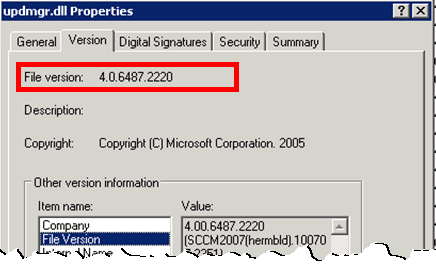
The log file will be created in the server’s % temp% folder and will offer details about the installation. Also, after applying this hotfix, the “Updmgr.dll” file will be replaced. The new file version should be “4.0.6487.2220.”
We are on WhatsApp. To get the latest step-by-step guides and news updates, Join our Channel. Click here –HTMD WhatsApp.
Author
Anoop C Nair is Microsoft MVP! He is a Device Management Admin with more than 20 years of experience (calculation done in 2021) in IT. He is a Blogger, Speaker, and Local User Group HTMD Community leader. His primary focus is Device Management technologies like SCCM 2012, Current Branch, and Intune. He writes about ConfigMgr, Windows 11, Windows 10, Azure AD, Microsoft Intune, Windows 365, AVD, etc.




we caught up in a situation where we downloaded 1200+ updates and now its re-distributing to our (1000+) child primary site. Currently central site is receiving large amount of status messages and filling up hard disk space. is there anything you can suggest in order to resolve this issue.
How about using Filter Status Messages Rules. This can be done through Status IDs. More info http://www.myitforum.com/articles/9/view.asp?id=12445
Hi Anoop,
I have a question here, will the SCCM clients at locations coming under secondary sites download the metadata from Central site if synchronization is not completed by SUP on secondary sites.
e.g. Central site syncs with MS at 12 PM
Secondary SUP sync with Central at 7 PM
Meanwhile since all machines have the policy of revised patches and if they dont find it on secondary servers (at 2 PM) will these machines go to Central site to download teh Metadata?
We have all boundaries and protected DPs configured correctly. I wonder this has happened and all the client machines have contacted central site between 2 to 4 PM on the day when we received revised patches.
Thanks in advance..awaiting your reply
StaffHi Shrikant ! – The secondary server sync should be completed from it’s upstream server, otherwise the client won’t get the latest metadata. I don’t think, it will go to central and download the metadata from there.