






Intune Fix MDM User License Error Code 0X80180018
Let’s discuss Intune Fix MDM User License Error Code 0X80180018. Microsoft Intune users get an error code 0X80180018 licensing for enrolling a device in Microsoft Intune or another mobile device management (MDM) service. This is one of the significant issues faced by Intune users.
Getting errors is very common, and Intune Users are affected by error issues in daily life. However, people are unaware of how these errors occur and how to fix such errors in Intune and other Mobile Device Management services.
There are many reasons why errors occur in Microsoft Intune or other MDM services. Some carelessness in Device enrollment or a lack of knowledge of MDM services may lead to different error codes in Intune. So, users must enroll devices very carefully.
In this blog post, I will explain more about MDM User License Code 0X80180018. It will give you complete information about different reasons for this issue and various steps to fix it. You can easily avoid usual errors occurring reasons via this blog post.

- Fix MDM Enrollment Error Code 0x80180001
- Fix Autopilot Device Enrollment Error 0x80180022
- FIX Windows Autopilot Enrollment with Error 0x801C03ED
| Index |
|---|
| Fix MDM User License Error Code 0X80180018 |
| Primary Reason for MDM User License Error |
| Fix MDM User License Error – Steps |
Intune Fix MDM User License Error Code 0X80180018
The error code 0X80180018 is an issue with the licensing for enrolling a device in Microsoft Intune or another mobile device management (MDM) service. This issue probably occurred because the user attempting to enroll in the device did not have the appropriate license assigned.
| Additional Problem Information | Details |
|---|---|
| Server Error Code | 80180018 |
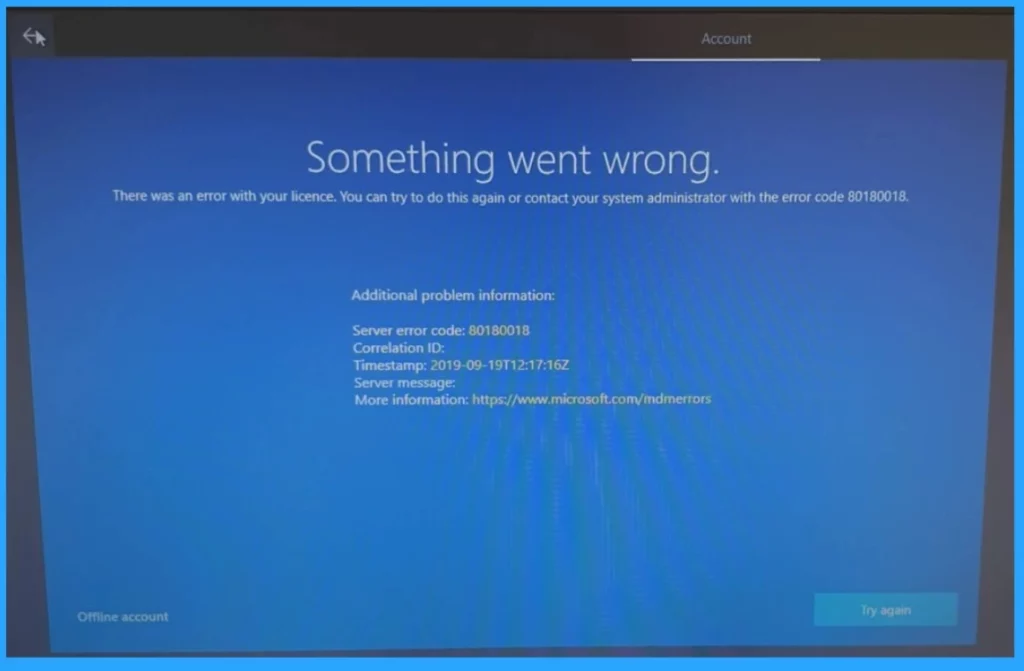
Something went wrong.
There was an error with your licence. You can try to do this again or contact your system administrator with the error code 80180018.
Additional problem information:
Server error code: 80180018
Correlation ID:
Timestamp:
Server message:
Primary Reason for MDM User License Error
There are many reasons behind the MDM user license error, but some common reasons are present in every error. The following table shows some common reasons.
MDM (Mobile Device Management) user license errors can occur for various reasons. Understanding the common causes can help in resolving these issues more efficiently. Below is a table that outlines some of the typical reasons behind MDM user license errors
| Major Reasons for MDM Authentication Errors |
|---|
| Invalid or Missing License |
| Auto-enrollment Not Activated |
| Configuration Issues |
| Device Already Enrolled |
- FIX Intune Windows Enrollment Invalid_Client Error
- How to Configure Automatic Intune MDM Enrollment | Auto Enrollment
- Fix Intune Error Code 80192EE7 the Device Management Enablement Issue on Intune

Steps to Fix MDM User License Error with Intune
You can quickly resolve the MDM User License Error. Some steps are available for you to resolve such issues, and you can avoid them. The following list shows some resolving tips.
- You should verify the user has a valid Intune License
- Ensure they have an Intune or Enterprise Mobility + Security (EMS) license.
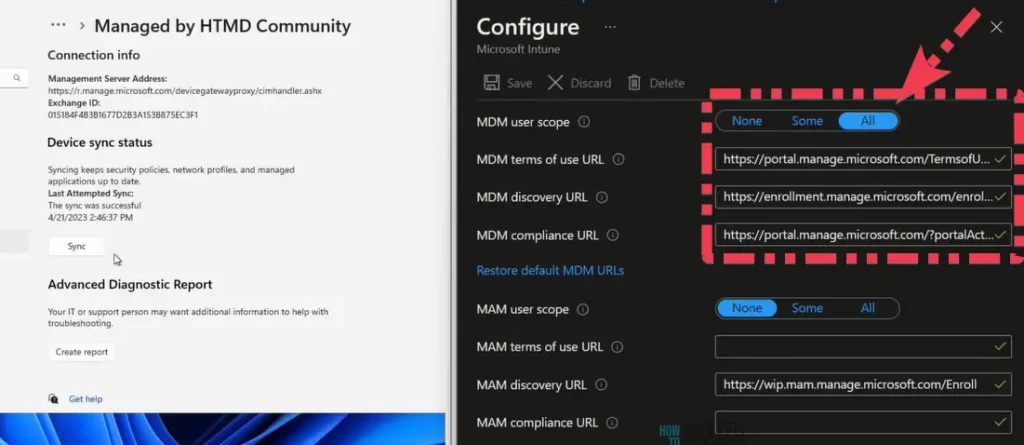
- Ensure that auto-enrollment is activated for the user
- Check if the device has enrolled and remove any previous enrollment if necessary.
- All the required settings and configurations are correctly applied.
- Verify the MDM Authority
- Remove the device from Intune and then try to enrol it again.
- Restart your device and try to enrol it again.
- Check the setting for a Maximum number of devices per user and ensure the user has not exceeded this limit.
We are on WhatsApp. To get the latest step-by-step guides and news updates, Join our Channel. Click here for HTMD WhatsApp.
Author
Anoop C Nair has been Microsoft MVP from 2015 onwards for 10 consecutive years! He is a Workplace Solution Architect with more than 22+ years of experience in Workplace technologies. He is also a Blogger, Speaker, and leader of the Local User Group Community. His main focus is on Device Management technologies like SCCM and Intune. He writes about technologies like Intune, SCCM, Windows, Cloud PC, Windows, Entra, Microsoft Security, Career, etc..


Discussion