






Best Copilot Assistance for Querying Device Inventory Data using KQL in Intune
In this article, I am going to discuss on how to use Copilot Assistance for Querying Device Inventory Data using KQL in Intune. KQL is nothing but Kusto Query Language. Microsoft Intune provides powerful device inventory data that can be queried using Kusto Query Language (KQL) within Log Analytics and Advanced Hunting in Microsoft Defender.
With KQL, IT administrators can extract critical insights about enrolled devices, including compliance status, OS versions, security baselines, and application installations. By leveraging Copilot assistance, users can quickly generate, refine, and optimize KQL queries without needing deep expertise in the language.
Copilot can suggest query optimizations, detect syntax errors, and help structure complex queries for better performance. For example, if an administrator needs to retrieve a list of non-compliant devices with a specific OS version, or List of inactive devices hostnames in this tenant Copilot can provide pre-built query templates or refine existing queries based on best practices. This reduces the time spent troubleshooting syntax issues and enhances the efficiency of data analysis.
By integrating Copilot with Intune’s device inventory data, organizations can improve endpoint visibility and decision-making. IT teams can proactively identify security risks, ensure compliance, and generate reports effortlessly. Whether it’s tracking software deployments, detecting unauthorized devices, or analyzing usage trends, Copilot-driven KQL queries make data-driven management easier and more accessible.

Table of Contents
Why to Use Copilot Assistance for Querying Device Inventory Data using KQL
Using Copilot assistance for querying device inventory data using KQL (Kusto Query Language) can significantly boost productivity and efficiency, especially in IT and security operations. Here’s a breakdown of why it’s beneficial.
| Benefits | Details |
|---|---|
| Accelerates Query Writing | Copilot helps generate complex KQL queries quickly with minimal input. Ideal for those less familiar with KQL syntax Copilot can bridge the gap by translating natural language into precise queries. |
| Reduces Human Errors | Writing queries manually can lead to syntax or logic errors. Copilot reduces such errors by suggesting accurate and optimized query patterns. |
| Improves Data Exploration | Inventory data (e.g., device health, OS versions, compliance states) can be vast. Copilot helps in formulating targeted queries to surface insights faster. |
| Enhances Learning | As Copilot suggests queries or explains parts of a query, it becomes a learning companion for improving KQL skills. |
| Boosts Productivity in Large Environments | In enterprise environments with thousands of endpoints, manually querying or filtering device inventory is time-consuming. Copilot provides smart filters, sorting, and aggregation suggestions, saving a lot of effort. |
| Optimized for Security & Compliance Scenarios | Helps write quick queries for scenarios like: Devices with outdated antivirus signatures Non-compliant OS versions Vulnerable configurations |
| Context-Aware Suggestions | When used within tools like Microsoft Defender or Intune’s advanced hunting, Copilot understands the schema and available tables, giving relevant and context-sensitive query suggestions. |
- Step-by-Step Guide How to Enable Copilot in Microsoft Intune
- Configure User Confirmed EPM Elevation Settings Policy using Microsoft Intune
- Best Way to Set Copilot Hardware Key Using Microsoft Intune
Create Copilot Assistance for Querying Device Inventory Data
To create a Copilot Assistance for Querying Device Inventory Data from scratch, first you need to enable Security Copilot in your Intune tenant, then follow the steps below. First, Sign In to the Microsoft Intune Admin Center using your administrator credentials.
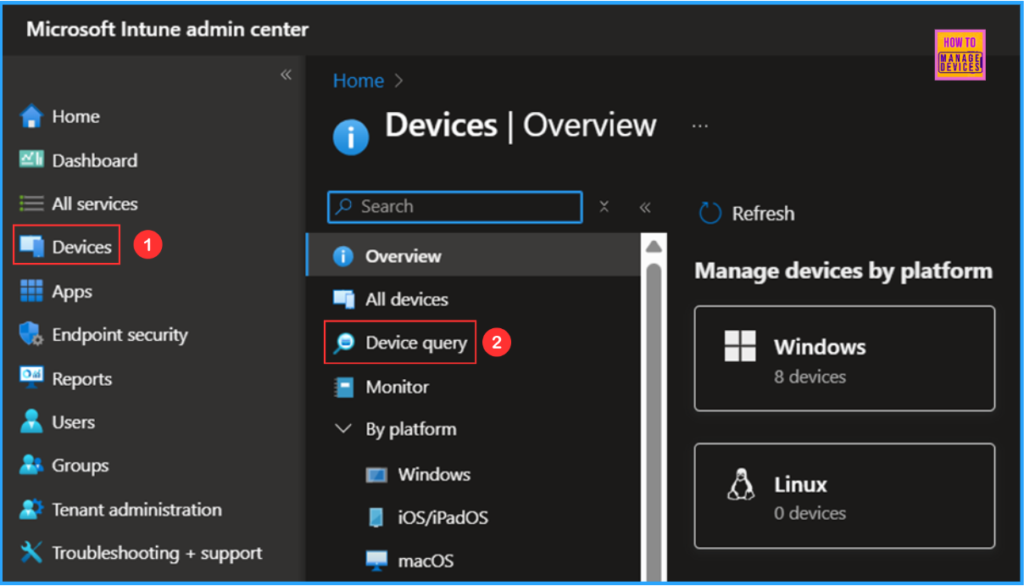
- Navigate to Devices > Device query
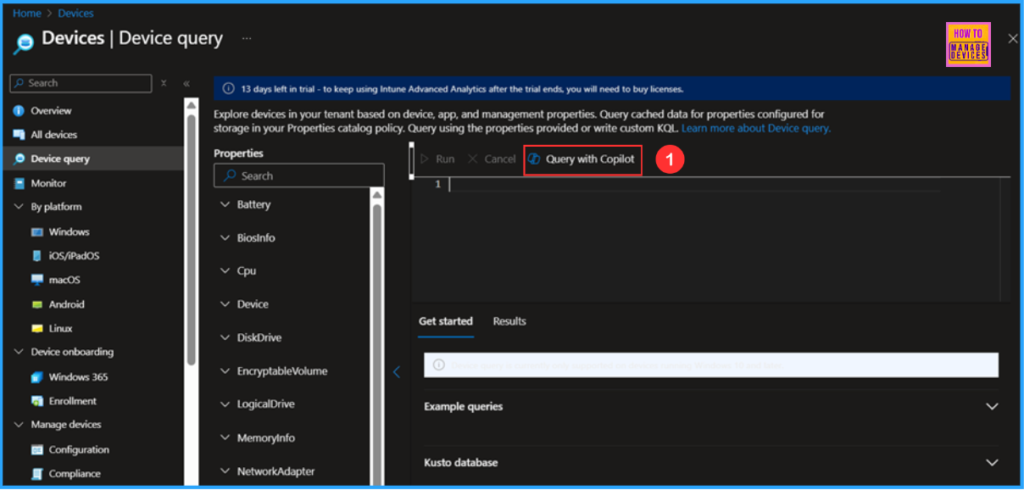
On the next page, click on Query with Copilot Option. we can explore Devices in your tenant based on device, app, and management properties . Query cashed data for properties configured for storage in your Properties catalog policy. Query using the properties provided or write custom KQL.
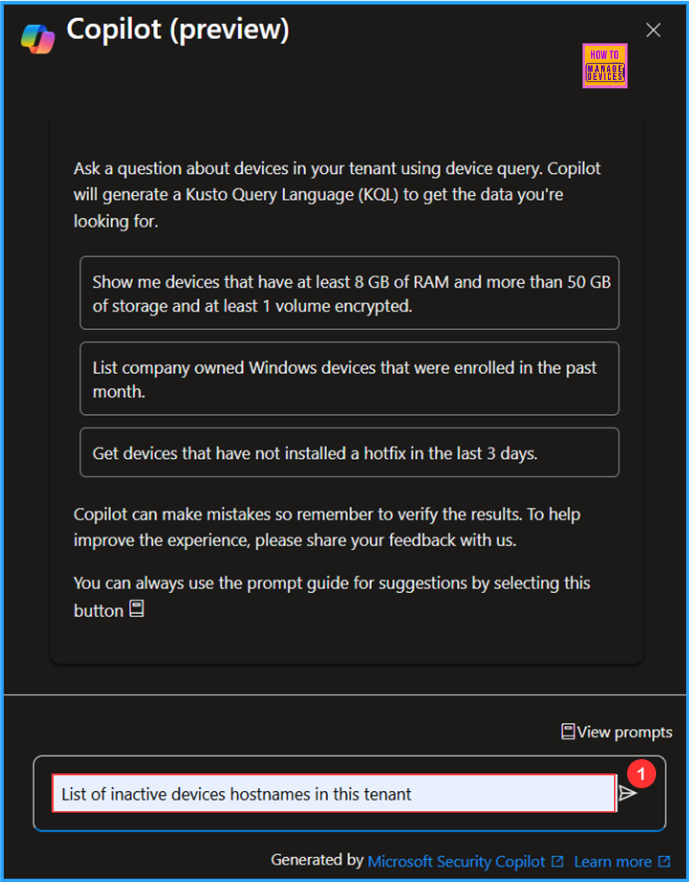
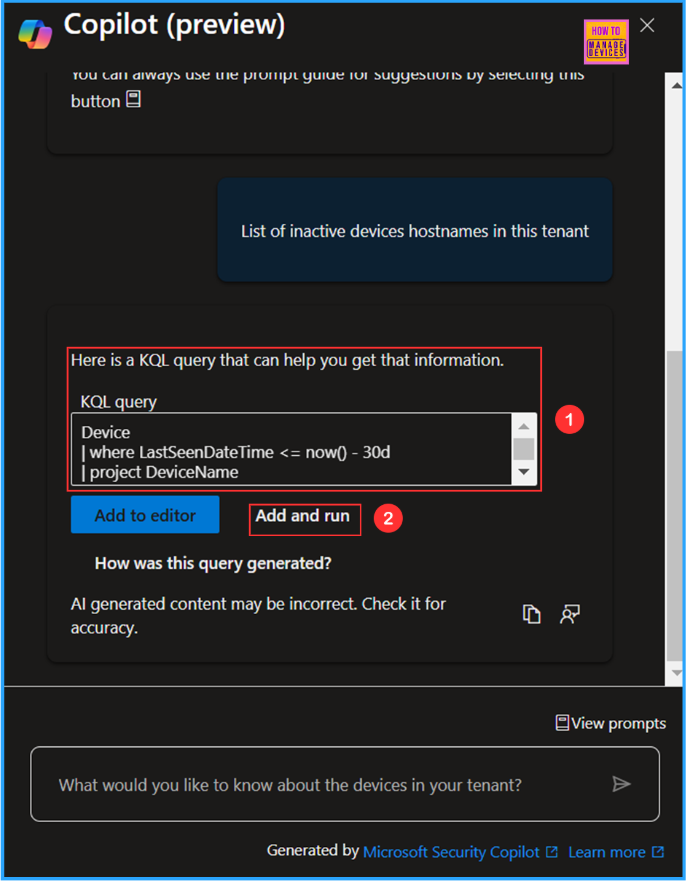
Now in the Copilot (preview) prompt, it will ask “What would you like to knowabout the devices in your tenant?” In this example, am gving a promept like “List of inactive devices hostnames in this tenant” and hit the Send arrow icon in the left.
Copilot will gernerate the KQL query that can help you get that information and it will display over same screen. Either you can click on Add to editor or Add and run. Here am selecting the option as Add and run.
- Key Differences between Copilot Chat in Microsoft 365 and Paid Copilot License
- Faster and Advanced Windows Search Performance is Now Available with Copilot + PCs
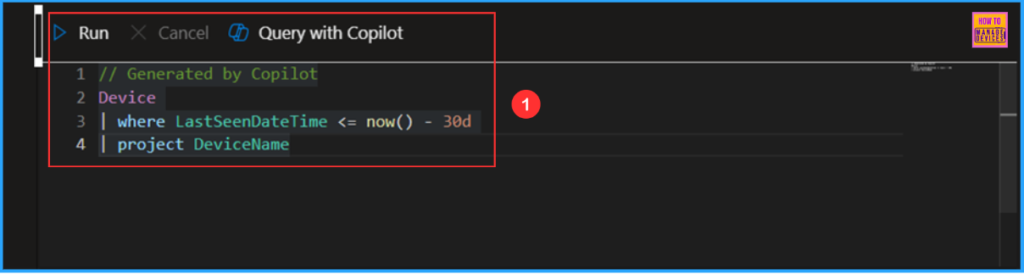
Here Copilot (preview) screen will automatically close and the gererated KQL query got added to device query execution area and it’s started running also.
End Result
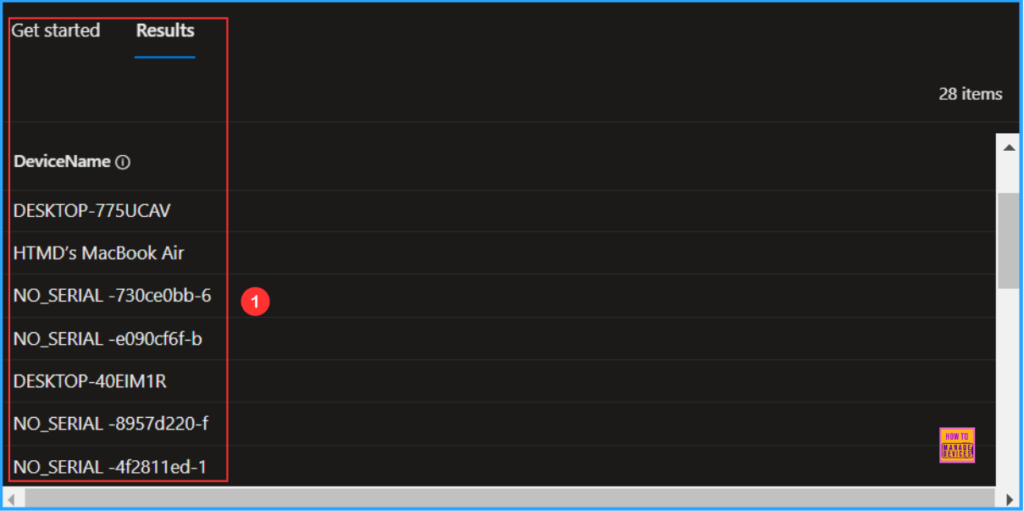
Now under the Results section we can see the query output of List of inactive devices hostnames in this tenant. I got 28 items with DeviceName. We can export with based on your requirement.
Need Further Assistance or Have Technical Questions?
Join the LinkedIn Page and Telegram group to get the latest step-by-step guides and news updates. Join our Meetup Page to participate in User group meetings. Also, Join the WhatsApp Community to get the latest news on Microsoft Technologies. We are there on Reddit as well.
Author
Vaishnav K has over 11 years of experience in SCCM, Device Management, and Automation Solutions. He writes and imparts knowledge about Microsoft Intune, Azure, PowerShell scripting, and automation. Check out his profile on LinkedIn.


Discussion