






How to Use Intune Assignment Filters Comparison Property gt ge lt le with OS Version
News Alert! Today, we have another topic to discuss in Intune: How to Use Intune Assignment Filters Comparison Property gt ge lt le with OS version. Microsoft Intune always has new feature updates every month. This month, we have an amazing feature called Intune Assignment Filters Comparison Property gt ge lt le with OS version.
We all know that Intune is a powerful tool for managing devices and applications in our Organization. One significant Intune tool is the Assignment Filter. These filters help IT admins customize policies according to specific rules.
The latest update in Microsoft Intune’s July service release introduces the operating System Version filter property. This feature is expected to be the best and most efficient among Intune features. With the new feature operating System Version, you can more effectively filter and manage devices based on their operating system versions.
This new feature can help IT admins manage devices more effectively and create rules for specific devices. Another enhancement with this feature now supports comparison properties, making it more effective in device management policy. This post can overview the Assignment Filters Comparison Property gt ge lt, l.e., with the OS version.

- Intune Supports Assignment Filters for Android AOSP
- MEM Intune: Create Assignment Filters for Azure Virtual Desktop Single Session Windows 10 | AVD
- Check Associated Assignments for Intune Filters
- Intune Filters for Assigning Apps Policies and Profiles In Intune Portal | Endpoint Manager
- What is Microsoft Intune?
Table of Contents
What is an Assignment Filters?
How to Use Intune Assignment Filters Comparison Property gt ge lt le with OS Version
Above, we discussed the new feature’s overall features; in the July update for Intune, Microsoft announced the New operating system version filter property with new comparison operators. The main point is that it’s currently in public preview and under development.
- You may also face some issues because the features may not work yet. (like Preview devices).
- Also, the OSVersion property Should be used instead of the existing one, which is being deprecated.
- When operatingSystemVersion becomes generally available, the old OSVersion property will retire.
- The Existing filters using OSVersion will still work, but you won’t be able to create new filters with it.
- You can also check the new feature through the below steps;
- Open the Microsoft Intune admin center
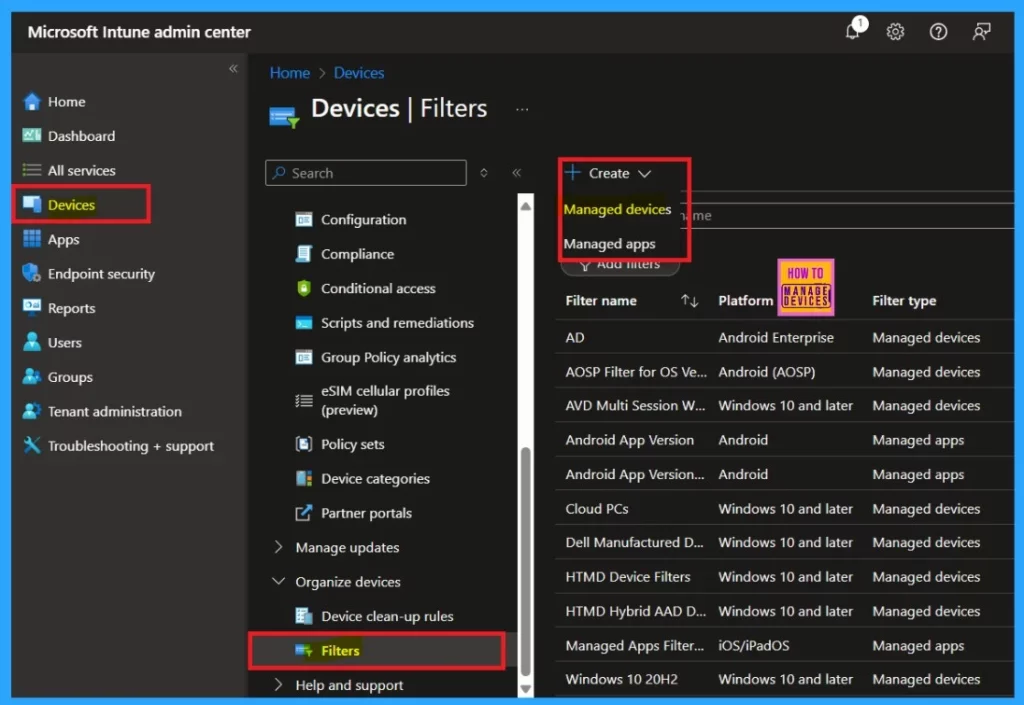
- Navigate the path Devices> Filters>Create> Managed Devices
Note: Platforms such as Android, iOS/iPadOS, macOS, and Windows can be used for managed devices and operating system versions.
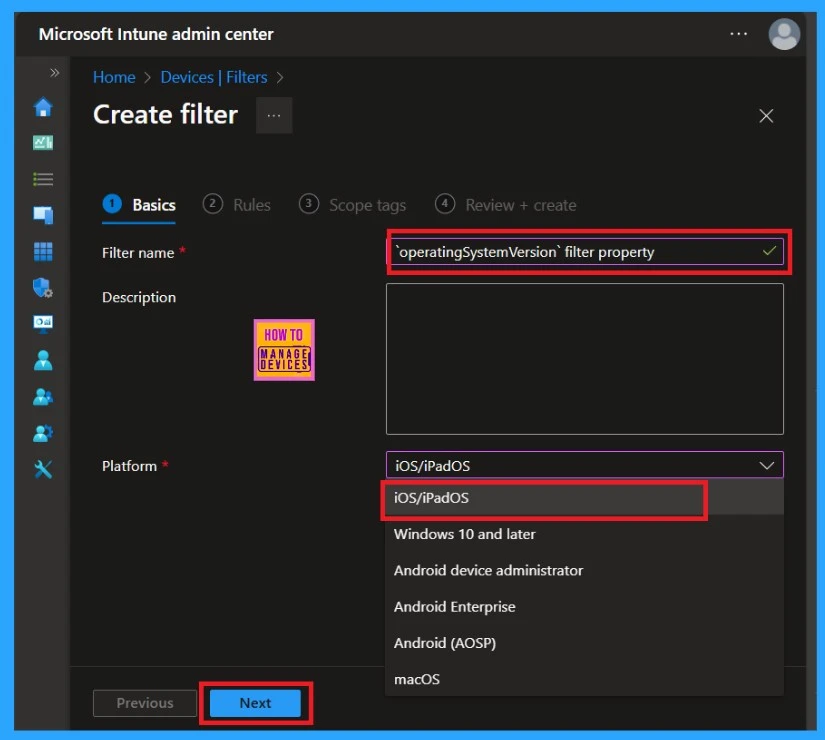
When you click on the Managed Device option, you can access the first step in creating a filter, which is the basics. You know that the basics are essential. With this step, you can enter the Names and Descriptions. For example, I named the” operating system version filter property” here.
Then, you must select the platform. You must understand that you can also create the filter for managed apps like Android, iOS/iPadOS, and Windows.
- So, I selected iOS/iPadOS as the platform for the managed device.
- Then click the Next
- Issue on Minimum PIN Length for Startup in Disk Encryption Policies in Intune
- Fix MDM User License Error Code 0X80180018
- Step-by-Step Guide Install Node.js with Intune Enterprise App Catalog App
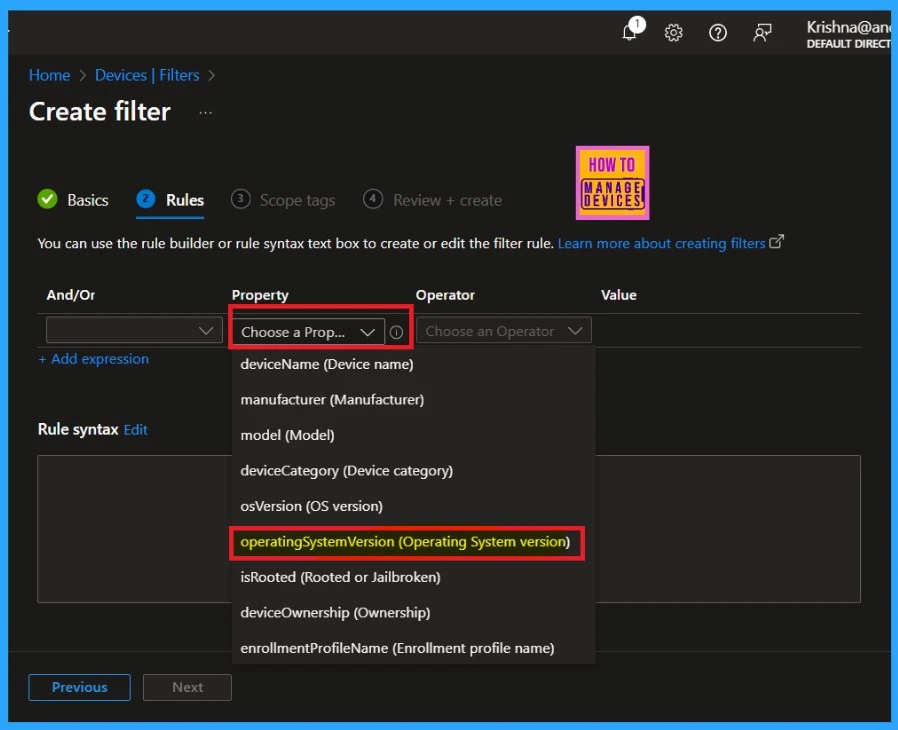
You can set the rules for managed devices like Android, iOS/iPadOS, macOS, and Windows on the rule page. The option called Filter Property is available here. You can see the screenshot below. In that option, you can select the properties. Here, you can see the new “operating system version filter property.”
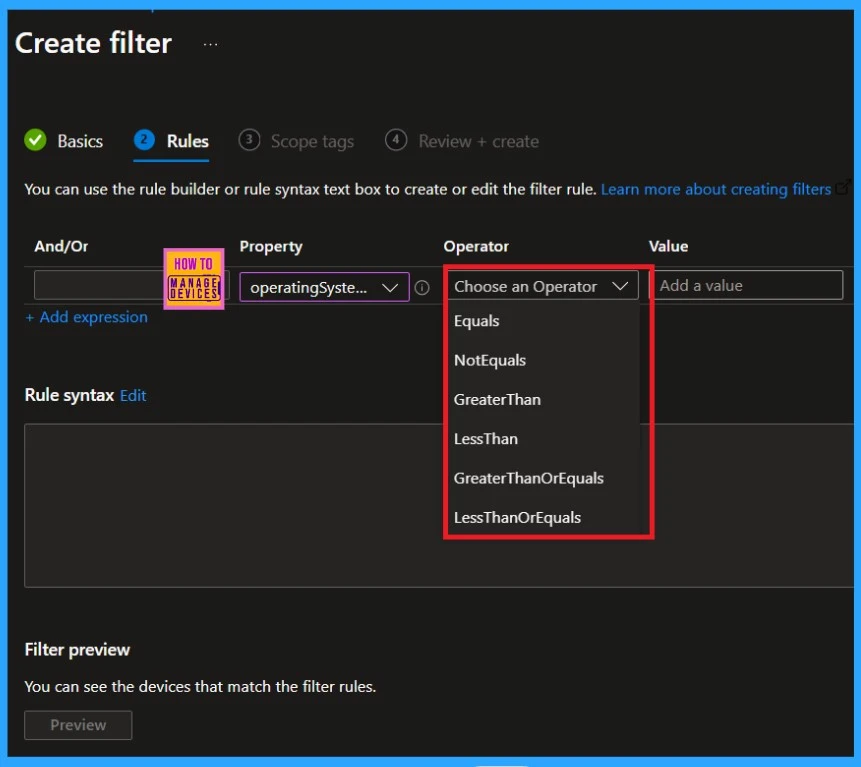
The new feature of the operating System Version filter property allows you to use the new Comparison Property gt ge lt le with the OS version. The screenshot below shows the comparison operator option.
| Comparison Operator | Info |
|---|---|
| Equals | It means two values are the same (equal) |
| Not Equals | It means that 2 values are not equal |
| GreaterThan | This is the new Comparison Operator, and the allowed values are Allowed values, such as -gt | gt. E.g. (device.operatingSystemVersion -gt 10.0.22000.1000) |
| LessThan | This new value allowing values: -lt | lt for example (device.operatingSystemVersion -lt 10.0.22000.1000) |
| Greater than Equal | This is another comparison operator and the allowing value is -ge | ge. For example (device.operatingSystemVersion -ge 10.0.22000.1000) |
| Less than Equal | This is another comparison operator, and the allowing value is -le | le. For example (device.operatingSystemVersion -le 10.0.22000.1000) |
We are on WhatsApp now. To get the latest step-by-step guides, news, and updates, Join our Channel. Click here. HTMD WhatsApp.
Author
Anoop C Nair has been Microsoft MVP from 2015 onwards for 10 consecutive years! He is a Workplace Solution Architect with more than 22+ years of experience in Workplace technologies. He is also a Blogger, Speaker, and leader of the Local User Group Community. His main focus is on Device Management technologies like SCCM and Intune. He writes about technologies like Intune, SCCM, Windows, Cloud PC, Windows, Entra, Microsoft Security, Career, etc..


Discussion