






SCCM IBCM Vs CMG Differences a Real-World Comparison
Let us check the SCCM IBCM Vs CMG Differences in a Real-World Comparison. Isn’t a revolution (really?) happening with Digital Transformation?
Let’s examine the SCCM internet client management revolutions. In this post, I will compare SCCM IBCM to CMG.
Internet-Based Client Management (IBCM) is a Microsoft System Center Configuration Manager (SCCM) feature that enables you to manage SCCM clients when they are not connected to your internal network.
IBCM provides an alternative to using a Cloud Management Gateway (CMG) for managing clients over the Internet. Both options allow you to manage SCCM clients outside your internal network efficiently.

| Index |
|---|
| SCCM IBCM Vs CMG |
| Cost |
| Locations |
| Stability |
| Location Awareness |
| Setup Troubleshooting Complexity |
| Operability |
| Security |
| Future Proof |
| Co-Management Support |
What is SCCM Internet Client Management?
There are two (2) methods for managing SCCM clients from the Internet.
SCCM IBCM (Traditional)
SCCM CMG (Modern)
The SCCM clients connected through a traditional VPN tunnel are NOT SCCM internet client management.
SCCM IBCM Vs CMG
The following table gives a quick overview of SCCM IBCM vs CMG. The sections below this post provide a more detailed discussion of all the columns and some pointers.
| No (check the comments to get more details) | SCCM IBCM | SCCM CMG |
|---|---|---|
| Cost | Fixed Cost | Variable Cost |
| Location | On-Prem/Private Cloud | Azure Cloud (PaaS) |
| Stability | Stable | Continuous Improvements |
| Complexity (Setup + Troubleshoot) | Complex | Complex |
| Location Awareness | No (for internet clients) | No Support for location-awareness |
| Operability | Use existing Process | We might need to set up a new process |
| Security | Yes (Traditional) | Yes (Modern) |
| Future Proof | NO | Yes |
| IT Community Support | Less Blog posts/Videos | Many Blog Posts/Videos |
| Co-MGMT Support | Yes | Yes (Advanced) |
| API Support | Yes | No (checkout the comments to get more details) |
All SCCM client Communications are supported (Almost?) Only selected SCCM client Communication is supported.
Cost
Yes, cost is one factor we must consider when deciding between SCCM IBCM Vs CMG.
The comparison here is between variable and fixed costs. I won’t say IBCM always will have set prices, but it’s more or less fixed or internal to your organization. So, it’s near to a FIXED cost.
On the other hand, SCCM CMG is a variable cost depending on data storage usage, data transfer, client count, etc… The best way to analyze SCCM CMG cost is by using Azure Pricing Tool. The following SCCM CMG component list will give you some hints:-

- Standard A2 V2 VM (not an IaaS solution, but it’s PaaS – ~100$ per month (US)?)
- Outbound data transfer (Lower Estimate 100-300 MB per client per month) – $0.087 per GB/Month
- Content Storage cost (Application content files – 3rd Party patch content as well) –$0.02 / GB / month
- Dynamic IP cost per CMG instance – ~$3/Month
- Public DNS Costs (name resolution)
Locations
The location topic is essential from the decision-making perspective. You should be clear about your location preferences before checking on the SCCM IBCM Vs CMG comparison.
- SCCM CMG is a platform-as-a-service (PaaS) solution located in Microsoft Azure. (You can’t create an SCCM CMG in Amazon or Google Cloud—full Stop!)
- SCCM IBMC is a solution you can build within your ON-PREM data center. Or in Private cloud or Amazon/Google Cloud
Stability
SCCM IBCM has been used to manage internet-based clients for many years. However, CMG is introduced with SCCM 1610 version as a pre-release version. SCCM CMG has been promoted since SCCM 1802 version.
Stability is essential for SCCM IBCM vs CMG discussions. I don’t think SCCM CMG is unstable at all. However, many new features are being added to SCCM CMG, and the CMG code is changing in all the releases.
Location Awareness
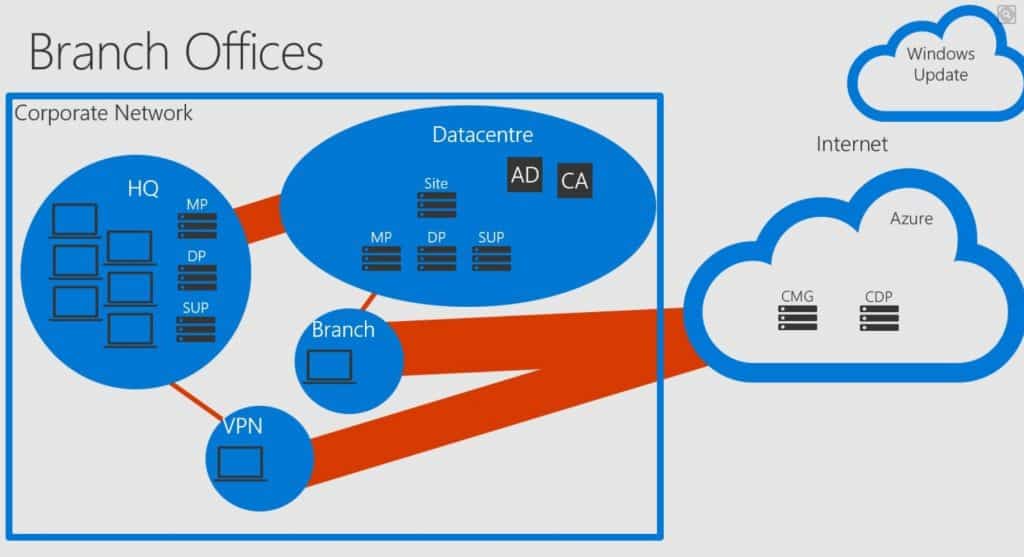
SCCM CMG doesn’t have regional awareness capabilities. So the SCCM client connected to the internet can go to any one of the CMG available.
The new SCCM CMG behavior with boundary groups helps scenario, which will help you to move SCCM traffic off the expensive and slow WAN/VPN and onto the cheaper Internet links to SCCM CMG.
The new preview version of SCCM 1902 will make SCCM CMG more comparable to IBCM features. These developments will help you decide between SCCM IBCM and CMG.
Setup Troubleshooting Complexity
I think SCCM CMG and IBCM are equally complex to set up + troubleshoot for different reasons.
SCCM IBCM complexity is mainly because of dealing with your organization’s PKI, Firewall, and Security teams.
SCCM CMG complexity is mostly because it’s pretty new to many SCCM admins. SCCM admins should undergo an upskilling process (continuous learning) and learn more about the concepts of SCCM CMG.
[Related Post – SCCM Co-Management Video Guide With 16 Posts]
Operability
You can use your existing processes (SAL, TOM, RACI, etc.) to manage and operate SCCM IBCM components.
SCCM CMG requires a modern way of thinking, and you might need to create or update existing SLAs, TOMs, RACIs, etc. However, these changes will help you start your organization’s digital transformation, which is helpful.
Security
There should not be any comparison between modern and traditional security verticals. Both are made for different reasons.
SCCM IBCM components are placed in the DMZ of your organization’s data center. The SCCM clients from the internet will directly connect to those IBCM components (sometimes via reverse proxy).
SCCM CMG components are placed in the Microsoft Azure data center, not in your on-prem DMZ. Moreover, internet clients DO NOT communicate directly with SCCM on-prem elements. SCCM CMG components will always create outbound connections to the Microsoft cloud.

Future Proof
Don’t get me wrong; I’m not saying SCCM IBCM is not future-proof. However, I can see that Microsoft put much more effort into improving the capabilities of SCCM CMG.
Co-Management Support
SCCM IBCM vs CMG comparison always reaches a point where co-management support is discussed. There is NO hardcore dependency on co-management and CMG.
SCCM CMG is more aligned with co-management options and scenarios.
Resources
- How to Setup Co-Management – Introduction – Prerequisites Part 1
- How to Setup Co-Management – Firewall Ports Proxy Requirements Part 2
- Setup Co-Management – AAD Connect UPN Suffix Part 3
- Setup Co-Management – CA PKI & Certificates Part 4
- Setup Co-Management Cloud DP Azure Blob Storage Part 5
- Setup Co-Management Azure Cloud Services CMG Part 6
- SCCM Configure Settings for Client PKI Certificates Part 7
- How to Setup SCCM Co-Management to Offload Workloads to Intune – Part 8
- How to Deploy SCCM Client from Intune – Co-Management – Part 9
- End-User Experience of Windows 10 Co-Management – Part 10
- Overview Windows 10 Co-Management with Intune and SCCM
- Custom Report to Identify Machines Connected via SCCM CMG
- How to Setup SCCM Cloud Management Gateway as cloud DP
- Troubleshooting Tips SCCM CMG Connection Analyzer
- Learn How to Remove SCCM Cloud DP
- Clean up SCCM CMG and Cloud Services from SCCM
We are on WhatsApp. To get the latest step-by-step guides and news updates, Join our Channel. Click here –HTMD WhatsApp.
Author
Anoop C Nair is Microsoft MVP! He is a Device Management Admin with more than 20 years of experience (calculation done in 2021) in IT. He is a Blogger, Speaker, and Local User Group HTMD
Community leader. His main focus is on Device Management technologies like SCCM 2012, Current Branch, and Intune. He writes about ConfigMgr, Windows 11, Windows 10, Azure AD, Microsoft Intune, Windows 365, AVD, etc.




Hi Anoop –
Nice comparison and very helpful to help decide. For Parallels it came down to IBCM has an open to development API and CMG doesn’t. We would have preferred to go with CMG but couldn’t integrate it for Mac management in SCCM. To bring Macs into the policy management of SCCM, external off-prem Mac’s can use an HTTPS URL to receive a download of our Parallels Mac Management for SCCM agent, connect through the DMZ where IBCM is, then be enrolled into SCCM for off-prem policy management. For associates that will seldom be in the office, this gives a secure method to achieve a well managed Mac no matter where it is.
Regards!
StaffHi Danny – I’ll add the API into the list. I remember you mentioning the same point in London user group presentation! It was nice presentation!!
Very helpful thank you !
Hello Anoop,
Have you ever find yourself in the scenario of having an IBCM and try to install clients from Intune, using the IBCM MP as the managementpoint to point to when sending the client’s deployment from Intune?
Thanks!
StaffHello – I have not got into that scenario. But it’s almost same as to the situation of CMG isn’t it.
If you have appropriate certs and authentication and co-management enabled, then it should work just fine isn’t it
I do have co-management enabled, and I already did it the other way (Enroll into Intune same computer when it had the client and certs), it fails when the computer is fresh started and I want that scenario, a fresh computer, enroll to AAD / Intune, and then deploy SCCM client to co-manage.
Either way, I just discovered your “forum.howtomanagedevices.com” and threw the question there,
Thanks a lot!
StaffSure let’s discuss https://forum.howtomanagedevices.com/endpointmanager/intune/does-anyone-know-if-having-an-ibcm-instead-of-a-cmg-is-possible-scenario-for-intune-autopilot-and-com-management-using-ibcms-management-point-role-to-deploy-client-installation-from-intune-to-aad/
any suggestions on reverse proxy to use for IBCM …having a impossible time to get the clients to talk over the internet to my IBCM server via an nginx proxy …