






SCCM Patch Management is Enough for Vulnerability Management
Is SCCM patch management enough for Vulnerability Management in an organization’s overall Information Technology (IT) strategy? This post will answer that question.
SCCM has excellent patch management and many integration options for third-party application patch management.
Let’s check whether these SCCM patch management workflows are enough to secure your organization. Let’s understand the importance of security strategy!
SCCM has improved a lot with many new features in current branch versions. I don’t know how many of you remember the SCUP integration with SCCM (no more required in most scenarios).

[Related Posts – SCCM Third-Party Software Update Support without SCUP & How Tedious for SCCM Admins to Patch 3rd Party Applications via SCUP]
Fifth Dimension of Modern Warfare
You all know four(4) dimensions of warfare for the government. It’s a known fact that “Cyber Security” is so important to governments worldwide and organizations. Let’s see more details about the cybersecurity dimension in this post.
- Air
- Sea
- Land
- Space
- Cyber Security
SCCM Patch Management Overview
SCCM patch management is a proven solution for Windows patch management. The patch management through SCCM improved a ton. I wrote patch management via an SCCM pro-con comparison blog post back in 2013.
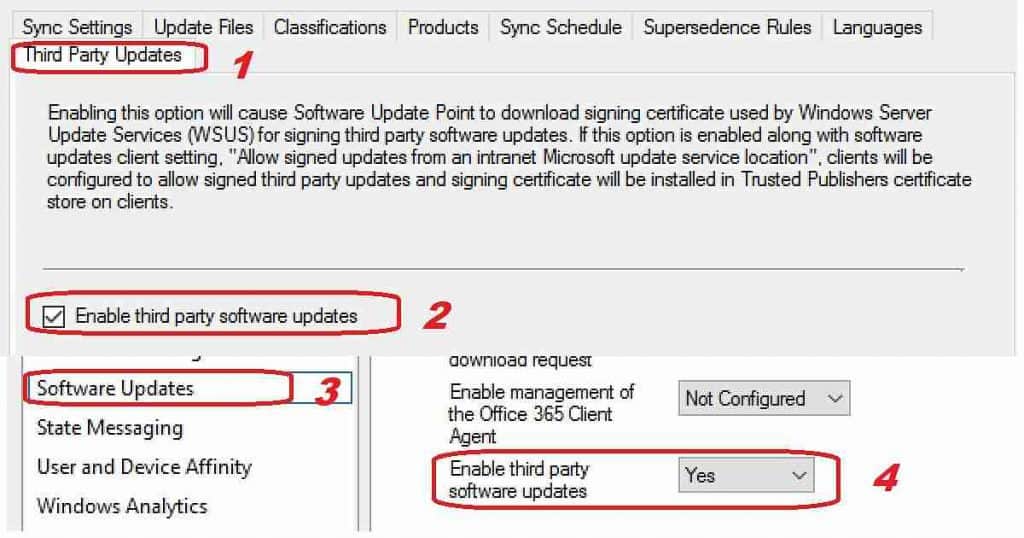
The “real” game-changer in the Windows patch management world is the SCCM feature to support third-party application patching support without SCUP natively.
SCCM Patch Management is Enough
The above question is wrong! The question should be whether patch management is enough for the information security strategy or not.
The answer is NO! Only SCCM patch management will not fully secure your organization. Don’t get me wrong; patch management is a critical stepping stone to your security strategy.
Importance of Vulnerability Management
Vulnerability management plays a vital role in any organization’s overall information security initiative by minimizing the attack surface, but they are just one component.
The following are the best methods to build a vulnerability strategy for your organization. You can read more details from Reuter’s post.
- Awareness of Vulnerability Management
- Understanding Vulnerability Patterns
- Detecting New Vulnerability Patterns with Machine Learning
- Automation – Vulnerability Management with Artificial Intelligence (AI)
- Tools to Fix Modern Vulnerabilities almost real-time
Automate Vulnerability Management with SCCM
Automation tools for Vulnerability Management are essential in the modern world. SCCM patch management is the first step in automating vulnerability management.
In addition to SCCM patch management, you can use SCCM Configuration Items, Baselines, and SCCM fast channel Run Script options to automate Vulnerability Management (VM).
Automate Vulnerability Management with Peer to Peer Technology
Do you want to know a more granular way to Automate Vulnerability Management?
Resources
We are on WhatsApp. To get the latest step-by-step guides and news updates, Join our Channel. Click here –HTMD WhatsApp.
Author
Anoop C Nair is Microsoft MVP! He is a Device Management Admin with more than 20 years of experience (calculation done in 2021) in IT. He is a Blogger, Speaker, and Local User Group HTMD Community leader. His main focus is on Device Management technologies like SCCM 2012, Current Branch, and Intune. He writes about ConfigMgr, Windows 11, Windows 10, Azure AD, Microsoft Intune, Windows 365, AVD, etc.




It’s not enough but it’s must!
StaffYes that is what I showed in the diagram !! It’s the core and start of the building block for IT security strategy !