






FIXED SCCM 1902 Prerequisite Error Network Access Protection (NAP) is No Longer Supported
Let us learn about the fixed SCCM 1902 Prerequisite Error: Network Access Protection (NAP) is No Longer Supported. The SCCM 1902 Opt-in(fast) ring was released last week.
Many organizations try to use the staging environment or perform testing with the Opt-in version of SCCM 1902. This post provides more details about the SCCM 1902 Prerequisite Check Failed error.
You will learn more about how to fix Network Access Protection (NAP), which is no longer a Supported Failed pre-requisite Check error.
It was updated on 23rd April – NOTE! – SCCM 1902 NAP is FIXED in SLOW ring.

Related Posts – SCCM 1902 Upgrade Step-by-Step Guide, SCCM Known Issues, & SCCM Deprecated Features and Support
SCCM 1902 Prerequisite Check Failed
I heard reports in the SCCM Professionals Facebook Group community about the prerequisite check error SCCM 1902 Network Access Protection (NAP) is No Longer Supported Failed.
This SCCM 1902 prerequisite failed error is reported by Thomas Hantsch & René Laurberg Jørgensen. Thomas raised a Microsoft support case and fixed the issue (SCCM 1902 Prerequisite Check Failed).
The SCCM 1902 upgrade got stuck on the pre-requisite check page with the SCCM Network Access Protection (NAP) No Longer Supported Failed Error.
Error! Network Access Protection (NAP) is no longer supported; Error; Configuration Manager has detected that you have software updates enabled for NAP. You must remove NAP policies from your environment before Setup can continue. For more information, see https://go.microsoft.com/fwlink/?LinkId=722800
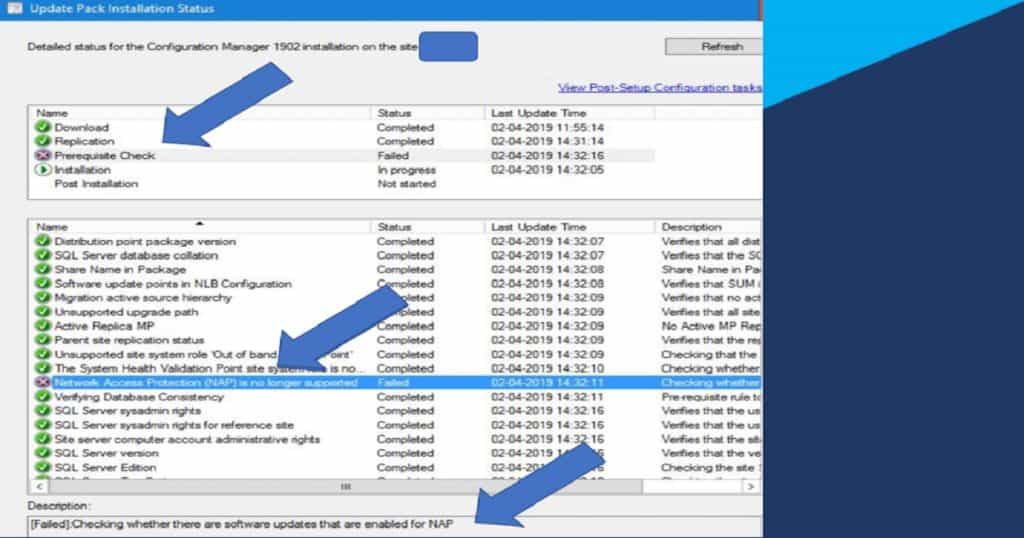
Root Cause of SCCM 1902 Prerequisite Failure Related to NAP
Have you ever enabled Network Access Protection (NAP) in your SCCM environment? I suspect that fewer organizations are using this feature.
As I already reported, the SCCM Network Access Protection (NAP) is No Longer Supported from SCCM 1511 onward (SCCM 1902 Prerequisite Check Failed).
As per Microsoft premier support (and Thomas’s report in the FB group), an SQL maintenance task normally runs every 30 days to remove the tombstoned rows from the Quar_QuarantineCIs table. But that task did not work in this scenario with that one row.
The above-mentioned tombstoned entry in Quar_QuarantineCIs is causing SCCM 1902 prerequisite failure related to “Network Access Protection (NAP) is no longer supported by SCCM.”
FIX – SCCM 1902 Prerequisite Check Failed
IMPORTANT: I don’t recommend editing the SCCM SQL DB directly if you are doing it in the production environment. Directly editing DB is not a supported scenario.
Thomas shared that the Microsoft SCCM premier support engineer helped him delete the tombstoned entry in the Quar_QuarantineCIs table.
First Step to Confirm SCCM 1902 Prerequisite Check Issue
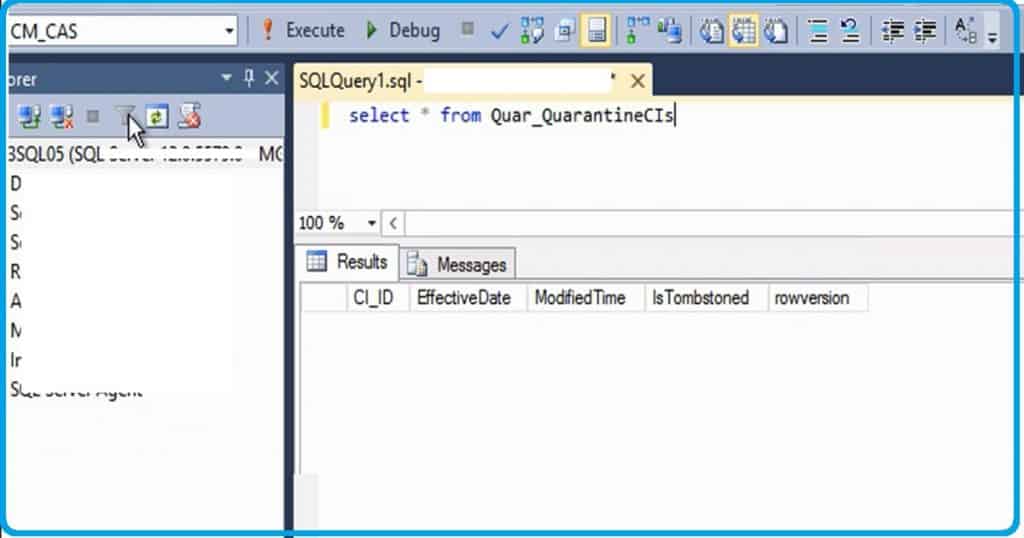
You must check and confirm whether you have the same problem explained above. Run the following query against your SCCM SQL DB (CM_CAS, where CAS is the SCCM site code) to prove the issue.
SELECT * FROM Quar_QuarantineCIs
When you get a blank screen result (as you can see in the below screen capture) after running the SQL query mentioned below, then you don’t have an SCCM NAP tombstoned entry in your SCCM SQL DB and you’re okay to proceed with SCCM 1902 upgrade. No need to fix SCCM 1902 Prerequisite Check Failed errors.
Second Step to Resolve SCCM 1902 Prerequisite Check Failure Issue
When you have the SCCM NAP tombstoned entry in your SCCM SQL DB, you must raise a support case with Microsoft support.
NOTE!-I strongly recommend raising the ticket with Microsoft support if you have a contract with Microsoft’s support organization. Also, take the backup of your SQL DB before running the following query.
Delete from Quar_QuarantineCIs where IsTombstoned=1
Once you have successfully run the above query, you can rerun the SCCM 1902 prerequisite check and proceed with the SCCM 1902 upgrade. I will update the list of SCCM 1902 known issues with this issue in a while.
Resources
We are on WhatsApp. To get the latest step-by-step guides and news updates, Join our Channel. Click here –HTMD WhatsApp.
Author
Anoop C Nair is Microsoft MVP! He is a Device Management Admin with more than 20 years of experience (calculation done in 2021) in IT. He is a Blogger, Speaker, and Local User Group HTMD Community leader. His main focus is on Device Management technologies like SCCM 2012, Current Branch, and Intune. He writes about ConfigMgr, Windows 11, Windows 10, Azure AD, Microsoft Intune, Windows 365, AVD, etc.




Hi anoop,
I regularly follow your posts.While upgrading sccm 1806 to sccm 1902, I got FileCopy failed; 0x800704c8 error while checking prerequisites. The package downloads correctly and distributes to DP. While extracting package this error comes up. I have disabled Real time protection on windows defender from all site servers.
Hi,
Trying manual upgrade 2012R2 to 1902 as I do not find any other versions prior to 1902. However, I get a prerequisite check error Link ID 722800. “SELECT * FROM Quar_QuarantineCIs” returned zero results.
Upgraded my 1810 SCCM to 1902 and now I am getting the following error on the managment point, I cannot find a reason why (I am no SCCM guru but still have this role)
MP Control Manager detected management point is not responding to HTTP requests. The HTTP status code and text is 500, Internal Server Error.
Possible cause: Management point encountered an error when connecting to SQL Server.
Solution: Verify that the SQL Server is properly configured to allow Management Point access. Verify that management point computer account or the Management Point Database Connection Account is a member of Management Point Role (smsdbrole_MP) in the SQL Server database.
Possible cause: The SQL Server Service Principal Names (SPNs) are not registered correctly in Active Directory
Solution: Ensure SQL Server SPNs are correctly registered. Review Q829868.
Possible cause: Internet Information Services (IIS) isn’t configured to listen on the ports over which the site is configured to communicate.
Solution: Verify that the designated Web Site is configured to use the same ports which the site is configured to use.
Possible cause: The designated Web Site is disabled in IIS.
Solution: Verify that the designated Web Site is enabled, and functioning properly.
Possible cause: The MP ISAPI Application Identity does not have the requisite logon privileges.
Solution: Verify that the account that the MP ISAPI is configured to run under has not been denied batch logon rights through group policy.
For more information, refer to Microsoft Knowledge Base article 838891.
Wrong section 🙁 in panic mode
Hi ANoop
After upgrade to 1902, KB5700571 not been installed correctly as it stopped at pre-requisite failed due to disk space issue.
I have checked disk space, it has more than 12GB still.
Can you advise step to fix this
StaffAgainst which server you are getting that error and which drive ?