






New Update Button is Available for Intune Enterprise Application Management to Update Catalog Apps
A New Update Button is Available for Intune Enterprise Application Management to update Apps. Discuss the new enhancements to Microsoft Intune Catalog Apps for Managing and Updating Apps. The feature has been updated with a new experience to make managing apps easier.
Last year, Microsoft added Enterprise App Management to the Microsoft Intune Suite, making it easier for IT admins to manage apps on their organization’s devices. Now, Microsoft has made updates to simplify further managing and updating apps in the catalog.
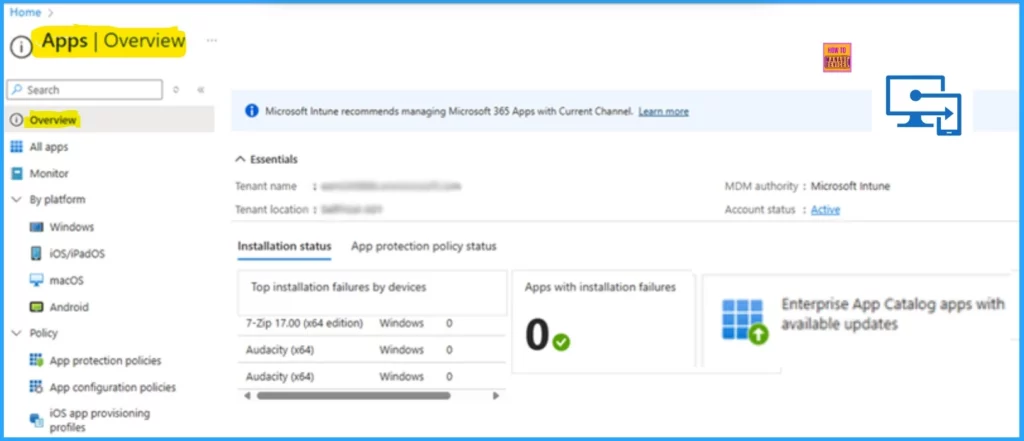
One significant improvement is a new tile on the Intune overview page. This tile is a notification for IT admins responsible for managing application updates, including supersedence policies. These policies help admins control which applications are used, ensuring that older versions are replaced or upgraded quickly and easily.
In this post, you will find all the details of the New Enhancements for Managing and Updating Apps in Microsoft Intune Enterprise App Management. Below are more details.

Table of Contents
What are Updated Supersedence Policies for App Management?
Update supersedence policies allow IT admins to manage which application versions are used, ensuring that older versions are efficiently replaced or upgraded with newer ones.
New Update Button is Available for Intune Enterprise Applications
The Microsoft Intune Enterprise Application Management feature has been updated with a new experience to make app management easier. IT admins can now see a new tile on the overview page that alerts them about available app updates.
They can access and manage these updates with just one click, simplifying the process of keeping apps up-to-date and secure. This improvement helps admins save time and ensures that apps are constantly updated.
| Steps | Action |
|---|---|
| Step1 | Sign in to the Microsoft Intune admin center. |
| Step2 | Navigate to Apps on the left-hand side of the Intune portal |
| Step3 | Click on Overview under the Apps section. |
- 6 Exciting Features coming to Intune Enterprise App Management
- Microsoft Added New 160+ Apps on Intune Enterprise App Catalog
- Deploy Windows Catalog App type using Intune Enterprise Application Catalog
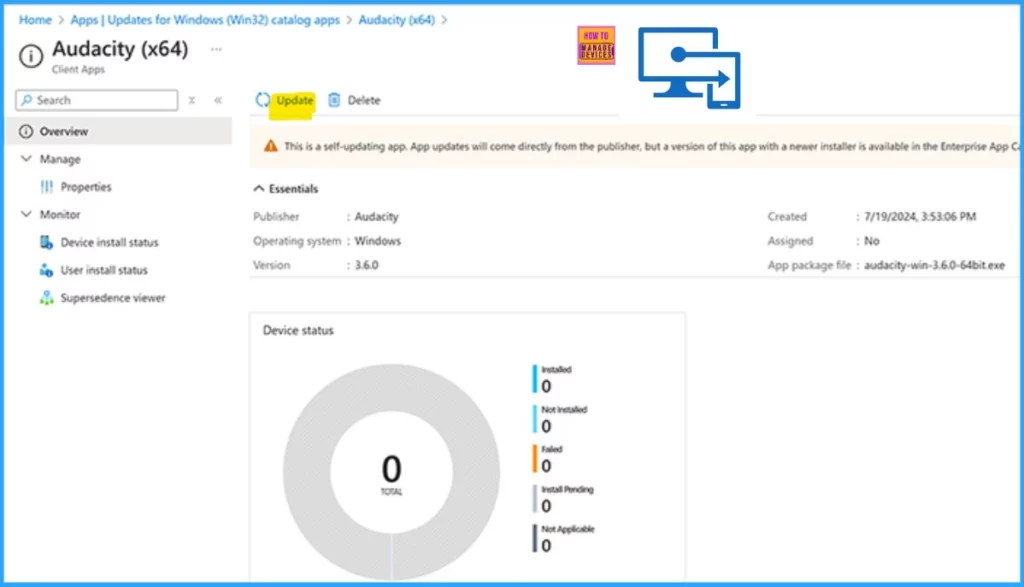
The process for setting up app updates has been made more accessible. When admins click the Update button, the app creation flow starts and many essential app details are filled out. Admins can change these details if they want.
Additionally, admins can choose to have apps automatically update when the previous version is found on enrolled devices. This feature will be available in early 2025 for those working in Government Community Cloud (GCC) High and U.S. Department of Defense (DoD) environments.
This is a self-updating app. App updates will come directly from the publisher, but a version of this app with a newer installer is available in the Enterprise App Catalog.
- Create and Deploy Python Application with Intune Enterprise App Catalog App
- Install Zoom Client using Windows Enterprise App Catalog App with Intune
Join the LinkedIn Page and Telegram group to get the latest step-by-step guides and news updates. Join our Meetup Page to participate in User group meetings. Also, Join the WhatsApp Community to get the latest news on Microsoft Technologies. We are there on Reddit as well.
Author
Anoop C Nair has been Microsoft MVP from 2015 onwards for 10 consecutive years! He is a Workplace Solution Architect with more than 22+ years of experience in Workplace technologies. He is also a Blogger, Speaker, and leader of the Local User Group Community. His primary focus is on Device Management technologies like SCCM and Intune. He writes about technologies like Intune, SCCM, Windows, Cloud PC, Windows, Entra, Microsoft Security, Career, etc.


Discussion