






Microsoft Intune Enhances PKCS Certificate Issuance with SID Support
Microsoft Intune Enhances PKCS Certificate Issuance with SID Support! The PKCS certificate issuance process in Microsoft Intune has been updated to meet the Security Identifier (SID) information requirements outlined in KB5014754.
This update introduces an Object Identifier (OID) attribute that includes the user or device SID within the certificate. It is available in the Certificate Connector for Microsoft Intune, version 6.2406.0.1001, and applies to users and devices synced from Active Directory to Microsoft Entra ID.
Microsoft Intune has introduced new working time settings for App Protection Policies, allowing organizations to limit app access and mute notifications outside working hours. This gives businesses more control over app usage and helps reduce distractions during non-working hours.
Microsoft Intune has added a new Update button in the Enterprise Application Management section, making it easier to update apps. This enhancement simplifies the process of managing and keeping apps up to date. The Intune catalog has also been updated with a more user-friendly experience, helping IT administrators manage apps more efficiently.

Table of Contents
What is the New Update for PKCS Certificate Issuance in Microsoft Intune?
The update enhances the PKCS certificate issuance process to support Security Identifier (SID) information as required by KB5014754.
Which Version of the Certificate Connector includes this Update?
This change is available in the Certificate Connector for Microsoft Intune, version 6.2406.0.1001.
Microsoft Intune Enhances PKCS Certificate Issuance with SID Support
The update for PKCS certificate issuance in Microsoft Intune with version 6.2406.0.1001 introduces support for Security Identifier (SID) information, as outlined in KB5014754. An object identifier (OID) attribute containing the user or device SID is now added to the certificate when issuing certificates.
KB5014754 is a Microsoft update that introduces changes to certificate-based authentication on Windows domain controllers to enhance security and mitigate specific vulnerabilities.
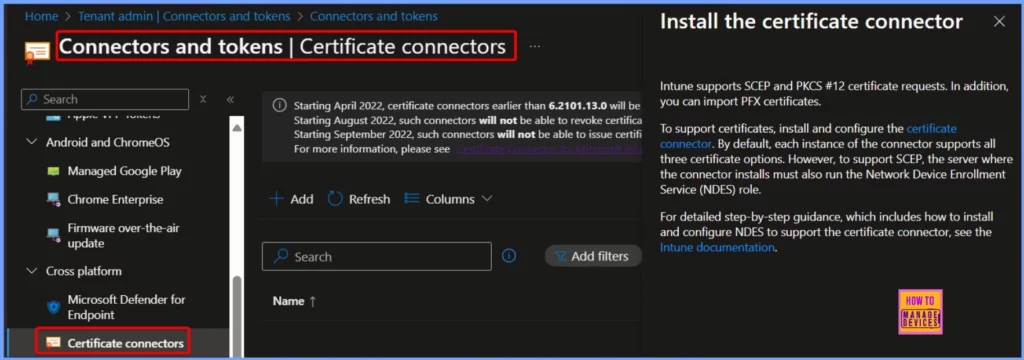
- Sign In to Microsoft Intune Admin Center.
- In the left navigation pane, select Tenant Administration.
- Under Tenant administration, click on Connectors and Tokens.
- Then, select Certificate connectors.
- Click on Add to start the process of adding a new certificate connector.
Note! If you don’t see the new feature, you may use an older version of the Certificate Connector or haven’t updated the certificate profiles as needed. Ensure the latest version is installed and configured correctly in the Intune portal to access the new functionality.
- Enhanced App Deployment in Intune with Direct App Links from Enterprise App Catalog
- Integrating Dell Management Portal in Intune Admin Center Coming Soon
- Intune Device Firmware Configuration Interface DFCI now Supports VAIO Devices Running Windows 10 and 11
SID Information in Certificates
The update includes a feature that embeds the SID (a unique identifier for users or devices) in the certificate. This is required for certificates issued to users or devices synced from Active Directory on-premises to Microsoft Entra ID (formerly Azure AD).
| SID update availability | Details |
|---|---|
| User Certificates | The update applies to user certificates on all platforms. |
| Device Certificates | The update specifically applies to device certificates on Microsoft Entra hybrid joined Windows devices (devices connected to both Active Directory and Microsoft Entra ID). |
How to Get this Update
Let’s discuss how to get this update. The table below will help you to see more details.
| How to Get This Update | Details |
|---|---|
| Install or Update the Connector | You need to install or update to the Certificate Connector for Microsoft Intune, version 6.2406.0.1001. Once updated, the connector will automatically handle the inclusion of SID data in issued certificates. |
Simple Steps to Check and Apply the Update
PKCS certificates help securely manage identities and ensure trust in digital communications. PKCS, which RSA Security LLC developed in the 1990s, stands for Public Key Cryptography Standards. One commonly used format is PKCS#12, also known as PFX.
- Make sure you are using version 6.2406.0.1001 of the Certificate Connector for Intune.
- Update your PKCS certificate profiles to include the new OID attribute with the SID information.
- Assign the updated certificate profiles to the relevant users or devices synced from Active Directory to Microsoft Entra ID.
Join the LinkedIn Page and Telegram group to get the latest step-by-step guides and news updates. Join our Meetup Page to participate in User group meetings. Also, Join the WhatsApp Community to get the latest news on Microsoft Technologies. We are there on Reddit as well.
Author
Anoop C Nair has been Microsoft MVP from 2015 onwards for 10 consecutive years! He is a Workplace Solution Architect with more than 22+ years of experience in Workplace technologies. He is also a Blogger, Speaker, and Local User Group Community leader. His primary focus is on Device Management technologies like SCCM and Intune. He writes about technologies like Intune, SCCM, Windows, Cloud PC, Windows, Entra, Microsoft Security, Career, etc.


Discussion