





How to Install and Manage Microsoft Intune Client
Today, I would like to explain How to Install and Manage Microsoft Intune Client. Windows Intune is a lighter version of ConfigMgr. This is my second post on Intune.
Microsoft Intune is a cloud-based endpoint management solution. It simplifies app and device management for desktop computers, mobile devices, and virtual endpoints while managing users to log on to organizational resources.
Microsoft Intune is a standalone management policy for mobile device management (MDM). IT admins can control configurations and confirm compliance on Windows devices, Android, iOS, iPadOS, and macOS.
I’ve been doing several tests with this product for the last few days and love it. Obviously, Windows Intune doesn’t have all the features of ConfigMgr.

Table of Contents
How to Install and Manage Microsoft Intune Client
Step 1 Prepare for Deployment
The best practice is to go through the prerequisite of Intune client software before trying to install it. The current version (4.0.9377.0) of Intune doesn’t support Windows 8.

- Deploy Install SCCM Client Via Intune – Co-Management (anoopcnair.com)
- Microsoft Added New 160+ Apps on Intune Enterprise App Catalog
- Install SysInternals Suite on Windows Device using Intune
- Best Method How To Remove Microsoft Intune Client HTMD Blog (anoopcnair.com)
As Intune is a Cloud-based service, Internet connectivity is the first point that needs to be taken care of. Some special proxy server configurations are required. Windows Intune supports unauthenticated proxy servers. All Intune clients’ communications will be through 80 and 443 ports.
Step2 Download and Deploy
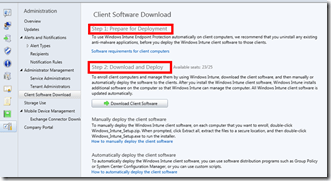
Log in to the Intune Admin Console from the home page. Navigate through the Administration node and then click on Client Software Download. As mentioned above, the first step is to verify the prerequisites.

Click the Download Client Software button from the Admin Console to download the client software. Save the client software Windows_Intune_Setup.zip in zipped format and extract it. The extracted folder should contain two files, Windows_Intune_Setup.exe and WindowsIntune.accountcert.

These are the two files required for installing Intune Client. They can be copied to a USB drive and used in client machines. WindowsIntune Account cert is the certificate file that will authenticate the client with the Intune server. So don’t change this certificate; the exe file alone won’t work.
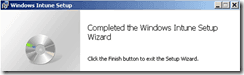
I used manual installation. You need to double-click on the Windows_Intune_Setup.exe file, and that is it. The Intune client software installation log should be available in the %TEMP% folder, and the file name, in my case, was “MSI96de5.log.”
MSI (c) (E0:B4) [17:38:58:869]: The Windows Installer installed the product. The Product Name is Windows Intune, and the Version is 4.0.9377.0. The Product Language is 0. The manufacturer is Microsoft Corporation. The installation success or error status is 0.

Step 3 Verify whether the client enrolled successfully
Microsoft recommends checking the status of client enrollment in the Windows Intune admin console after 30 minutes of a successful installation.
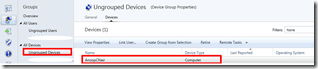
My computer “AnoopCNair” showed up in Admin Console under Groups “All Devices” –> “Ungrouped Devices” –> “Devices”. Hardware inventory details are also available after some time.
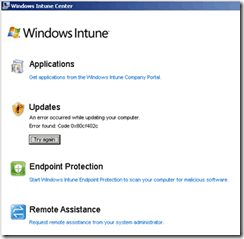
The client console will look like this. As with the CM 2012 application catalog, users can search for available applications in the company portal and install the required applications. Updates, Endpoint Protection, and Remote assistance options are in the Intune client applet.
Windows Intune’s log files are located at “C: Program FilesMicrosoftOnlineManagementLogs.” The Windows Intune client icon will be available on the taskbar. Also, you can find the actual client UI exe (cltui.exe) at “C: Program FilesMicrosoftOnlineManagementClient UI.”
Hardware and Software inventory details of the Windows Intune client are available in the “C:\Program Files\Microsoft\OnlineManagement\PolicyAgent\ReportCache” folder.
Resources
We are on WhatsApp. To get the latest step-by-step guides and news updates, Join our Channel. Click here –HTMD WhatsApp.
Author
Anoop C Nair has been Microsoft MVP from 2015 onwards for 10 consecutive years! He is a Workplace Solution Architect with more than 22+ years of experience in Workplace technologies. He is also a Blogger, Speaker, and leader of the Local User Group Community. His main focus is on Device Management technologies like SCCM and Intune. He writes about technologies like Intune, SCCM, Windows, Cloud PC, Windows, Entra, Microsoft Security, Career, etc..


Discussion · 1 comment