






Entra Conditional Access is Central to Secure Microsoft 365 – A Brief Analysis
Today, I will explain how Entra Conditional Access is central to secure Microsoft 365. Conditional access is the device used by Microsoft Entra ID to combine signals, make decisions, and enforce organizational policies. Use conditional access policies only when needed to keep your organization secure.
This security policy application engine examines real-time signals to assess security enforcement at critical checkpoints. Microsoft Entra Conditional Access enforces granular access controls across third-party tools and Microsoft security products, including Microsoft Entra, Microsoft Defender for Cloud Apps, Microsoft Intune, and Microsoft Purview.
Conditional access analyzes over 40 TB of identity-related security signals using machine learning to determine the appropriate policy for a resource. Policies allow users to access corporate on any device if the user or device satisfies the Conditions configured. You can find more details and insights shared by Ru Campbell, Threatscape’s Head of Microsoft Security Practice, and Merill Fernando, Product Manager at Microsoft in this post.
Conditional Access policies are built around user location, device health, and risk level signals. These policies can enforce actions like requiring multi-factor authentication (MFA), blocking access from untrusted locations, allowing access only to devices that meet compliance standards, and confirming that company data is only retrieved under secure conditions.

Table of Contents
What is required for Conditional Access?
Entra Conditional Access is Central to Secure Microsoft 365
Nowadays, multi-factor authentication (MFA) is almost everywhere. While MFA has helped corporate users with security teams achieve board-level buy-in, many organisations seek the next, more secure step.
Security controls are often set for maximum protection; productivity and practical ease of access are still impaired. In that case, there’s every chance that employees may try and find common-sense workarounds, reducing crucial visibility and creating gaps in security coverage.
- Best Guide To Setup Conditional Access For Remote Help With Intune | RemoteAssistanceService
- New Cloud-Based Microsoft Defender App For Home Users | Step-By-Step User Guide
- Best Guide to Install Microsoft Graph PowerShell Modules
How Conditional Access Works?
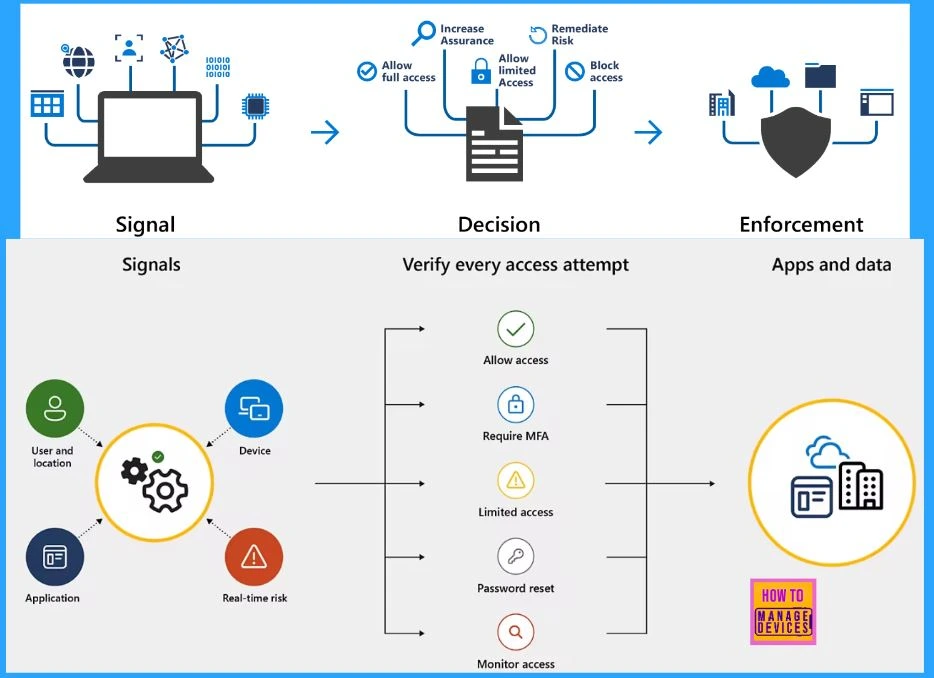
Below is a diagram for your reference. The left side of the diagram represents how signals from users, devices, locations, apps, data labels, and risk analysis are aggregated. Decisions are administered based on the accumulated signals.
The middle of the diagram shows common decisions based on signals, including blocking, limiting, allowing access, or requiring additional steps (such as multifactor authentication or password reset).
The right side of the diagram represents how a decision is enforced on apps and data once conditional access agrees to the applicable action.
Key Benefits of Conditional Access
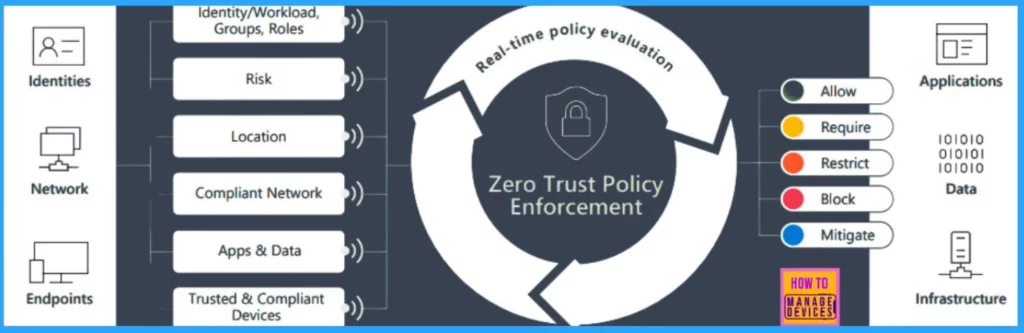
Conditional access protects your applications, data, network, and infrastructure from threats inside and outside your organization. It is based on Zero Trust principles and uses fine-tuned policies that examine user, device, and network context and real-time risk signals before granting access.
| Benefits | Description |
|---|---|
| Beyond passwords Enhanced security | Before granting authenticated users access to apps and resources, consider network conditions, historical behavior, device health, threat signals, and other real-time factors. |
| Efficient Access Management | Intend granular access policies, then let the system decide when to allow, block, or limit access based on real-time user context, location, device and session risk information. |
| Context-based restrictions on user activity | Avoid insider errors or exploitation by restricting activity based on user role, other factors or device compliance, such as whether the user is trying to log on to a trusted app or a non-compliant website. |
| User-friendly sign-in experience | Reduce productivity breaks by only prompting for multifactor authentication (MFA) when risk conditions reach a high enough threshold. |
| Built on Zero Trust principles | Verify users openly by demanding MFA when necessary, enforcing least privilege access using granular controls, and blocking or limiting access when risk conditions are high. |
Protect Identities and Secure Access to Resources
The following are the key points that show you how Conditional access works as a protector.
- Real-time session monitoring and access revocation
- Actionable security insights and recommendations
- Flexible policy testing with report-only mode
- Enhanced protection for critical operations
About Maester and its Features
Maester has many essential features. It assists you in maintaining the best security enhancements by automating several security inspections. It is a PowerShell-based test automation framework aimed at helping you monitor and maintain the security configuration of your Microsoft 365. It is like security test automation, running tests to confirm that your configuration follows your security policies.
It helps tenant administrators improve their Entra ID tenant’s security configuration and offers ready-to-use security tests. Maester uses Pester and Microsoft Graphs. You can create custom tests to check the security settings of your Microsoft 365 setup.
| The Key Features Offered by Measter |
|---|
| Maester Powershell Module |
| 40+ EIDSCA Tests |
| Interactive Test Report |
| Graph Helper commands for writing tests |
| 20+ Measter Entra Tests |
| Email+Report Gen +CI/CD Commands |
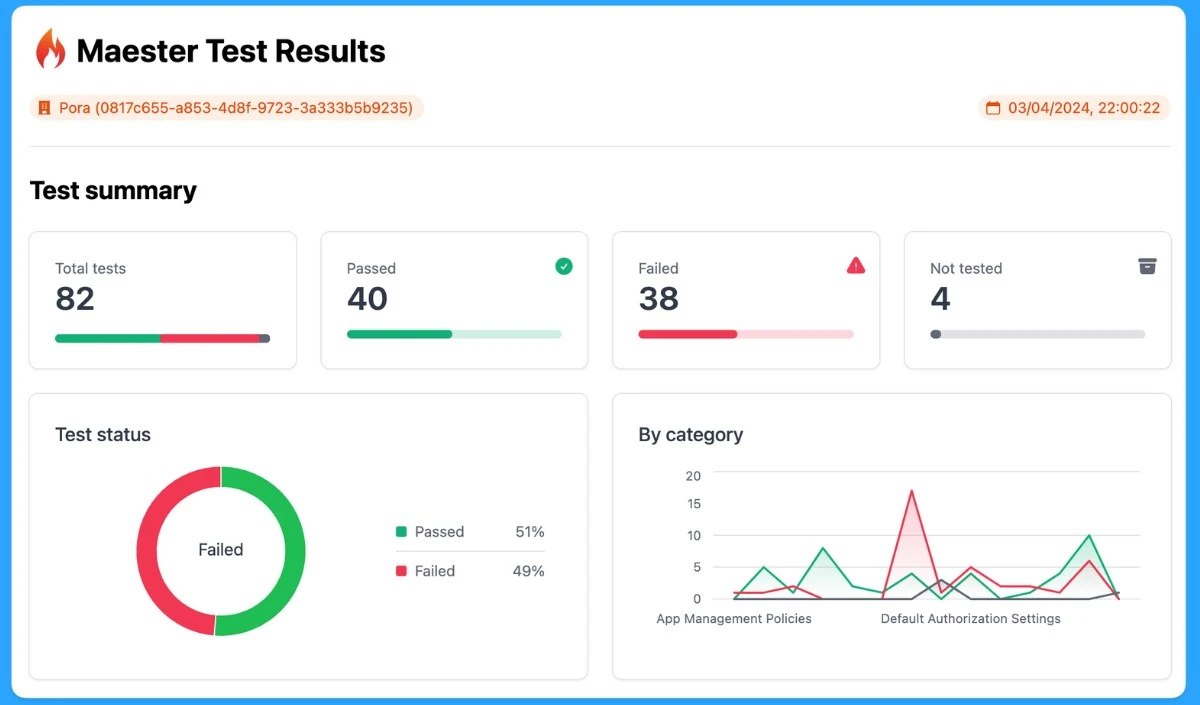
The top-quality Measter provides excellent test results. These test results give an instant overview of your security tenants. It will show you every detail of your tenant’s test results, such as the Total tests, Passed tests, Failed tests, and Not tested.
License Requirements
As I mentioned above, customers with Microsoft 365 Business Premium licenses have conditional access. Risk-based policies require access to Microsoft Entra ID Protection, which requires P2 licenses. Other products and features related to Conditional Access policies require appropriate licensing for those products and features.
When licenses mandatory for Conditional Access expire, policies are not automatically disabled or deleted. This allows customers to migrate away from Conditional Access policies and unexpected changes in their security posture. The remaining policies can be viewed and deleted but are no longer updated.
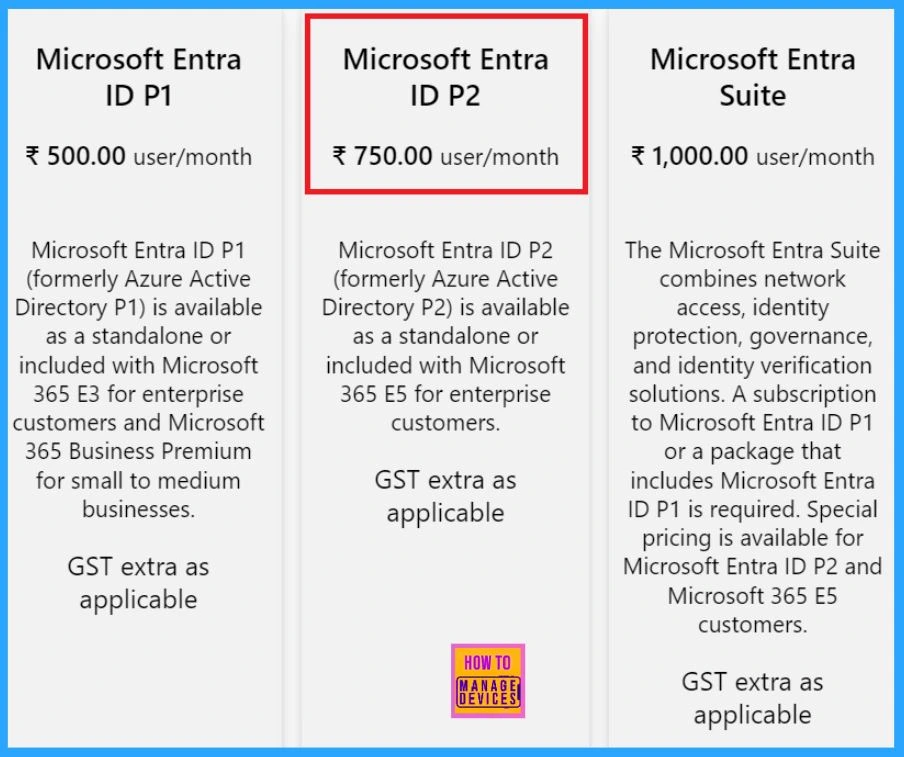
Microsoft Entra ID Pricing
Conditional access features are available with a Microsoft Entra ID P2 subscription. A Microsoft Entra ID P2 is included with Microsoft 365 E5 and offers a free 30-day trial. The following image helps you select the best option for your identity needs.
Resources
- How is Entra Conditional Access Central to Securing M365?
- Microsoft Entra Conditional Access | Microsoft Security
Join the LinkedIn Page and Telegram group to get the latest step-by-step guides and news updates. Join our Meetup Page to participate in User group meetings. Also, Join the WhatsApp Community to get the latest news on Microsoft Technologies. We are there on Reddit as well.
Author
Anoop C Nair has been Microsoft MVP for 10 consecutive years from 2015 onwards. He is a Workplace Solution Architect with more than 22+ years of experience in Workplace technologies. He is a Blogger, Speaker, and Local User Group Community leader. His primary focus is on Device Management technologies like SCCM and Intune. He writes about technologies like Intune, SCCM, Windows, Cloud PC, Windows, Entra, Microsoft Security, Career, etc.




Discussion