






Right Click Tools for Intune and Recast Automation | First Look
Let’s see what is in Right Click Tools for Intune and Recast Automation! Recast Software has launched Right Click Tools for Intune, a set of tools designed to help IT teams manage devices more quickly and efficiently. This is the latest update on the news we shared before Intune Right Click Tools For Application Manager.
These tools simplify everyday tasks, making it faster for IT administrators to keep company devices secure and running smoothly. Whether devices are managed on-premises – physically in the office or in the cloud, these tools help ensure that everything stays up-to-date and compliant with security rules.
Right Click Tools is now integrated into Microsoft Intune, making device management more accessible and efficient. With support for over 60 million endpoints, IT administrators can use a well-known set of tools within the Intune interface.
This integration simplifies workflows and eliminates the need to switch between different platforms. Now, users can access the same features previously available only in SCCM, all from their Intune-managed devices.

Table of Contents
What is Right Click Tools?
Right Click Tools is a robust set of device management tools that help IT administrators simplify workflows and manage endpoints efficiently.
How Many Endpoints Do Right Click Tools Currently Support?
Right Click Tools supports over 60 million endpoints.
What Features can Users Access through the Right Click Tools Integration in Intune?
Users can execute a menu of previously available features only in Configuration Manager directly from their Intune-managed devices.
Right Click Tools for Intune and Recast Automation
This post covers all the new features in Right Click Tools for Intune, including Recast Automation and Endpoint Insights. These tools make device management more accessible and efficient for IT teams, helping them automate tasks, access helpful device information, manage kiosks, and control user access.
More details are available in the On-Demand recording of the launch event – Intune Enhanced – Recast Software. Demo Start Time is 29:00, and Right Click Tool Demo is 46:00 minutes.
- Sign in to the Microsoft Intune Admin Center using your administrator credentials.
- Go to Devices > Windows > Windows Devices
- Select One Particular Device
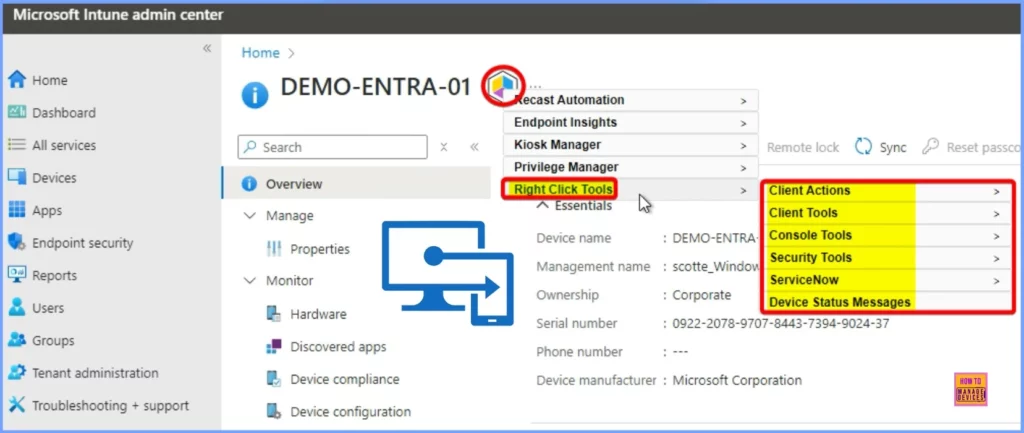
- In the below Intune Console, you can see that the New Recastsoftware Icon
- Click the Icon; It shows a set of options, such as
- Recast Automation
- Endpoint Insights
- Kiosk Manager
- Privilege Manager, and the last option is Right click Tools
- The Right-click Tools shows the following Actions
| Right click Tools |
|---|
| Client Actions |
| Client Tools |
| Console Tools |
| Security Tools |
| ServiceNow |
| Device Status Messages |
- Intune Application Deployment using MSI EXE IntuneWin Formats
- Maximum Size Cap for Intune Win32 App is Increased Now
Recast Automation
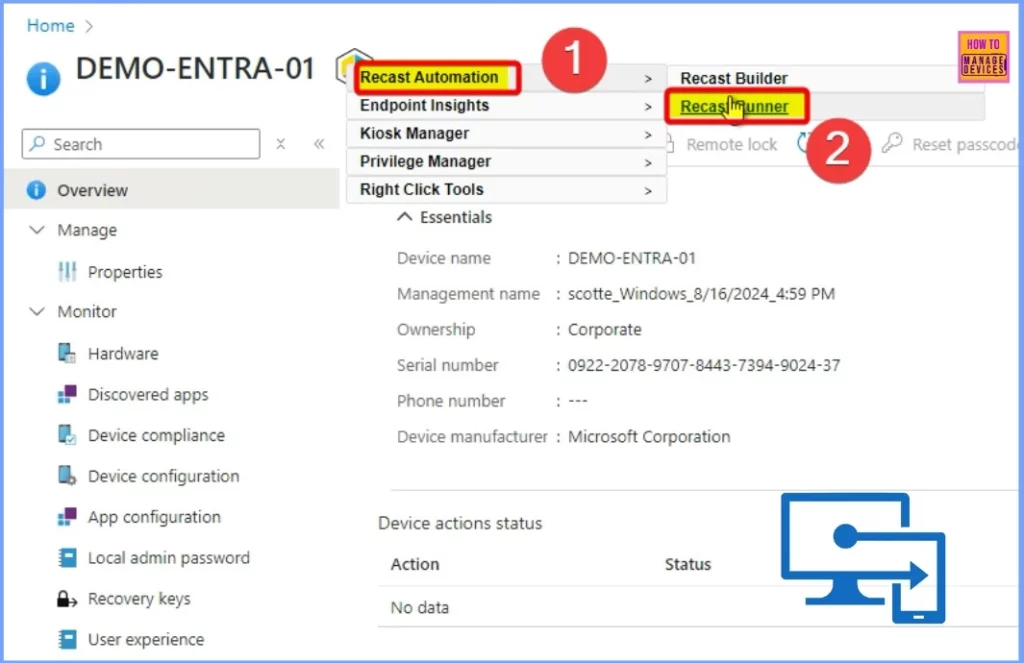
The Recast Automation feature includes two settings: Recast Builder and Recast Runner. To proceed, select the Recast Runner from the Recast Automation options. This allows you to execute automated tasks using predefined workflows efficiently.
- Microsoft Adds Anti-Spoofing Update to Intune for On-Premises Comanaged Devices
- Intune and Patch My PC Cloud SaaS Solution for 3rd Party App Patching Lifecycle Management
- Robopack Intune Patching Solution is Free for Smaller Customers and NGO
Connect with HTMD Community
Join the LinkedIn Page and Telegram group to get the latest step-by-step guides and news updates. Join our Meetup Page to participate in User group meetings. Also, Join the WhatsApp Community to get the latest news on Microsoft Technologies. We are there on Reddit as well.
Author
Anoop C Nair has been Microsoft MVP from 2015 onwards for 10 consecutive years! He is a Workplace Solution Architect with more than 22+ years of experience in Workplace technologies. He is also a Blogger, Speaker, and Local User Group Community leader. His primary focus is on Device Management technologies like SCCM and Intune. He writes about technologies like Intune, SCCM, Windows, Cloud PC, Windows, Entra, Microsoft Security, Career, etc.




Discussion