





FIX Issues with SCCM RBAC Clear Required PXE Deployments Options
FIX Issues with SCCM RBAC Clear Required PXE Deployments Options. This is a regularly used option in SCCM / ConfigMgr.
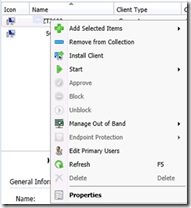
I recently found that Operating System Deployment Managers (the default security role) cannot perform the above-mentioned function by right-clicking on a device.
Full Administrators won’t face this issue. The clear PXE option is available in SP1 beta. However, I can’t replicate this issue in the Service Pack 1 version of ConfigMgr 2012.
In this post, I will explain how to FIX Issues with SCCM RBAC Clear Required PXE Deployments Options.

Table of Contents
FIX Issues with SCCM RBAC Clear Required PXE Deployments Options
The Clear Required PXE deployment option is available in the ribbon menu. However, this will clear the required PXE boot deployments of all the members assigned to this site in this collection.
- SCCM RBAC Security Role OSD Manager Does Not Have Access To Create TS ConfigMgr
- SCCM RBAC Implementation Troubleshooting Guide ConfigMgr
- Use SCCM RBAC Viewer Exe to Check RBAC Settings ConfigMgr
The members NOT assigned to this site will not be affected. So basically, it’s collection-based clear PXE deployments, and we don’t normally use this option because it will clear the PXE for all the members of that collection.
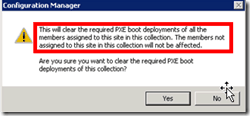
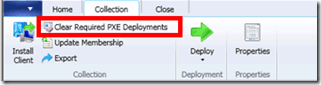
I’ve done some analysis on this. You must follow the following steps to make this option available for Operating System Deployment Managers or any other security roles.
The security role should have “Modify Resource” access on Collection. Collection –-> Modify Resource –> Yes.
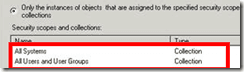
Administrative User/s (for e.g Operating System Deployment Manager) should be part of “All Systems” and “All Users and User Groups” collections irrespective of Security Scopes.
Note: If you remove any of those (above-mentioned) collections from the administrative user, the option to clear the PXE will also be removed. Providing modified access to “All Systems” and “All Users and User Groups” is not a good idea.
The workaround for this issue is to create a separate collection for PXE-clear devices. If you want to clear a device’s PXE advert, move it into that collection and then do “Clear Required PXE Deployments.” This collection would act as a temporary holding place for the device/s we need to clear PXE adverts. I know there is slightly more administrative work involved in this method. However, it is better than providing “modified resource” access to all the systems and users.
There is no need to worry, as I can see this issue is not present in the System Center 2012 Configuration Manager SP1 version (beta).
To know more about other issues we normally face during RBA implementation and How to fine-tune RBA in your organization, you can go through my posts – Post 1 and FIX Default Client Settings Issue With SCCM Security Role Infra Admin HTMD Blog (anoopcnair.com)
We are on WhatsApp. To get the latest step-by-step guides and news updates, Join our Channel. Click here –HTMD WhatsApp.
Author
Anoop C Nair has been Microsoft MVP from 2015 onwards for 10 consecutive years! He is a Workplace Solution Architect with more than 22+ years of experience in Workplace technologies. He is also a Blogger, Speaker, and leader of the Local User Group Community. His main focus is on Device Management technologies like SCCM and Intune. He writes about technologies like Intune, SCCM, Windows, Cloud PC, Windows, Entra, Microsoft Security, Career, etc..




Cheers Anoop. Another great reason to move to SP1 and beyond