






End Support of Windows Mail Calendar and Peoples Apps on Windows 11
Hi, today we are discussing the End of support for Windows Mail, Calendar, and Peoples Apps on Windows 11. Recently, Microsoft officially announced the end of support for these applications.
December 31, 2024, will be the last date Microsoft will no longer support the Windows Mail, Calendar, and People apps. These apps, which have been crucial tools for managing emails, schedules, and contacts, will be end of service.
As you know, Windows Mial, Calendar and People are part of the Windows operating system. At the time, these apps were the best way to manage users’ everyday digital communication. Microsoft is now moving users to the new Outlook for Windows.
These apps are essential tools for managing email schedules, which will continuously increase productivity. Now, it is time for the end of an era so that we can go through a quick overview of Support for Windows Mail, Calendar, and People apps, which will end on December 31, 2024.

Table of Contents
What Does It Mean the End of Support?
End Support of Windows Mail Calendar and Peoples App on Windows 11
Above, we discussed the latest news about Microsoft’s Announcement That It Will End Support for Windows Mail, Calendar, and People App. According to the Microsoft account, after December 31, 2024, you won’t be able to send or receive emails with Windows Mail and Calendar. However, Microsoft confirms that you can still save your emails, calendar events, and contacts.
- FIX Outlook Error Trouble Opening this Item while Opening Multiple Emails at once
- Classic Outlook Startup Crashes Caused by ucrtbase.dll and Learn How to Run Clean Rules Command
- Outlook Word or OneNote Closing Unexpectedly While Typing
Microsoft Phase Out Mail and Calendar Apps on Windows 11
Microsoft has confirmed that the application will be gradually deprecated. As a result, some users may still have access to the app and its functionality for a limited time while Microsoft works on phasing it out entirely. The app might continue to work for some users until Microsoft puts a stop to it globally.
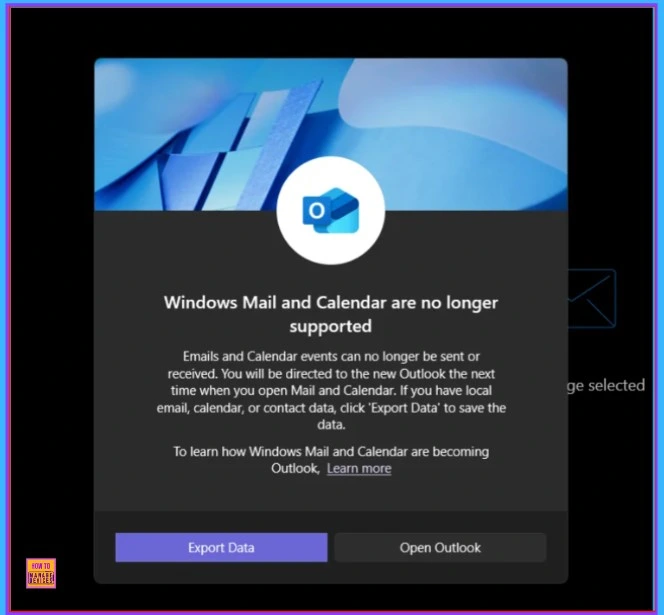
| Windows Mail and Calendar are No Longer Supported |
|---|
| Emails and Calendar events can no longer be sent or received. |
| You will be directed to the new Outlook the next time when you open Mail and Calendar. |
| If you have local email, calendar, or contact data, click ‘Export Data‘ to save the data. |
The Only Choice is New Outlook
The new Outlook app is still developing a full range of features that match those of the classic Outlook app. When it first launched, it was even inferior to the Mail and Calendar app. Now, the new Outlook is available by default, and the old app will soon become inaccessible.
The New Changes
Microsoft made these changes for users of the new Outlook for Windows. After the end-of-life date, I mentioned that you cannot send or receive emails with Windows Mail and Calendar. But you can save your emails, calendar events, and contacts.
- You can Export emails and contacts from Windows Mail or People to the new Outlook.
- You can also return to Windows Mail and Calendar by going to Outlook Settings>General>About Outlook.
- In the About Outlook tab, toggle the Outlook for Windows App.
- This toggle option confuses some users because Ms. Do does not clarify whether it is last after the end date.
- That means users won’t be able to send/receive mail on the old app, but they can continue to use it by using the toggle.
- It does not clarify whether the toggle option is available at the end of December 31st.
New Outlook for Windows
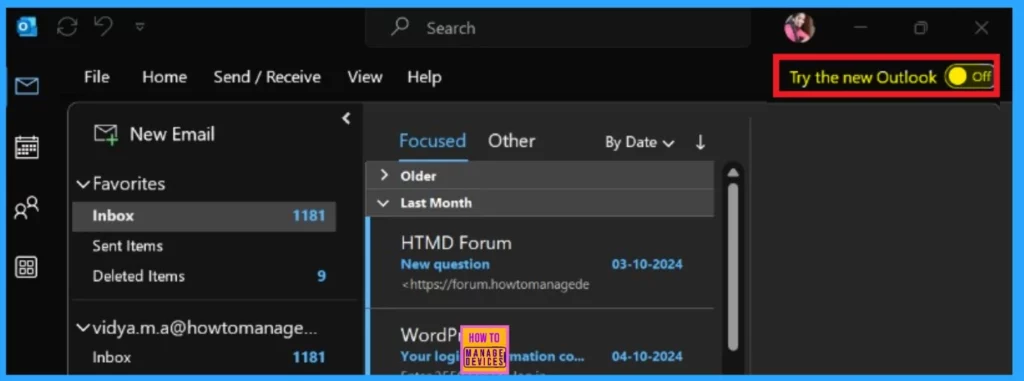
You all know that Outlook has to be changed in a new way. Outlook also allows users to try the new Outlook for Windows. For that, you can get an option in Outlook( look at the screenshot below). You can easily toggle in the top-right corner of your Mail and Calendar or classic Outlook app.
- You can any time switch to the Old Outlook by using the toggle pane
- The new outlook is available for all users
- There is no subscription needed.
- The new outlook is integrated with the AI and provides better emails, making them clearer.
| New feature of Outlook( New) | Info |
|---|---|
| A better Organizer | New outlook organized everything better way share your availability and events with just a click, and make time for what matters most. |
| More secure | Microsoft’s security helps protect your emails and documents from phishing and scams. |
| Accomplish more | Enjoy free access to Microsoft 365 online, including Word, Excel, PowerPoint, and OneDrive, with just one click. |
| It allows a unified Account experiance | new Outlook for Windows makes it easy to manage all your emails and calendar events in one place, whether you have accounts from different providers. |
Join the LinkedIn Page and Telegram group to get the latest step-by-step guides and news updates. Join our Meetup Page to participate in User group meetings. Also, Join the WhatsApp Community to get the latest news on Microsoft Technologies. We are there on Reddit as well.
Author
Anoop C Nair has been Microsoft MVP for 10 consecutive years from 2015 onwards. He is a Workplace Solution Architect with more than 22+ years of experience in Workplace technologies. He is a Blogger, Speaker, and Local User Group Community leader. His primary focus is on Device Management technologies like SCCM and Intune. He writes about technologies like Intune, SCCM, Windows, Cloud PC, Windows, Entra, Microsoft Security, Career, etc.




Discussion