






FIX Autopilot V2 Enrollment Error 80180014 Issue with Corporate Device Identifier Format
Let’s discuss the FIX Autopilot V2 Enrollment Error 80180014 Issue with Corporate Device Identifier Format. Autopilot users faced an issue with Autopilot V2 Enrollment, and an error occurred at 80180014. This issue was raised while testing Autopilot V2, and a corporate device identifier was uploaded.
Windows Autopilot V2 Enrollment is an advanced version of the Windows Autopilot deployment service. It simplifies setting up and pre-configuring new devices, immediately preparing them for productive use.
Autopilot users always face different enrollment errors while uploading a corporate device identifier. There are many reasons behind the error occurring on Autopilot, so you must be careful when uploading a Corporate device identifier.
In this blog post, I will help you learn more about the Autopilot V2 Enrollment Error 80180014 Issue with Corporate Device Identifier Format. I will also explain why and issue fixes for Autopilot V2 Enrollment Error 80180014.

Table of Contents
Autopilot V2 Enrollment Error 80180014 Issue with Corporate Device Identifier Format
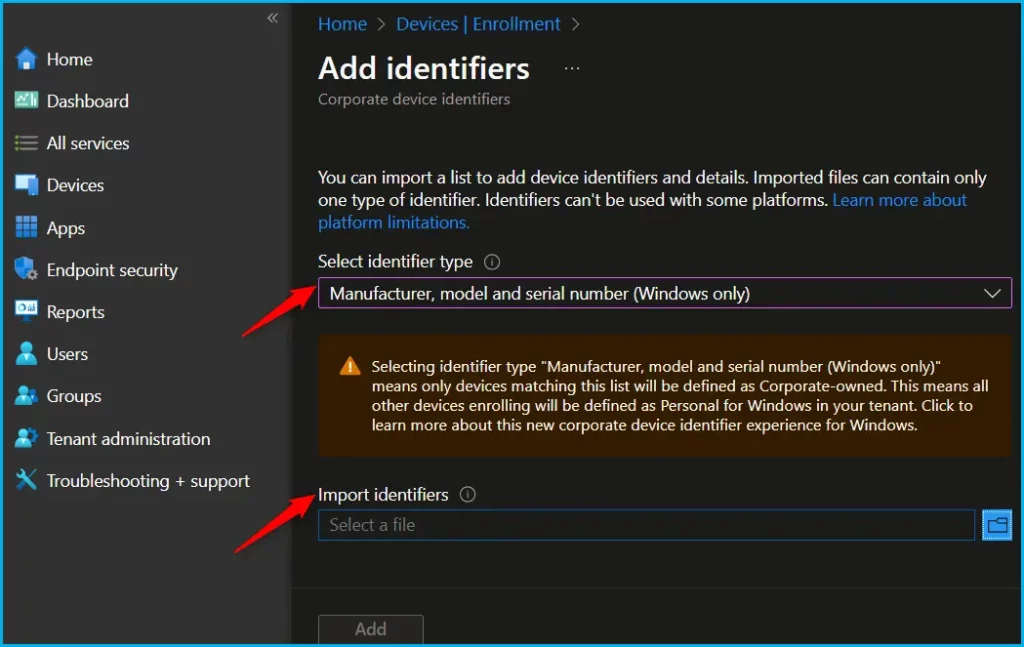
Error 80180014 occurred when the users tested Autopilot V2 and uploaded a corporate device identifier in the following format: HP, HP EliteBook 850 G8 Notebook PC, 5CGXXXX. Hassan Raad Shared in Twitter about this error recently.

- Intune LOB and Win32 Apps Together Co-Exist with New Windows Autopilot
- Intune MDM Enrollment Error Code 80180005
- Fix MDM Authentication Error Code 80180002
Reasons for Autopilot V2 Enrollment Error
There are many reasons for errors occurring on Autopilot V2 Enrollment. The main reasons are Device Enrollment Restrictions, Incorrect Device Identifier Format, Policy Settings, Device Import Issues, Enrollment Process, and OS Version Compatibility.
| Reasons | Details |
|---|---|
| Device Enrollment Restrictions | Ensure that the device enrollment restrictions in Intune are not blocking the enrollment of the device. |
| Incorrect Device Identifier Format | Verify that the corporate device identifier is formatted correctly. |
| Policy Settings | Check the platform settings in the Intune admin center to make sure that Windows (MDM) is allowed for the devices you are trying to enroll |
| Device Import Issues | When importing devices into Autopilot, ensure that the hardware ID is correctly formatted and recognized as a corporate device |
| Enrollment Process | Follow the correct steps for enrolling devices, including pre-staging the device with Autopilot or using a device enrollment manager account |
| OS Version Compatibility | Ensure that the operating system version on the device is compatible with the Autopilot V2 enrollment process |
Fixes for Autopilot V2 Enrollment Error 80180014
In Microsoft Intune you can follow some steps to fix Fixes for Autopilot V2 Enrollment Error 80180014. The following steps will help you.
- Sign in to the Microsoft Intune admin center.
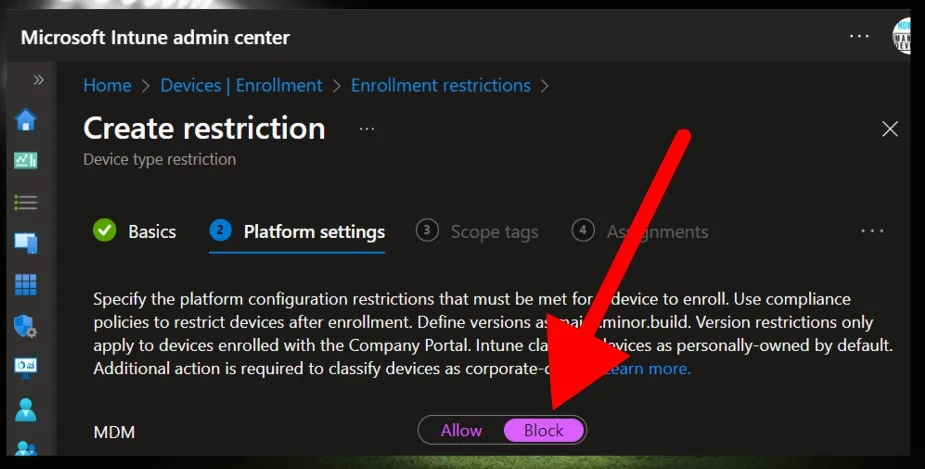
- Go to Devices > Enrollment Device Platform Restrictions.
- Select a device type restriction and select Properties. To edit the device restriction policy, click on Edit next to Platform Settings.
- Notice that the Windows MDM enrollment is “Blocked” under Platform Settings in the screenshot below. This is why a Windows device fails to enrol with Intune, resulting in error 80180014 during Autopilot.
- Enable the Windows MDM enrollment. Next, if you want to allow the enrollment of personally owned devices in Intune, set the Personally owned devices to ‘Allow.’ Select Review+Save.
- After making the above changes to the device restriction policy, wait for a few minutes. Restart the problematic device, and the Windows Autopilot process will be completed without error.
Need Further Assistance or Have Technical Questions?
Join the LinkedIn Page and Telegram group to get the latest step-by-step guides and news updates. Join our Meetup Page to participate in User group meetings. Also, Join the WhatsApp Community to get the latest news on Microsoft Technologies. We are there on Reddit as well.
Resources
Author
Anoop C Nair has been Microsoft MVP from 2015 onwards for 10 consecutive years! He is a Workplace Solution Architect with more than 22+ years of experience in Workplace technologies. He is also a Blogger, Speaker, and leader of the Local User Group Community. His primary focus is on Device Management technologies like SCCM and Intune. He writes about technologies like Intune, SCCM, Windows, Cloud PC, Windows, Entra, Microsoft Security, Career, etc.


Discussion