






New Enrollment Policies Experience for iOS iPadOS ADE in Microsoft Intune
Let’s discuss the new enrollment policies for iOS iPadOS ADE. Microsoft recently Introduced New enrollment policies for ADE (Automated Device Enrollment) for the iOS/iPadOS. With this, Microsoft aims to improve the environment and security.
You know Automated Device Enrollment, also known as Apple device enrollment. ADE always focuses on the lack of manual enrollment for many iOS/iPadOS devices. So, the devices are purchased from Apple, preconfigured with your settings, and can be sent directly to users or schools.
The new experience for iOS/iPadOS ADE is practical and helpful for administrators because it reduces the effort required to enroll devices. Whether you need to enrol in a few devices or a large number, this option supports bulk enrollment.
This new experience provides enhanced control over devices and allows devices to be associated with a single user, ensuring personalized settings and policies. This post briefly overviews the new enrollment policies experience for iOS/iPadOS ADE.

What is Automated Device Enrollment?
New Enrollment Policies Experience for iOS iPadOS ADE in Microsoft Intune
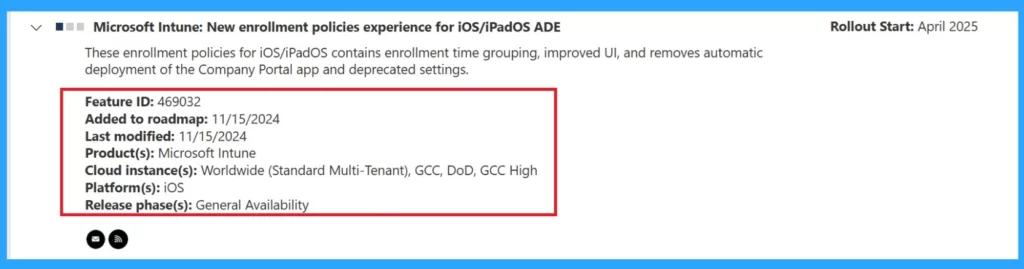
Above, we discussed an overall view of the experience with new enrollment policies for iOS/iPadOS ADE. You know these recent updates are coming into the Roadmap. According to the Roadmap, These enrollment policies for iOS/iPadOS contain enrollment time grouping, improved UI, and removal of automatic deployment of the Company Portal app and deprecated settings.
- This will roll out in April 2025.
| Features of New enrollment policies experience for iOS/iPadOS ADE | Info |
|---|---|
| Feature ID | 469032 |
| Added to roadmap | 11/15/2024 |
| Last modified | 11/15/2024 |
| Product(s) | Microsoft Intune |
| Cloud instance(s) | Worldwide (Standard Multi-Tenant), GCC, DoD, GCC High |
| Platform(s) | iOS |
| Release phase(s) | General Availability |
- Renew Automated Device Enrollment Apple ADE Tokens in Intune
- Enroll iOS/iPadOS Devices In Intune Step By Step Guide
- MS Intune Stop Supporting User Enrollment with Company Portal for iOS iPadOS
When to Use This Enrollment Option
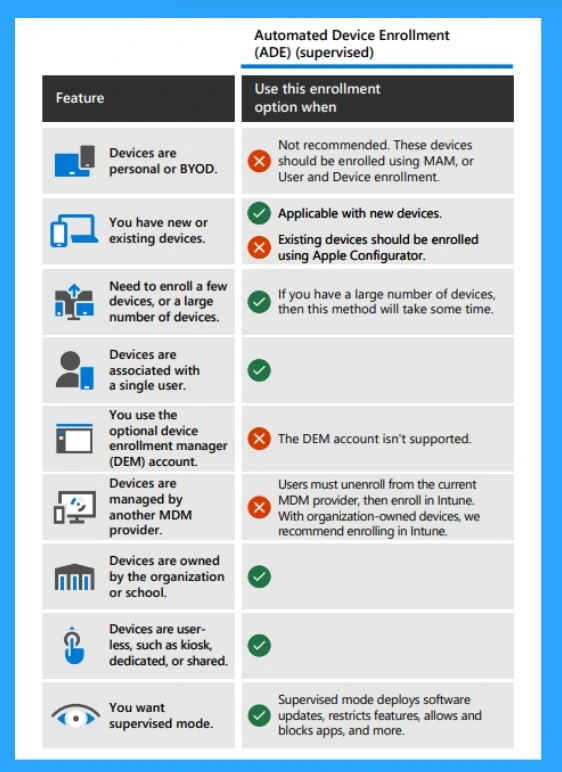
We must understand when to use Automated Device Enrollment. According to MS, this option can be used when you want devices to be in supervised mode. This allows the deployment of software updates, restriction of features, and allowing and blocking of apps. Other Recommendations are given in the list.
- You have new or existing devices – Applicable with new devices.
- You need to enrol a few or many devices– If you have many devices, this method will take some time.
- Devices are associated with a single user – Are recommended
- The organization or school owns devices– are recommended
- Supervised Mode– Supervised mode deploys software updates, restricts features, allows and blocks apps, and more.
Need Further Assistance or Have Technical Questions?
Join the LinkedIn Page and Telegram group to get the latest step-by-step guides and news updates. Join our Meetup Page to participate in User group meetings. Also, Join the WhatsApp Community to get the latest news on Microsoft Technologies. We are there on Reddit as well.
Author
Anoop C Nair has been Microsoft MVP from 2015 onwards for 10 consecutive years! He is a Workplace Solution Architect with more than 22+ years of experience in Workplace technologies. He is also a Blogger, Speaker, and Local User Group Community leader. His primary focus is on Device Management technologies like SCCM and Intune. He writes about technologies like Intune, SCCM, Windows, Cloud PC, Windows, Entra, Microsoft Security, Career, etc.


Discussion