






Microsoft 365 Copilot Oversharing Blueprint 3 Phases Shared on Ignite 2024
Let’s discuss Microsoft 365 Copilot Oversharing Blueprint 3 Phases Shared on Ignite 2024. Microsoft shared a new feature on Ignite 2024 called Copilot Oversharing Blueprint. Have you heard about Copilot Oversharing Blue Print?
The Copilot Oversharing Blueprint is a framework designed to address concerns about data oversharing when using Microsoft 365 Copilot. This blueprint outlines strategies and tools to ensure that sensitive information is protected and that only relevant data is accessible by Copilot.
Copilot in Microsoft 365 works with different Microsoft services to help you get your data ready for Copilot. For Copilot administrators, it can be overwhelming to know where to start. Existing administrators can also be unfamiliar with how some features can enhance their data security.
You can use a deployment blueprint to address the need for shorter, actionable, and prescriptive guidance. In this blueprint, Microsoft recommends an approach to addressing internal oversharing concerns throughout a Microsoft 365 Copilot deployment.

Table of Contents

Microsoft 365 Copilot Oversharing Blueprint 3 Phases Shared on Ignite 2024
Some components are in Copilot’s Oversharing Blue Print. This blueprint includes new SharePoint Advanced Management and Microsoft Purview capabilities to help organizations address internal oversharing concerns.
| Components of Oversharing Blueprint |
|---|
| SharePoint Advanced Management |
| Microsoft Purview |
| Restricted Content Discovery (RCD) |
| Restricted Access Control (RAC) |
- Microsoft Announces Major Microsoft 365 Pricing And Packaging Changes Coming In Mid-2026
- New Copilot Actions to Customize Your Template Settings to Automate Everyday Tasks
- Top 5 Windows 11 Security Features Microsoft Announced for During Ignite 2024
- Top 4 Security Copilot Use Cases and Prompts for Entra Shared by Microsoft
3 Phases of Copilot Oversharing Blueprint
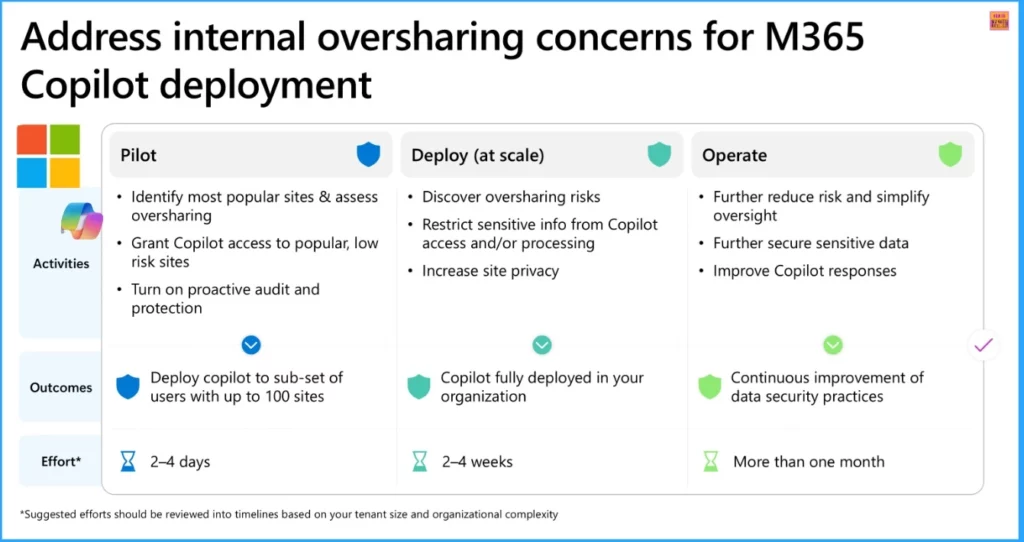
As I mentioned above, this oversharing Blueprint has three faces. The Blueprint phases provide an overview of the most common causes of internal oversharing in Microsoft SharePoint. The following list shows the three Phases.
- Pilot
- Deploy
- Operate
Pilot
The pilot is the initial stage of blueprint deployment. It provides steps for customers to enable a Microsoft 365 Copilot pilot quickly. You can create reports to identify the most frequently used and potentially overshared sites at this stage.
Based on these insights, you decide whether to allow or restrict SharePoint sites from being accessed and searched by Copilot during testing. The primary goal is to begin the Copilot deployment with a limited group of users and then expand iteratively based on the generated reports and learnings.
Deploy
Deploy is the second stage in Blueprint deployment. Deploy at scale helps customers fully deploy Copilot across the entire organization. The Phase stage focuses on identifying oversharing risks and restricting Copilot’s access to and processing of sensitive information.
Overall, data security posture is improved by ensuring organizational controls are set to avoid unintentional oversharing and to increase visibility into potential security gaps in this stage.
Operate
Operate is the third and final stage of blueprint deployment. This stage aims to mitigate risks and streamline oversight by regularly generating oversharing reports and implementing corrective actions. This stage Enhances the security of sensitive data through automatic labelling. It also improves Copilot responses by reducing data volume and minimizing the potential for oversharing.
Need Further Assistance or Have Technical Questions?
Join the LinkedIn Page and Telegram group to get the latest step-by-step guides and news updates. Join our Meetup Page to participate in User group meetings. Also, Join the WhatsApp Community to get the latest news on Microsoft Technologies. We are there on Reddit as well.
Resources
How to get your data ready for Microsoft 365 Copilot
Author
Anoop C Nair has been Microsoft MVP from 2015 onwards for 10 consecutive years! He is a Workplace Solution Architect with more than 22+ years of experience in Workplace technologies. He is also a Blogger, Speaker, and Local User Group Community leader. His primary focus is on Device Management technologies like SCCM and Intune. He writes about technologies like Intune, SCCM, Windows, Cloud PC, Windows, Entra,




Discussion