






Enhanced Application Security with Copilot and Endpoint Privilege Management
Let’s discuss Enhanced Application Security with Copilot and Endpoint Privilege Management (EPM). This powerful solution helps protect organizations using Microsoft Intune’s EPM, Copilot AI, and Microsoft Defender Threat Intelligence.
Copilot and EPM help keep your applications secure, ensuring users can work efficiently while minimizing the risk of cyberattacks. Microsoft has enhanced EPM by integrating Microsoft Defender Threat Intelligence and Copilot AI capabilities, creating a powerful solution that detects vulnerabilities, evaluates risks, and proactively stops attacks.
Endpoint Privilege Management (EPM), a feature within Microsoft Intune, enables organizations to manage user privileges effectively while adhering to the Zero Trust security model. This approach minimizes risks by granting users the least privilege required for their tasks, ensuring productivity without compromising security.
This post will teach you about Enhanced Application Security with Copilot and Endpoint Privilege Management (EPM). This solution helps protect your organization’s devices and applications using Microsoft Intune’s EPM, Copilot AI, and Microsoft Defender Threat Intelligence.

Table of Contents
Enhanced Application Security with Copilot and Endpoint Privilege Management
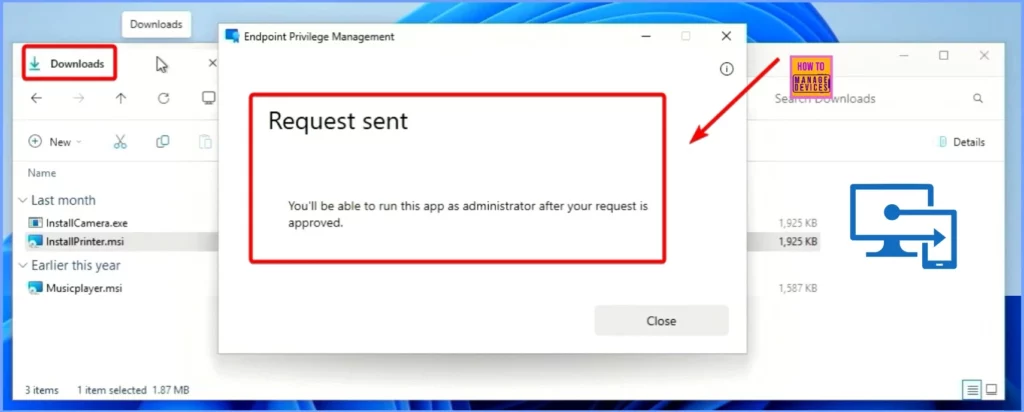
The user, who works from home, wants to install a printer driver and needs elevated permissions. They submit a request through the Support-Approved Workflow in Endpoint Privilege Management (EPM).
- How to Configure Support Approved EPM Elevation as Administrator using Intune Policy for Normal Users
- Intune EPM Support Approve Scenario Explained
- Easily Create New Intune EPM Rules directly from the Elevation Reports
Elevation Requests
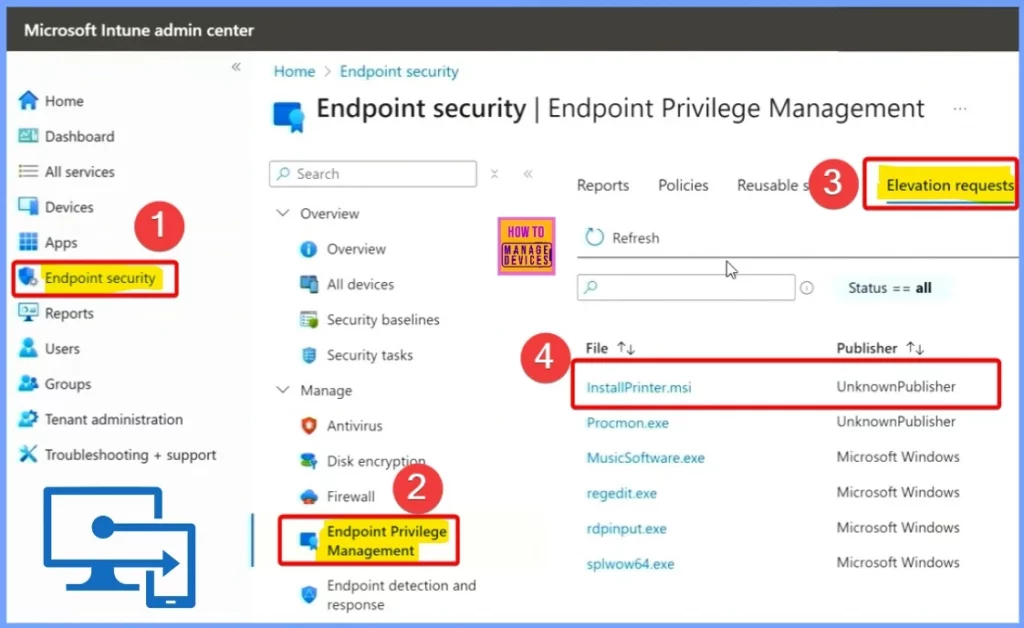
This request then appears on the administrator’s side. The administrator reviews the request and decides whether to approve or deny it based on its security and legitimacy. If approved, the user gets temporary elevated permissions to install the driver. The request is blocked if denied, and the user cannot install the driver.
- Go to the Microsoft Intune admin portal.
- Navigate through Endpoint Security> Endpoint Privilege Management > Elevation Requests.
- And then Click on the InstallPrinter.msi.
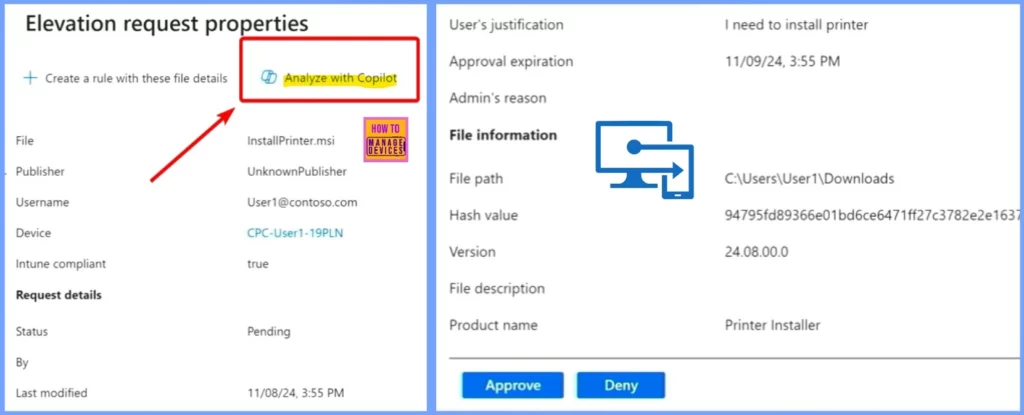
Elevation Request Properties
The Elevation request shows some details about the printer driver, but we can’t tell if it’s risky yet. We’ll use Copilot to analyze the information with Microsoft Defender Threat Intelligence to find out. This will help us check if the app has any vulnerabilities or security issues. Based on the analysis, we can decide whether to approve the request (if it’s safe) or deny it (if it’s risky).
| Elevation Request Properties | Details |
|---|---|
| File | InstallPrinter.msi |
| Publisher | UnknownPublisher |
| Username | User1@contoso.com |
| Device | CPC-User1-19PLN |
| Intune compliant | true |
| Status | Pending |
| Last Modified | 11/09/24, 3:55 PM |
| User’s justification | I need to install printer |
| Approval expiration | 11/09/24, 3:55 PM |
| File path | C:\Users\User1\Downloads |
| Hash value | 94795fd89366e01bd6ce6471ff27c3782e2e1637 |
| Version | 24.08.00.0 |
| Product name | Printer Installer |
- Easy Method to Hide Search on Windows 11 Taskbar Using Intune Policy Settings Catalog
- The Best Method to Enable Windows Passwordless Experience using Intune
Analyze with Copilot
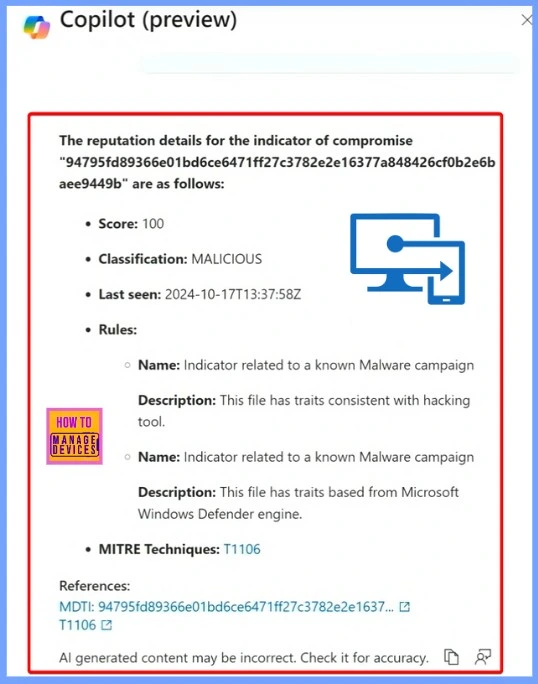
As we can see, this app is malicious, so it’s not safe to approve. It will go into the denial box. We are excited to bring this capability to life because it’s powerful. A customer was able to stop a nation-state attack using EPM and Microsoft Defender Threat Intelligence (MDTI). This shows how effective this system can be in protecting against serious threats.
| Analyze with Copilot | Details |
|---|---|
| Score | 100 |
| Classification | MALICIOUS |
| Last seen | 2024-10-17T13:37:58Z |
| Name | Indicator related to a known Malware campaign |
| Description | This file has traits consistent with hacking tool. |
| Name | Indicator related to a known Malware campaign |
| Description | This file has traits based on Microsoft Windows Defender engine. |
| MITRE Techniques | T1106 |
Need Further Assistance or Have Technical Questions?
Join the LinkedIn Page and Telegram group to get the latest step-by-step guides and news updates. Join our Meetup Page to participate in User group meetings. Also, Join the WhatsApp Community to get the latest news on Microsoft Technologies. We are there on Reddit as well.
Resources
Enhance IT expertise and efficiency with Copilot in Microsoft Intune
Author
Anoop C Nair has been Microsoft MVP from 2015 onwards for 10 consecutive years! He is a Workplace Solution Architect with more than 22+ years of experience in Workplace technologies. He is also a Blogger, Speaker, and Local User Group Community leader. His primary focus is on Device Management technologies like SCCM and Intune. He writes about technologies like Intune, SCCM, Windows, Cloud PC, Windows, Entra, Microsoft Security, Career, etc.


Discussion