






Windows Device Hardware Inventory in Microsoft Intune Coming in December
Hi all, today we are discussing a new topic: Windows Device Hardware Inventory in Microsoft Intune, which is Coming in December. As you all know, this month( November), the Ignite 2024 event has to be done. In this event, Mr. Lior_Bela has to make a significant announcement: enhanced device hardware inventory will be coming soon, in December 2024.
You know it’s essential to get detailed and accurate information about the hardware in an organization’s devices, which is crucial for effective IT management. As IT environments become more complex, organizations need effective tools to monitor and manage their hardware.
For this, Microsoft has introduced Enhanced Device Hardware Inventory for Windows devices in Microsoft Intune. This feature focuses on improving the type of hardware information that can be collected for Windows devices.
Enhanced device inventory for Windows devices provides detailed hardware information, helping organizations fix problems, make better business decisions, use resources wisely, and simplify IT tasks. This post briefly overviews the Enhanced Device hardware inventory for Windows devices.

Table of Contents
What is the Next Stage of Inventory for IT Professionals?
Windows Device Hardware Inventory in Microsoft Intune Coming in December
Above, we discussed the overall topic of Enhanced hardware inventory for Windows devices. Device hardware inventory is essential. IT professionals can gather and view more detailed hardware information for each device.
| Details on New Announcement | Info |
|---|---|
| Cross-platform inventory is coming. | Early Next Year |
| Enhanced Hardware Inventory | It is expected in December 2024 |

- Surface Management Portal in Intune a Simplified Device Management for IT Admins
- Enhancing Security with Administrator Protection in Windows 11 using Intune
- Troubleshoot Remote Desktop Issues in Intune | Finding Registry Value with Query using Copilot
How it Works
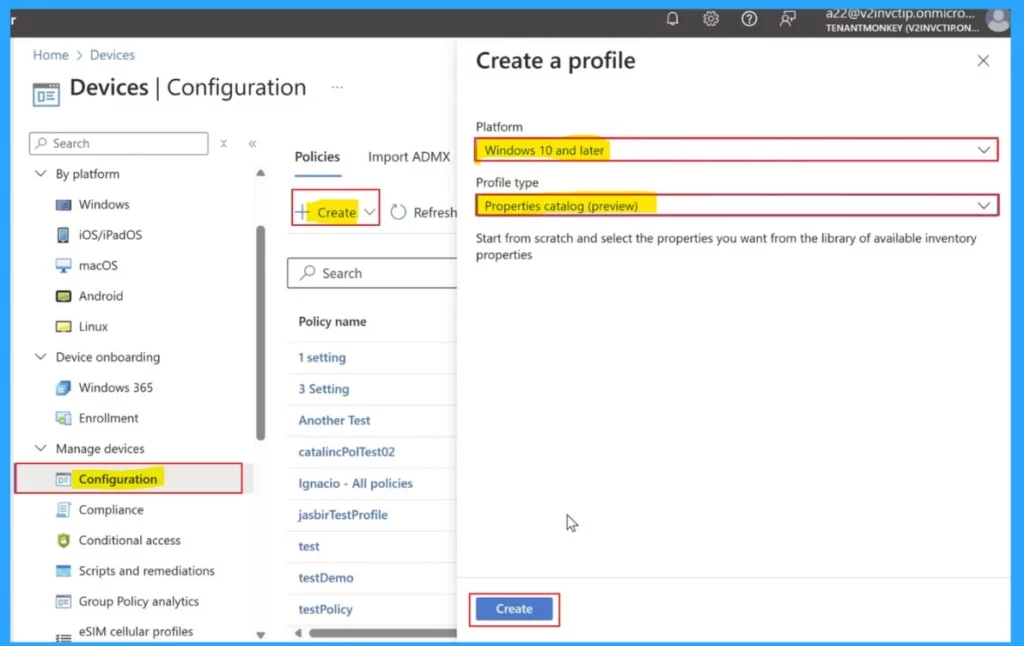
First, log into the Microsoft Intune Admin Centre, go to Device>Configuration> Create policy, select Windows 10 as the platform, and later, the profile type will be the properties catalog now in preview.
- For this, create a Properties catalogue profile policy.
- You have to specify the hardware details they wish to collect.
- You can assign the policy to specific device groups or all Windows devices.
The next important step is the properties picker. Here is a demo screenshot to see how property selectors are to be performed. Here, we can select the data type we want, like architecture, core count, and CPU status. You can click on the select option when you choose the properties picker.

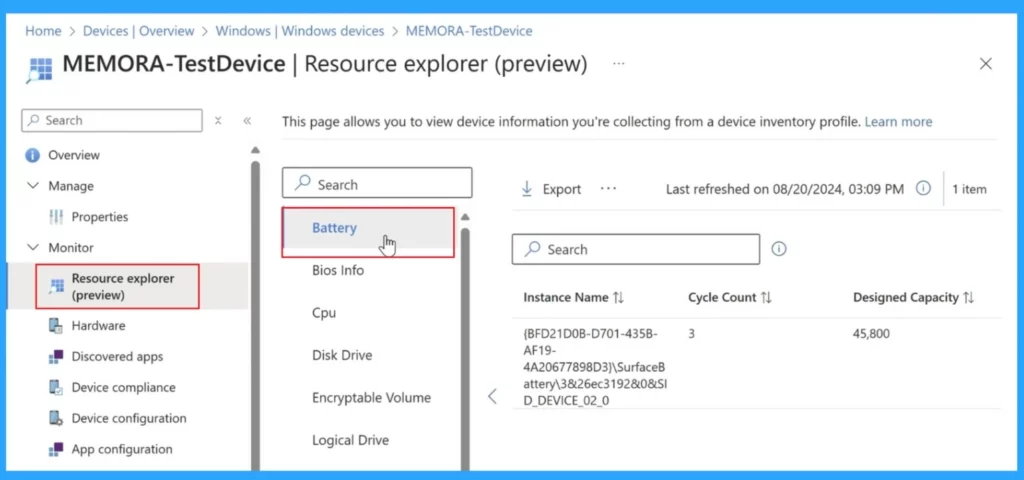
You can get 24 hours. All the device inventory data will be available in the Resource Explorer under the Monitor menu on each device’s details page. It uses device resources to minimize network traffic. The Resource Explorer is now in preview. Here, you will get complete information about the device.
- The screenshot below shows that the demonstration selects the battery section and will show the full information.
Future Plans– Cross-Platform Inventory
Microsoft also plans to extend the Enhanced inventory feature to macOS, iOS/iPadOS, and Android devices, which will be available early next year.
Need Further Assistance or Have Technical Questions?
Join the LinkedIn and Telegram group to get the latest step-by-step guides and news updates. Join our Meetup Page to participate in User group meetings. Also, Join the WhatsApp Community to get the latest news on Microsoft Technologies. We are there on Reddit as well.
Author
Anoop C Nair has been Microsoft MVP from 2015 onwards for 10 consecutive years! He is a Workplace Solution Architect with more than 22+ years of experience in Workplace technologies. He is also a Blogger, Speaker, and Local User Group Community leader. His primary focus is on Device Management technologies like SCCM and Intune. He writes about technologies like Intune, SCCM, Windows, Cloud PC, Windows, Entra, Microsoft Security, Career, etc.


Discussion