






ACME Protocol Support for macOS and Automated Device Enrollment in Intune
Today we are discussing on ACME Protocol Support for macOS and Automated Device Enrollment in Intune. As you all know, Microsoft Intune enhances its features with every update. In 2024, one of the most advanced changes is in the Automated Certificate Management Environment Protocol (ACME) Support for macOS and Automated Device Enrollment.
Microsoft Intune improved the security of certificates, so it is updating to support managed device attestation using the Automated Certificate Management Environment (ACME) protocol. The integration of ACME will be one of the most critical changes to the Apple device platform.
This update includes a gradual rollout of a new system for new enrollments that supports the ACME protocol. The Automated Certificate Management Environment protocol was created to make it easier to automatically get, renew, and manage digital certificates.
ACME protocol support for macOS device enrollment and Automated Device Enrollment in Intune significantly improves certificate management and device security. So in this briefly overview Automated Certificate Management Environment Protocol Support for macOS and ADE in Intune.

Table of Contents
What is the Automated Certificate Management Environment Protocol?
ACME Protocol Support for macOS and Automated Device Enrollment in Intune
Above we discussed an overall view on a topic of Automated Certificate Management Environment Protocol Support for macOS and ADE in Intune. This update enhances security and efficiency while preparing for managed device attestation.
- It enables organizations to manage macOS devices securely and effectively.
- ACME supports various Apple enrollment methods such as ADE (Apple device enrollment), Apple Configurator Enrollment and Automated device enrollment.
- Accelerate Microsoft Edge Performance By Enabling The QUIC Protocol Using Intune
- New Enrollment Policies Experience for iOS iPadOS ADE in Microsoft Intune
- Renew Automated Device Enrollment Apple ADE Tokens in Intune
- Enroll iOS/iPadOS Devices In Intune Step By Step Guide
ACME Protocol and Simple Certificate Enrollment Protocol
As we know that Microsoft Intune is used the Simple Certificate Enrollment Protocol (SCEP). This is used to enrolling and managingf the Certificates. In now Apple ddevices getting Automated Certificate Management Environment.This will helpful for protecting unauthorized certificate issuance.
- This new Changes allows strong validation and automated processes, reducing errors in certificate management.
| No | Supported OS Versions for ACME Enrollment |
|---|---|
| 1 | iOS 16.0 or later |
| 2 | iPadOS 16.1 or later |
| 3 | macOS 13.1 or later |
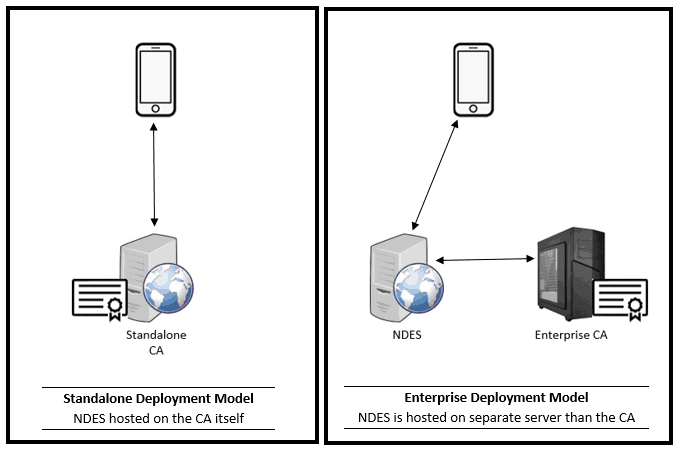
Know more about SCEP: Knowing SCEP – The General Workflow Intune PKI Made Easy With Joy – Part 2
Need Further Assistance or Have Technical Questions?
Join the LinkedIn Page and Telegram group to get the latest step-by-step guides and news updates. Join our Meetup Page to participate in User group meetings. Also, Join the WhatsApp Community to get the latest news on Microsoft Technologies. We are there on Reddit as well.
Author
Anoop C Nair has been Microsoft MVP from 2015 onwards for 10 consecutive years! He is a Workplace Solution Architect with more than 22+ years of experience in Workplace technologies. He is also a Blogger, Speaker, and Local User Group Community leader. His primary focus is on Device Management technologies like SCCM and Intune. He writes about technologies like Intune, SCCM, Windows, Cloud PC, Windows, Entra, Microsoft Security, Career, etc.


Discussion