






Outlook and Microsoft 365 Crashing on Windows Server 2016 or 2019 After Update to Version 2412
Outlook and Microsoft 365 Crashing on Windows Server 2016 or 2019 After Update to Version 2412! After updating to Version 2412 (Build 18324.20168), classic Outlook and Microsoft 365 apps might stop working and crash on Windows Server 2016 or 2019.
Users running Windows Server 2016 and 2019 have reported crashes in classic Outlook and Microsoft 365 applications after updating to Version 2412 (Build 18324.20168). This post provides all the details about the issue: Outlook and Microsoft 365 are crashing on Windows Server 2016 and 2019 after updating to Version 2412.
Windows Server 2016 and 2019 are Microsoft server operating systems. Windows Server 2016, released in September 2016, introduced enhanced security and improved virtualisation. Windows Server 2019, released in October 2018, builds on 2016 with added hybrid cloud support, better security, and improvements to the Windows Admin Center for easier management.
Outlook is an email client and personal information manager for managing emails, calendars, contacts, tasks, and appointments. Microsoft 365: Formerly known as Office 365, Microsoft 365 is a subscription-based service that provides access to a wide range of productivity applications and services.

Table of Contents
Outlook and Microsoft 365 Crashing on Windows Server 2016 or 2019
The issue causes the applications to stop functioning, with crashes logged in the Windows Event Viewer. Key error details include Event 1000 or Event 1001 entries, citing faults in the KERNELBASE.dll module.
Note – Sometimes, the “Faulting module name” and “Exception code” in the error details might differ.
Faulting application name: WINWORD.EXE, version: 16.0.18324.20168, time stamp: 0x677832b6
Faulting module name: KERNELBASE.dll, version: 10.0.14393.5850, time stamp: 0x64253b64
Exception code: 0xc06d007e
Fault offset: 0x000dcd42
Faulting process id: 0xb1b8
Faulting application start time: 0x01db655766958e10
Faulting application path: C:\Program Files (x86)\Microsoft Office\Root\Office16\WINWORD.EXE
Faulting module path: C:\Windows\System32\KERNELBASE.dll
- Fix Outlook Desktop Crashes Issue when sending Emails
- Fix Something Went Wrong 1001 Outlook Error Microsoft 365 Desktop Applications
- You can not connect Office 2016 and Office 2019 to Microsoft 365 services
Workaround Status
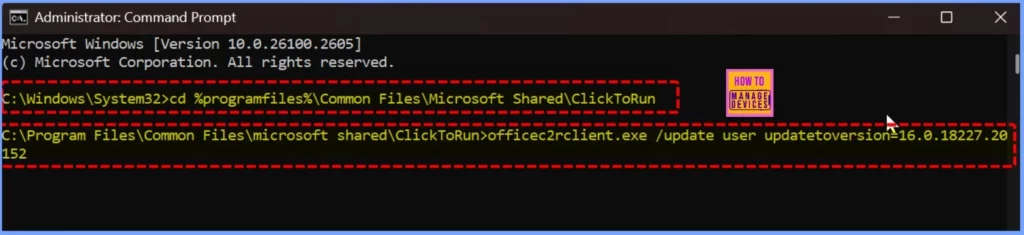
This issue is being tracked in the M365 Admin Center under MO978220. A workaround allows affected users to revert to the prior version to avoid crashes. The below list helps you to show the Workaround steps.
- Open a Command Prompt with Administrator privileges.
- Run the following commands, pressing Enter.
- cd %programfiles%\Common Files\Microsoft Shared\ClickToRun
- officec2rclient.exe /update user updatetoversion=16.0.18227.20152
- Disable automatic updates to prevent Office from updating back to the latest build
- Go to File > Office Account > Update Options > Disable Updates.
- Set a reminder for February 11th to re-enable updates or check back for a fix.
| Steps | Details |
|---|---|
| Track Issue | M365 Admin Center ID: MO978220 |
| Revert to Previous Version | Run commands in Command Prompt to downgrade to Version 2411 (Build 18227.20152). |
| Disable Updates | Prevent automatic updates via File > Office Account > Update Options > Disable Updates. |
| Recheck on Fix | Set a reminder for February 11th to re-enable updates or check for a solution to this issue. |
Need Further Assistance or Have Technical Questions?
Join the LinkedIn Page and Telegram group to get the latest step-by-step guides and news updates. Join our Meetup Page to participate in User group meetings. Also, Join the WhatsApp Community to get the latest news on Microsoft Technologies. We are there on Reddit as well.
Resources
Author
Anoop C Nair has been Microsoft MVP from 2015 onwards for 10 consecutive years! He is a Workplace Solution Architect with more than 22+ years of experience in Workplace technologies. He is also a Blogger, Speaker, and Local User Group Community leader. His primary focus is on Device Management technologies like SCCM and Intune. He writes about technologies like Intune, SCCM, Windows, Cloud PC, Windows, Entra, Microsoft Security, Career, etc.




Discussion