






Global Issue Impacting Outlook 2016 MSI Users in January 2025
Let’s discuss Global Issue Impacting Outlook 2016 MSI Users in January 2025. As you all know, every application can sometimes have errors or issues that can be resolved through detailed troubleshooting methods. I think you already facing this issue. In January 2025, a problem started affecting Outlook 2016 MSI users worldwide.
Starting January 25th, users observed that the sender’s name was not appearing in search results. This has made it difficult to quickly locate emails from specific senders. The sender’s name is crucial for determining the importance of each email, as it helps users identify urgent messages.
The issue with Outlook 2016 MSI not displaying the sender in search results is affecting user’s workflows. When this issue affects all users, it impacts their work and reduces the organization’s overall productivity. In such cases, Microsoft quickly addresses the issue with workarounds.
Additionally, they provide a temporary solution to resolve the problem, right? Microsoft released an update that fixed an Outlook 2016 MSI Not Displaying Sender in Search Results issue. So, in this post, we can look into the workaround for this issue provided by the MS.


Table of Contents
Outlook 2016 MSI Stopped Showing Sender in Search Results
Above we discussed about the issue with Outlook 2016 MSI not displaying the sender’s name, we noted that it is very difficult for users to identify an email without this information. Microsoft has not identified the exact cause of this issue, but they have recommended some workarounds to address it.
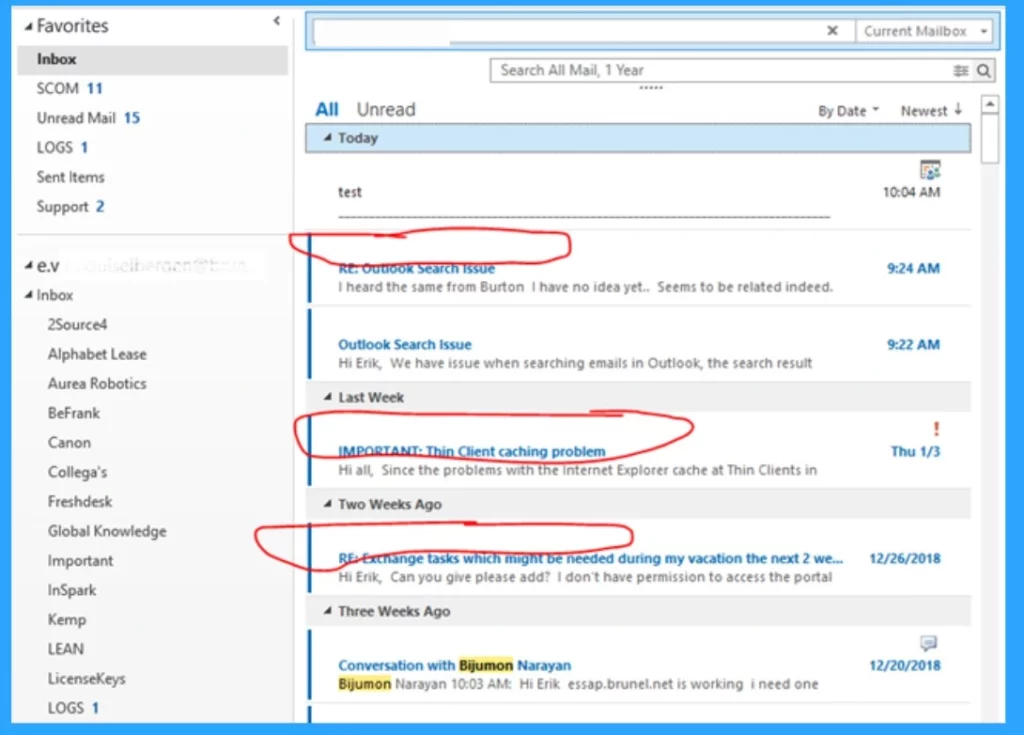
- In the screenshot below, you can see that the sender’s name is missing.
- Although the message content, times, and other information are visible, the absence of the sender’s name makes it challenging to understand who sent the email.
| Issues | Info |
|---|---|
| Classic Outlook Crashes on Reply and Forward After Updating to Version 2412 | In January 2025, Microsoft Outlook users experienced issues with Microsoft 365, as classic Outlook crashes occurred when replying or forwarding after updating to version 24.12. |
| Outlook 2016 MSI Not Displaying Sender in Search Results | Users experienced on January 25th on globally. |
- Outlook and Microsoft 365 Crashing on Windows Server 2016 or 2019 After Update to Version 2412
- Fix Outlook Desktop Crashes Issue when sending Emails
- Fix Something Went Wrong 1001 Outlook Error Microsoft 365 Desktop Applications
Workaround For the Issue
Microsoft announced a temporary workaround to address this issue. This workaround will help display the sender’s name in the search results. It uses the Windows Registry option for this workaround First, open the Windows Registry by using the Win+R, then type “regedit” and press Enter to open the Registry Editor. Then navigate through the below path.
Copy this: HKEY_CURRENT_USER\software\policies\Microsoft\office\16.0\outlook\search
- If the path does not exist in the Windows Registry, you may need to manually create the missing keys, such as search or outlook.
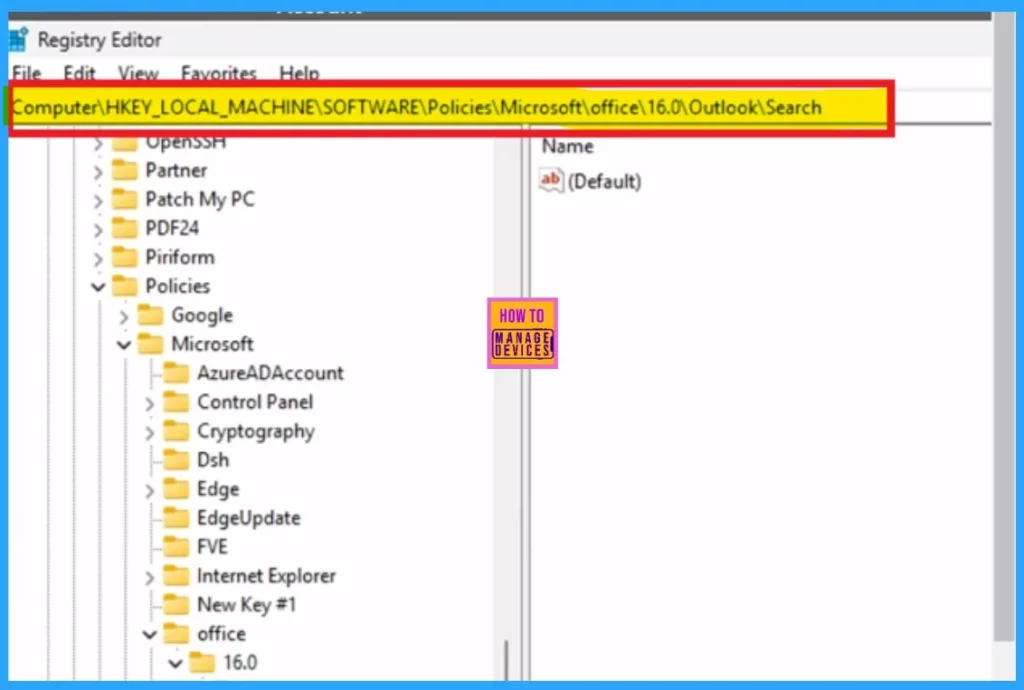
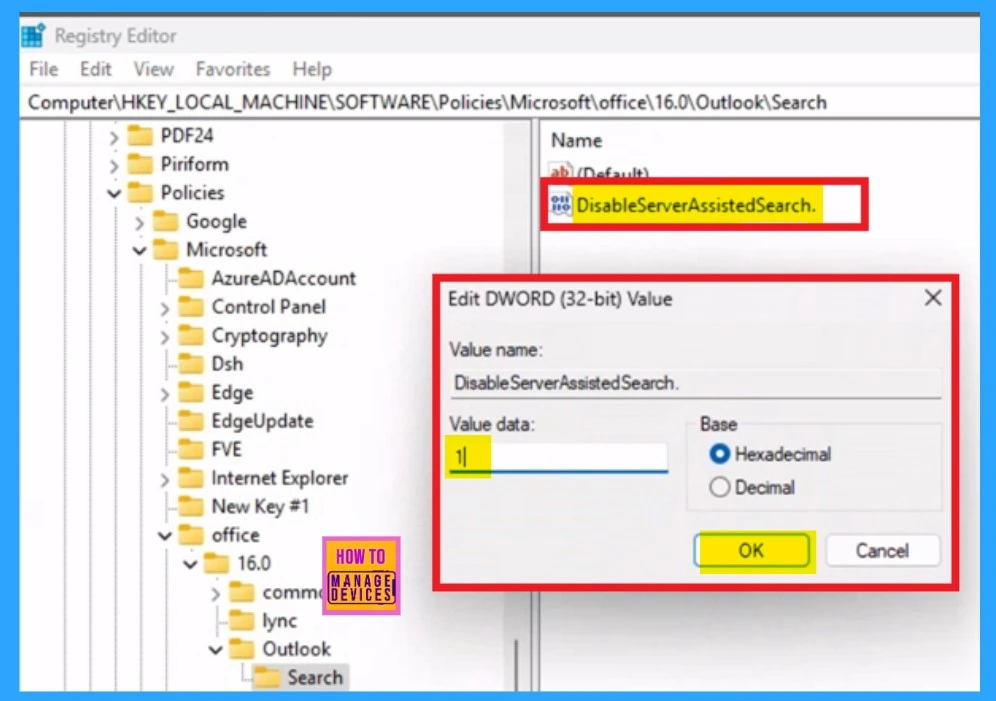
After making the necessary folders, you can create a new DWORD (32-bit) value. Right-click on the “search” key, choose “New” > “DWORD (32-bit) Value,” and name the newly created value “DisableServerAssistedSearch. After creating a new value called “DisableServerAssistedSearch,” double-click on that value.
- You will see an option to enter a value as “1” and click Ok.
- After that you can close registry and restart the Outlook.
Hope this Workaround will solve the Issue!
Need Further Assistance or Have Technical Questions?
Join the LinkedIn Page and Telegram group to get the latest step-by-step guides and news updates. Join our Meetup Page to participate in User group meetings. Also, Join the WhatsApp Community to get the latest news on Microsoft Technologies. We are there on Reddit as well.
Resource
Outlook 2016 MSI is not showing sender in search results
Author
Anoop C Nair has been Microsoft MVP for 10 consecutive years from 2015 onwards. He is a Workplace Solution Architect with more than 22+ years of experience in Workplace technologies. He is a Blogger, Speaker, and Local User Group Community leader. His primary focus is on Device Management technologies like SCCM and Intune. He writes about technologies like Intune, SCCM, Windows, Cloud PC, Windows, Entra, Microsoft Security, Career, etc.




Hello Arun,
I am Facing issue similar to this, where the Contacts Name are not appearing in the search box in Outlook Classic. Please let me know if you have a Solution to this