






Outlook for Mac Email Recall Tips for Resending and Fixing Email Errors
Hi, Let’s discuss Outlook for Mac Email Recall tips for resending and fixing Email errors. Microsoft announced that Recall, one of the most requested features from Outlook’s feedback portal, is now available to more users.
After hitting the Send button on an email, we have all experienced that moment of regret when we quickly realized a mistake was made, whether it was forgetting an attachment, sending it to the incorrect recipient, or spotting a significant typo.
Outlook for Mac now offers the ability to recall emails, a feature many appreciate in Outlook for Windows and Outlook for the Web. Outlook’s Recall feature lets you withdraw an email sent, a vital capability in professional environments where incorrect information can cause confusion or damage trust.
Email recall in Outlook for Mac, Windows, and the web requires both sender and recipient to use Microsoft 365 or Microsoft Exchange accounts within the same organization. In this blog post, I will explain how this feature works, where it is available, and more.

Table of Contents
What is Microsoft Outlook?
Microsoft Outlook, primarily used for sending and receiving emails, offers numerous features and is widely used for business communication. It includes a webmail interface with mail, calendaring, contacts, and task services.
Outlook for Mac Email Recall
Microsoft Outlook, part of the Microsoft 365 suite, is a personal information manager primarily used as a business email client. It also offers calendaring, task management, contact management, note-taking, journaling, web browsing, and RSS feed aggregation.
Using the Microsoft Outlook app or Outlook.com, you can recall or replace an email you sent. However, you and your recipients must be part of the same organization using Microsoft Exchange or Microsoft 365.
- Intune Remote Assistance for MacOS Devices
- New Device Restriction Settings Available in macOS
- SCCM Mac Management – How To Take A Decision In 10 Minutes
- Configure Recall Snapshot Storage to Optimize Device Performance using Intune
Steps to Outlook for Mac Email Recall
To correct an error in a sent message, find the email you wish to recall in the Sent Items folder. To initiate Recall, right-click on the message. Select Recall from the context menu. You can also select Recall in the triage toolbar.
| Delete Unread Copies of this Message | Delete Unread Copies and Replace with a New Message |
|---|---|
| This will attempt to remove the email from the recipients’ inboxes if they haven’t opened it yet. | This allows you to edit the original email or create a new one to send in its place. |
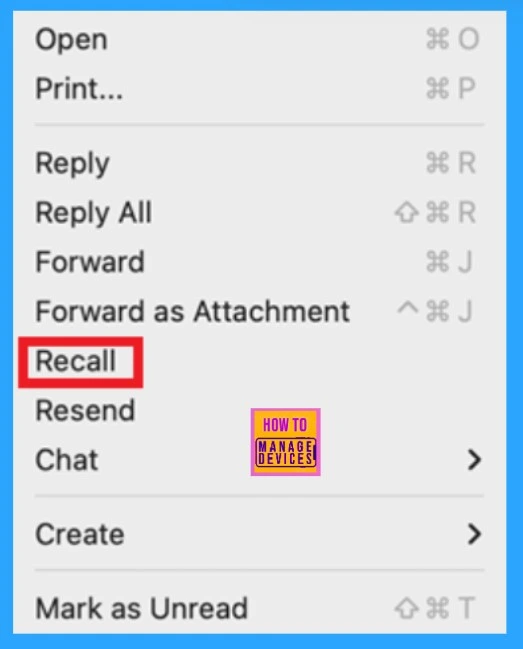
To resend a recalled email, right-click and select Resend. However, recalling very old emails usually doesn’t work. If the recall fails, send a follow-up email to clarify the mistakes. This follow-up should fix the mistake in the original message, whether it was a misspelling, a missing recipient, or something else.
Note: You will receive a status email about whether the recall was successful or not.
- You could say, “I apologize for misspelling your name, [correct spelling]. Let me know if you have questions.” Or, “Sorry for missing [recipient] in my last email – they are now added!”
Availability – Outlook for Mac Email Recall
This feature will be available to Beta Channel users using Version 16.94 (Build 25011325) or later, and it is scheduled to roll out to Current Channel (Preview) users in February 2025.

Resources
Need Further Assistance or Have Technical Questions?
Join the LinkedIn Page and Telegram group to get the latest step-by-step guides and news updates. Join our Meetup Page to participate in User group meetings. Also, Join the WhatsApp Community to get the latest news on Microsoft Technologies. We are there on Reddit as well.
Author
Anoop C Nair has been Microsoft MVP for 10 consecutive years from 2015 onwards. He is a Workplace Solution Architect with more than 22+ years of experience in Workplace technologies. He is a Blogger, Speaker, and Local User Group Community leader. His primary focus is on Device Management technologies like SCCM and Intune. He writes about technologies like Intune, SCCM, Windows, Cloud PC, Windows, Entra, Microsoft Security, Career, etc.




Discussion