






Best Method to Update Box Drive using Intune Enterprise App Catalog App
Let’s discuss the best method to Update Box Drive using Intune Enterprise App Catalog App. Using the Intune Enterprise App Catalog makes it simple to update Box Drive on all your devices. It automatically pushes updates to keep everyone current and secure, saving you time and manual effort.
Box Drive lets you easily access your Box files from your desktop. Whether you’re using Microsoft Office 365, Adobe, or Apple iWork, you can create and work on documents together in real time. Plus, Box keeps your files safe all the way.
Our blog post explains how to use 7-Zip updates with the Enterprise App Catalog in Microsoft Intune. With Intune Enterprise App Management, you can easily find, install, and manage the latest versions of apps, including both Microsoft and non-Microsoft programs, all in one place.
Enterprise App Management now lets you update Enterprise App Catalog apps using a simple wizard. You can add new applications and upgrade existing ones through supersedence. This feature is available as an Intune add-on, either with Intune Suite or as a standalone option, and is offered on a trial and pay-as-you-go basis.


Table of Contents
Update Box Drive using Intune Enterprise App Catalog App
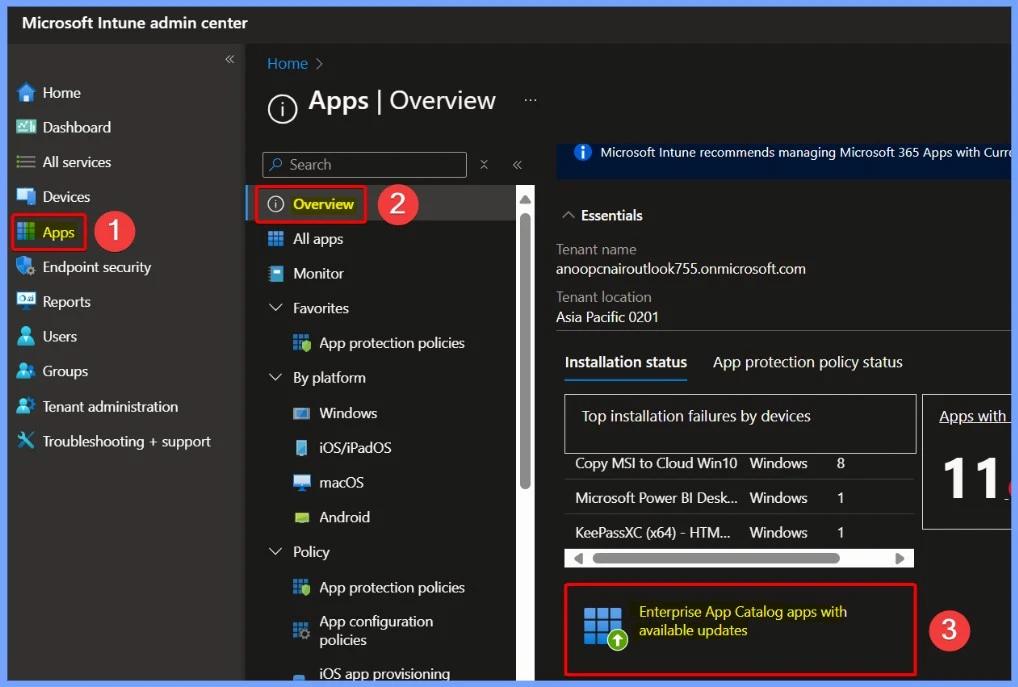
The enterprise app catalog app includes both Microsoft and non-Microsoft Win32 applications that have been pre-packaged and hosted by Microsoft. To manage updates, sign in to the Microsoft Intune Admin Center with your administrator credentials.
- Navigate to Apps > Overview and click on Enterprise App Catalog apps with available updates.
- Intune Win32 App Supersedence and Auto App Update Explained
- Install Box Drive with Intune Enterprise App Catalog App
- New Update Button is Available for Intune Enterprise Application Management to Update Catalog Apps
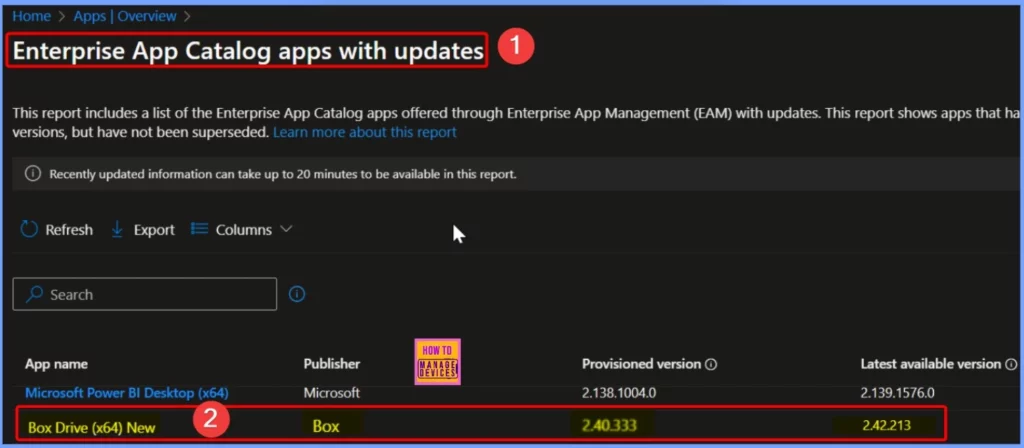
Enterprise App Catalog Apps with Updates
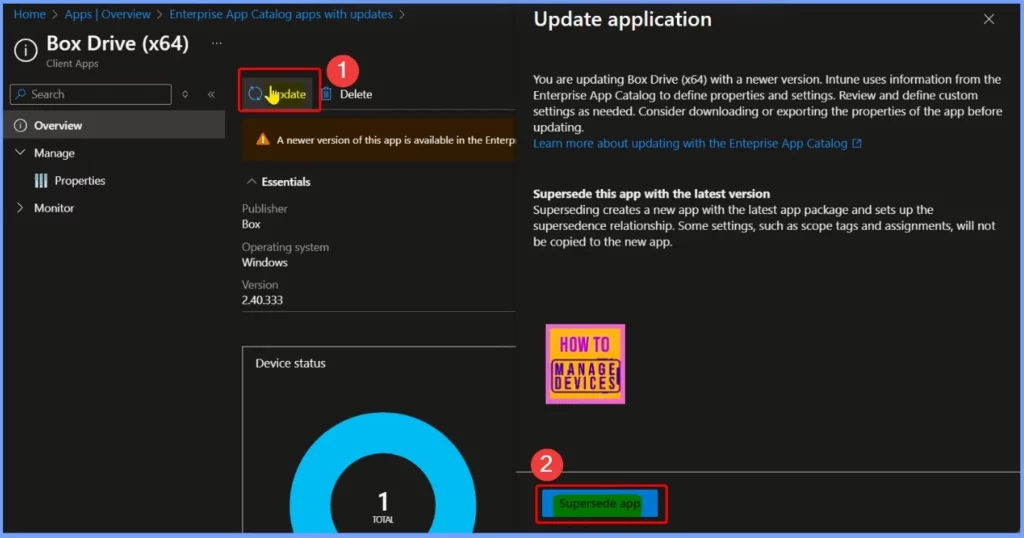
When updating Box Drive (x64) to a newer version, Intune uses the Enterprise App Catalog to define app settings. Before updating, you can review and customize the settings, and it’s a good idea to export the app’s properties. Superseding the app replaces the old version with the latest one, but some settings, like scope tags and assignments, won’t be copied to the new app.
Supersede App
In the main pane for Enterprise App Catalog apps with updates, select Box Drive (x64). You’ll notice that your current provisioned version is 2.40.333, while the latest available version is 2.42.213. The below screenshot provides more details.
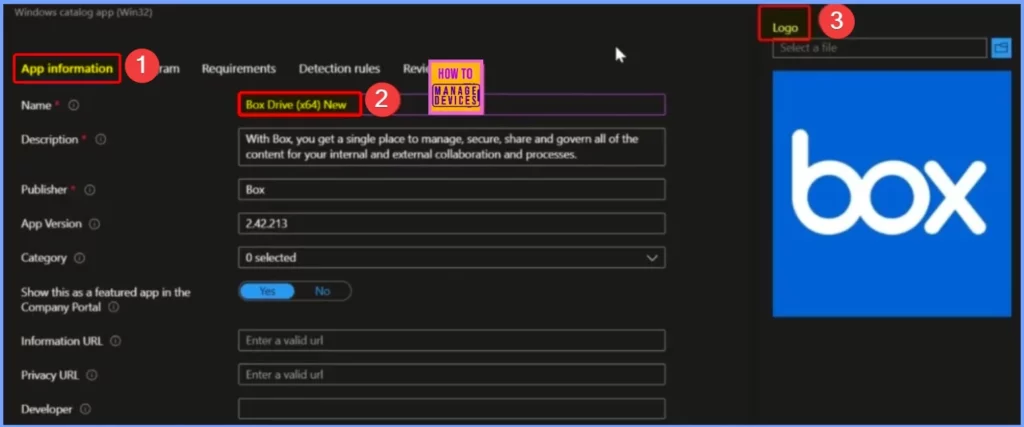
Box Drive x64 Version 2.42.213
The App Information settings page provides key details about the application, including its name, description, publisher, and version. Additionally, ensure that the “Show this as a featured app in the company portal” option is set to Yes for better visibility. A relevant Box Drive logo has also been added to enhance the app’s presentation.
Install and Uninstall Command
The Program settings define how Box Drive is installed and removed. The install command used is”%SystemRoot%\System32\msiexec.exe” /i “BoxDrive.msi” /qn”, while the uninstall command is
“%SystemRoot%\System32\msiexec.exe” /X {9ACD1AAB-DCE9-480D-A7A4-547 … v”.
- The installation process takes approximately 60 minutes, and the option to allow available uninstall is set to Yes for user flexibility.
- Allow available uninstall to Yes
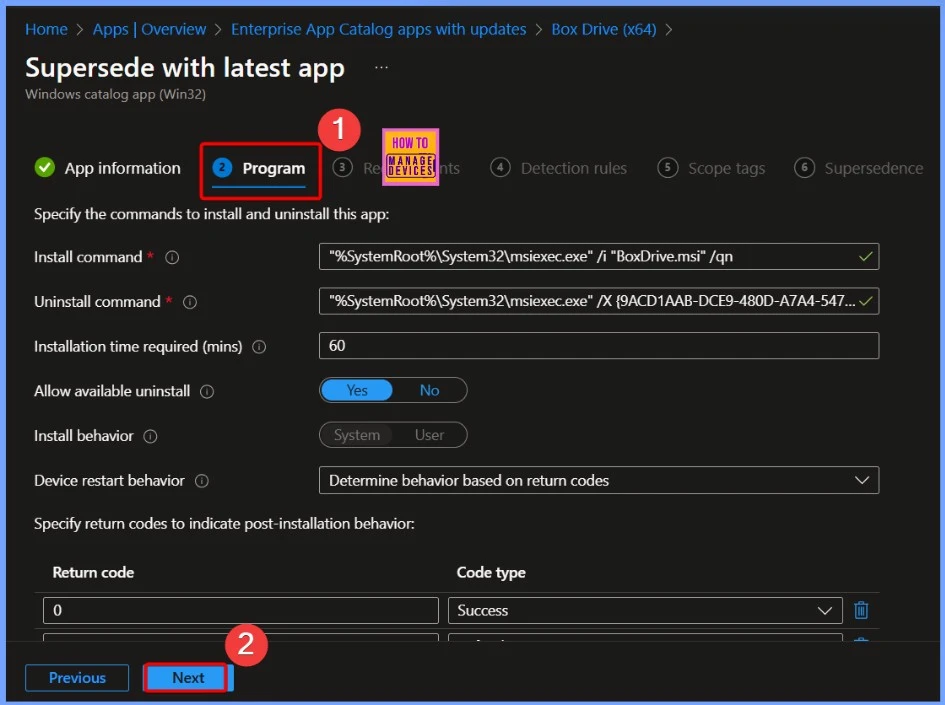
Supersede with Latest App
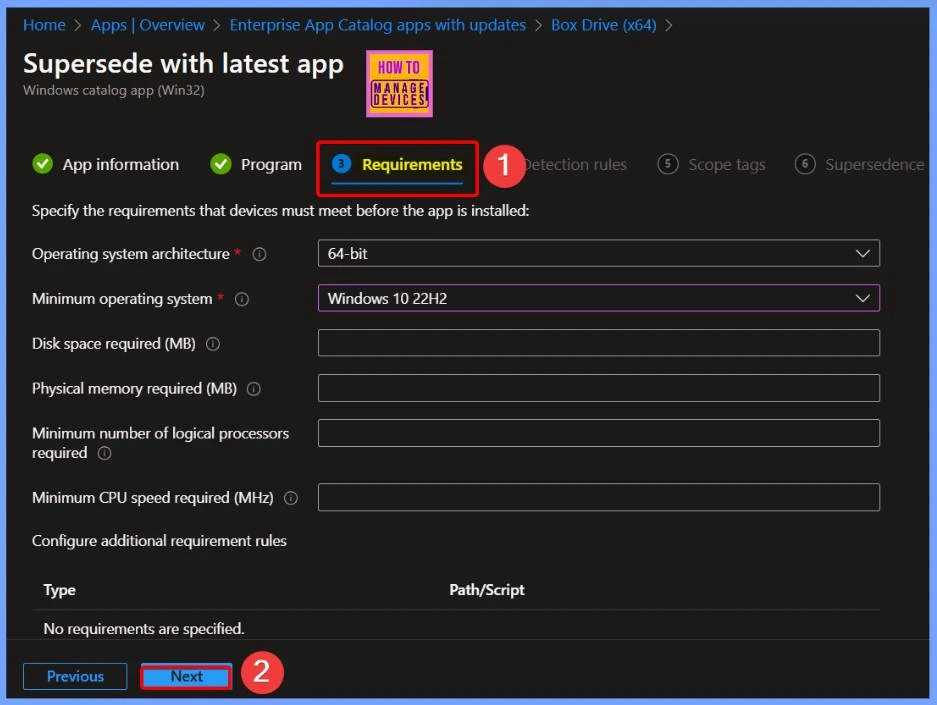
The next page displays the App Requirements, where details like the Operating System Architecture and Minimum Operating System are already prefilled. The other fields are optional, allowing you to customize them as needed. Once done, click Next to proceed.
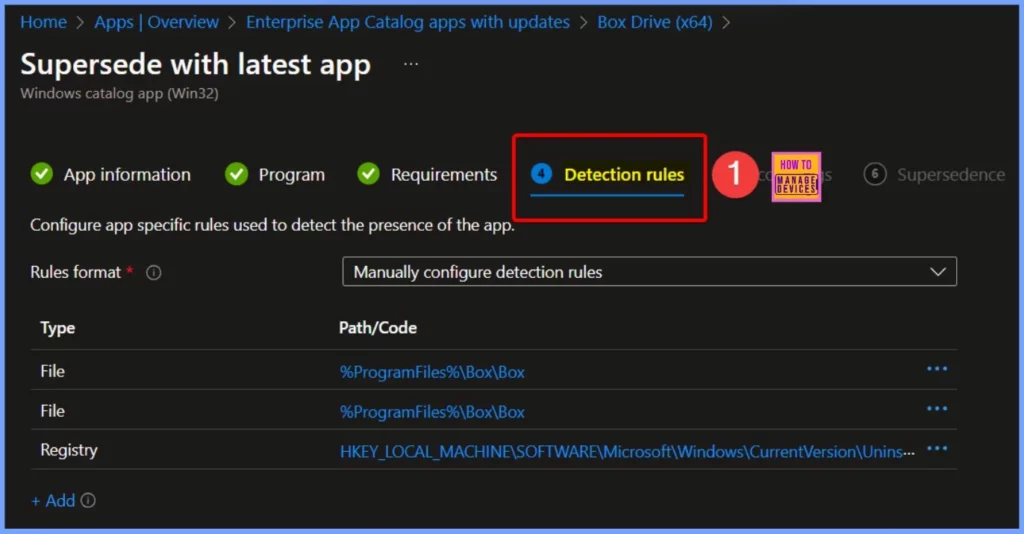
Detection Rules
The Detection Rules section helps verify if the app is installed. It includes file-based and registry-based detection methods. The specified file paths are %ProgramFiles%\Box\Box, and the registry path is shown in the screenshot below.
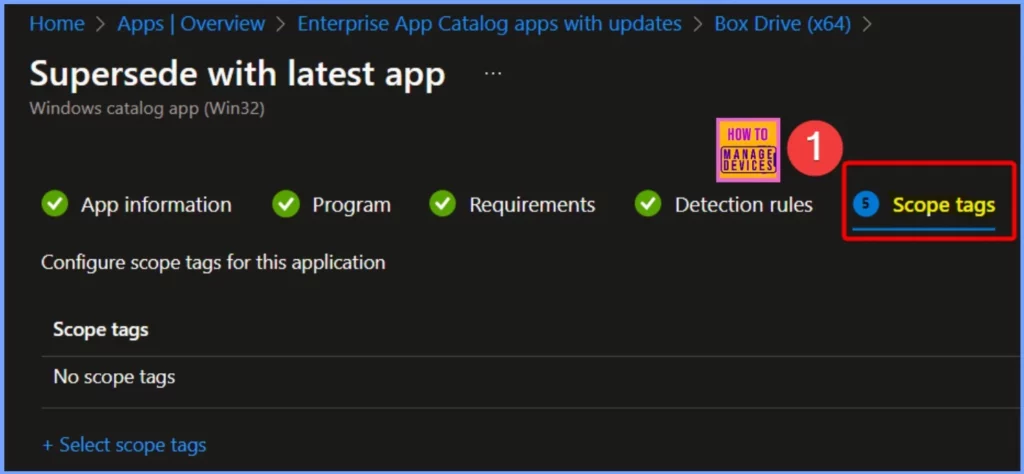
Scope Tags
Scope Tags in Intune help organize and control access to apps and policies within your organization. They allow you to assign specific apps, settings, or configurations to different groups based on roles or departments.
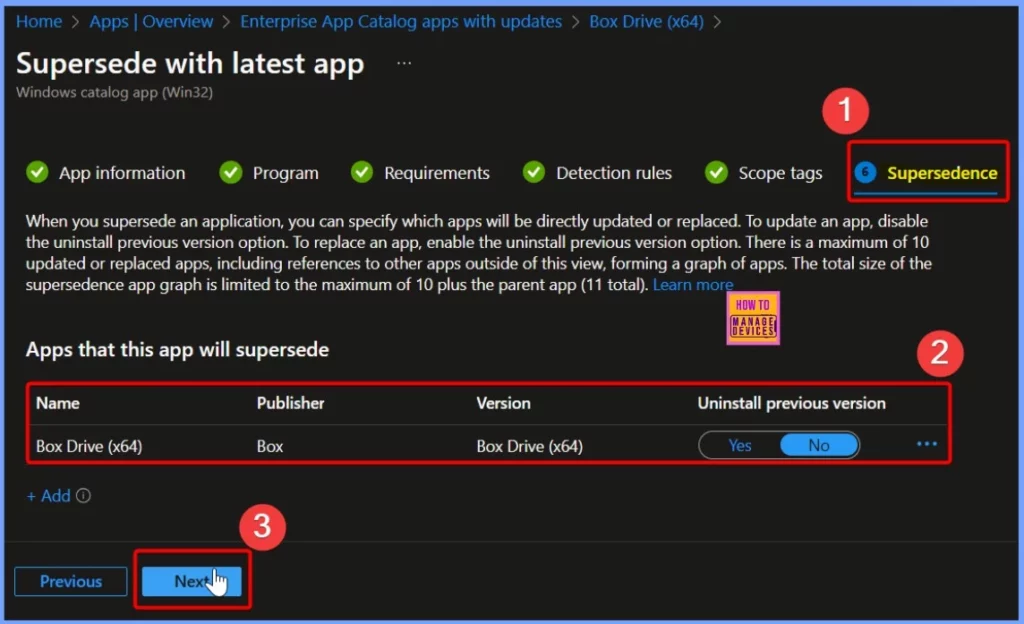
Uninstall Previous Version
When you supersede an application, you can specify which apps will be directly updated or replaced. To update an app, disable the uninstall previous version option. To replace an app, enable the uninstall previous version option.
There is a maximum of 10 updated or replaced apps, indluding references to other apps outside of this view, forming a graph of apps. The total size of the supersedence app graph is limited to the maximum of 10 plus the parent app (11 total).
| Name | Publisher | Version | Uninstall Previous Version |
|---|---|---|---|
| Box Drive (x64) | Box | Box Drive (x64) | No |
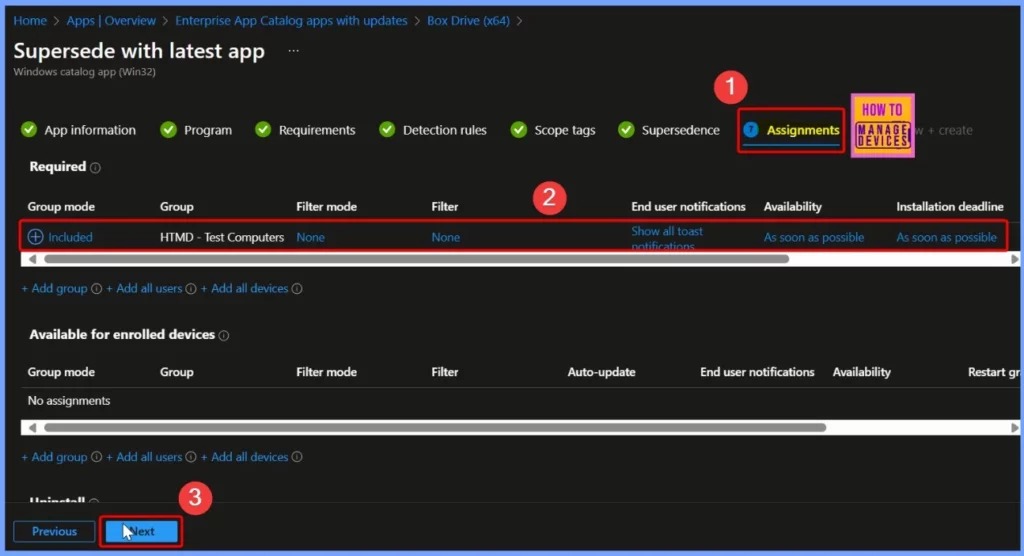
Assignments
To assign the Box Drive (x64) Update using the Enterprise App Catalog, select a device group. In this case, I chose HTMD – Test Computers. To proceed, click +Add group under the Required Group Assignment section.
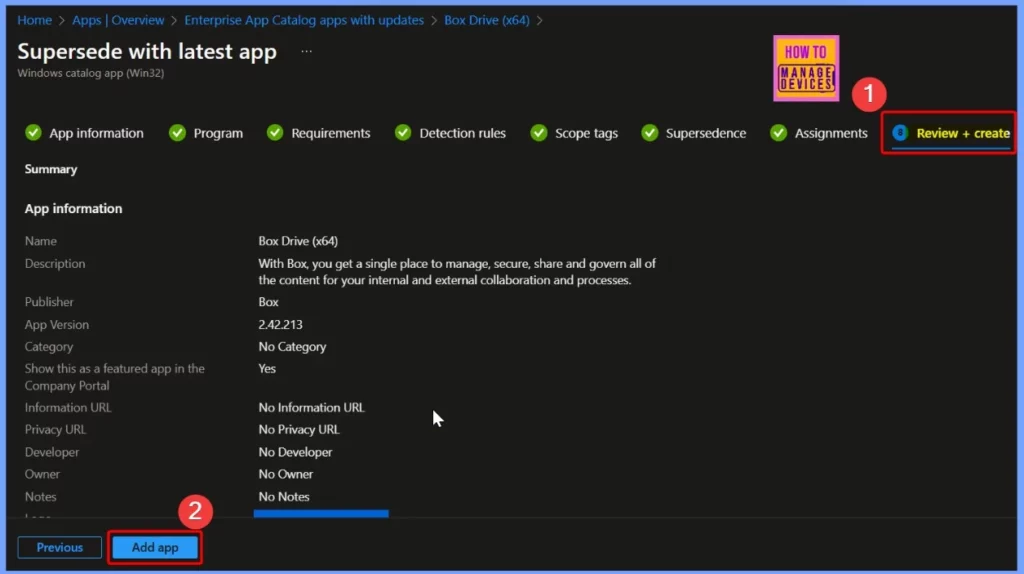
Review + Create Tab
The Review + Create tab is the final step before deploying the app. Here, you can review all the settings, including app details, requirements, detection rules, and assignments. If everything looks correct, click Create to finalize and deploy the Box Drive (x64) Update using the Enterprise App Catalog.
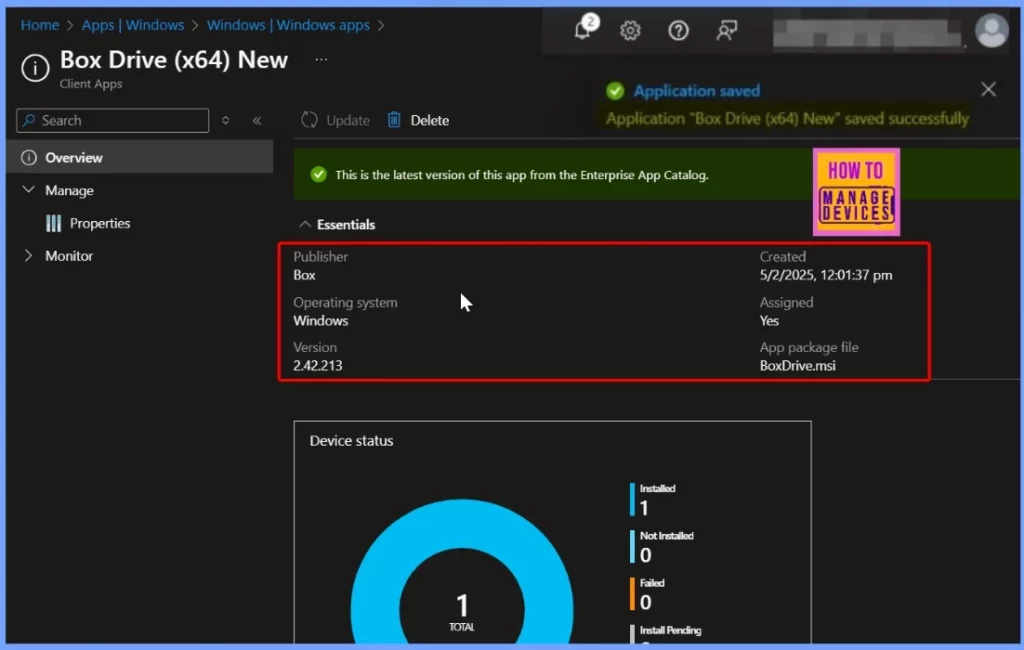
Monitoring Status
Go to Apps > Windows and search for Box Drive (x64) Version 2.42.213 in the Enterprise App Catalog. Click on the app to view the deployment status for both the device and user under the Overview pane. At the top, you’ll see a message saying, “This is the latest version of this app from the Enterprise App Catalog.”
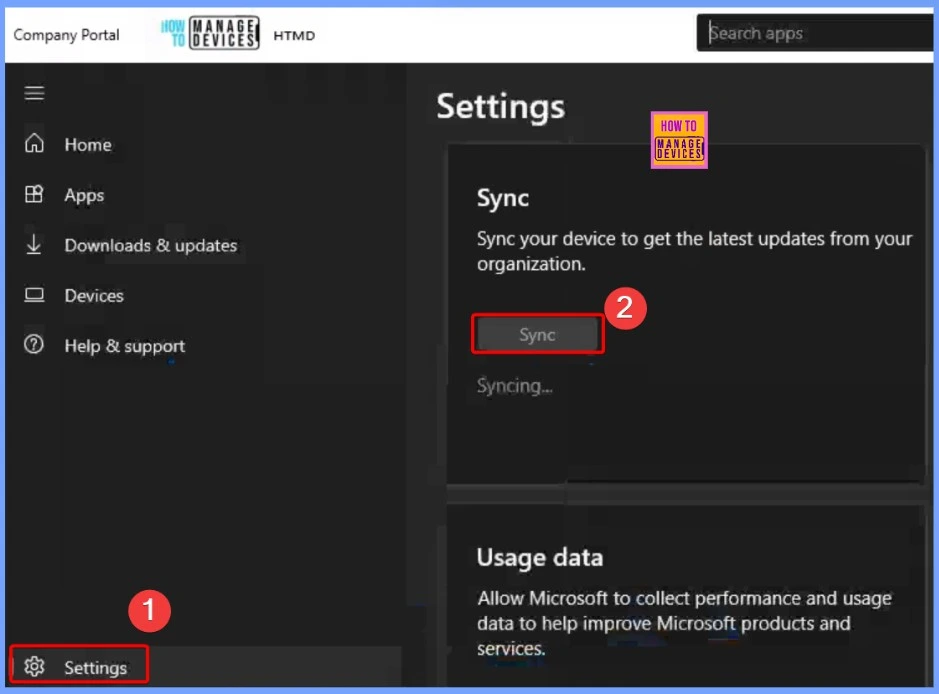
Company Portal Sync
To sync your device in the Company Portal app, follow these steps:Open the Company Portal app.
Tap the Settings button. In the settings tab, you’ll see the Sync option. Select it to sync your device and get the latest updates from your organization.
End User Experience
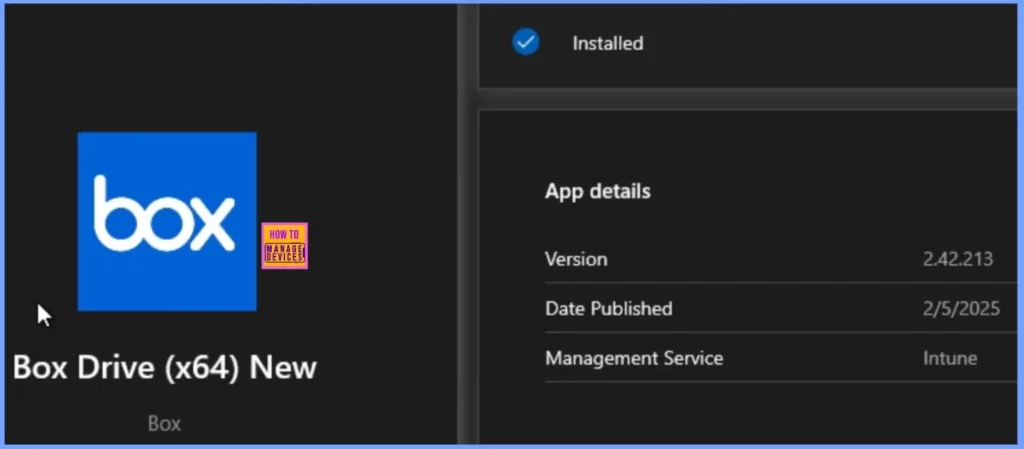
Click on Start menu and Open Company Portal, go to the Downloads & updates section, and search for Box Drive (x64) Version 2.40.333. Once you select that, we can see the “An update is available to install” hyperlink. Click on that. It will take you to the latest Box Drive (x64) Version 2.42.213, also showing as Installed.
Need Further Assistance or Have Technical Questions?
Join the LinkedIn Page and Telegram group to get the latest step-by-step guides and news updates. Join our Meetup Page to participate in User group meetings. Also, Join the WhatsApp Community to get the latest news on Microsoft Technologies. We are there on Reddit as well.
Author
Anoop C Nair has been Microsoft MVP from 2015 onwards for 10 consecutive years! He is a Workplace Solution Architect with more than 22+ years of experience in Workplace technologies. He is also a Blogger, Speaker, and Local User Group Community leader. His primary focus is on Device Management technologies like SCCM and Intune. He writes about technologies like Intune, SCCM, Windows, Cloud PC, Windows, Entra, Microsoft Security, Career, etc.


Discussion