






MS Intune Simplifying macOS Management with Payloadless Packages Running Scripts with Admin Rights
Hey there, Let’s discuss about MS Intune Simplifying macOS Management with Payloadless Packages Running Scripts with Admin Rights. From a support standpoint, Microsoft provides full support for Intune and its capability to deploy scripts. Payloadless packages are a powerful tool that extends macOS app management functionality.
A payloadless PKG is a type of package file used mainly in macOS environments that does not include any actual application files or data. With Intune, we can deploy payloadless PKGs to manage macOS endpoints by utilizing the built-in management capabilities for macOS PKGs.
Payloadless packages are distributed through the macOS agent channel, they offer enhanced flexibility, and Users can leverage pre-install and post-install scripts to perform specific tasks before and after the package is executed.
Multiple app types are available for deployment from Microsoft Intune to managed endpoints, including macOS PKGs, which can also be used for payloadless PKGs. Let’s join to delve deeper into this fascinating topic through this post.

Table of Contents
What is Payload?
MS Intune Simplifying macOS Management with Payloadless Packages Running Scripts with Admin Rights
One of the most effective applications of payload-less packages (PKGs) is the execution of scripts on demand. This ability allows for seamless and immediate script execution without the overhead of unnecessary file installations.

- ACME Protocol Support for macOS and Automated Device Enrollment in Intune
- MacOS Certificates can now be Stored in User Keychain using Intune
- Intune Fully Supports iOS iPadOS 18 and macOS 15 New Features and Enhancements
Prerequisites
| Shell Environment | User Permissions |
|---|---|
| The script should be run in a Bash shell on a macOS system. | The script needs to be executed with root privileges. |
By deploying this via a payloadless app, we can make it available in the Intune Company Portal. To do this we’ll need to use a payloadless package (Intune Unmanaged PKG) and a post-install script (Intune PKG Post Install Script).
- Upload dock.pkg to Intune: This empty PKG creates a receipt named com.intune.dock. For guided steps on uploading the PKG, refer to the following: Add an unmanaged macOS PKG app to Microsoft Intune. When you assign the package, ensure that you do it as soon as it is available.
- Paste dock5. The contents are as Post Install Script: For this flow, ensure that waitForApps is set to false.
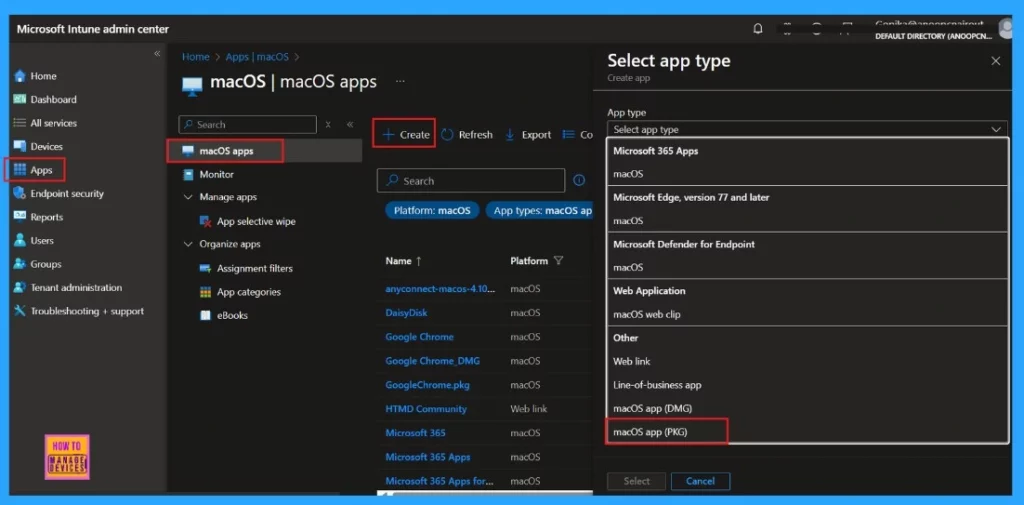
Microsoft Intune macOS App Types and Payloadless Package Support
Microsoft Intune provides a variety of app types that can be deployed to managed endpoints, including macOS Packages, which are also applicable for payloadless Packages. Here is a screenshot of the app types available for macOS in the Microsoft Intune admin center.
- Apps > macOS > Add App > macOS app (PKG)
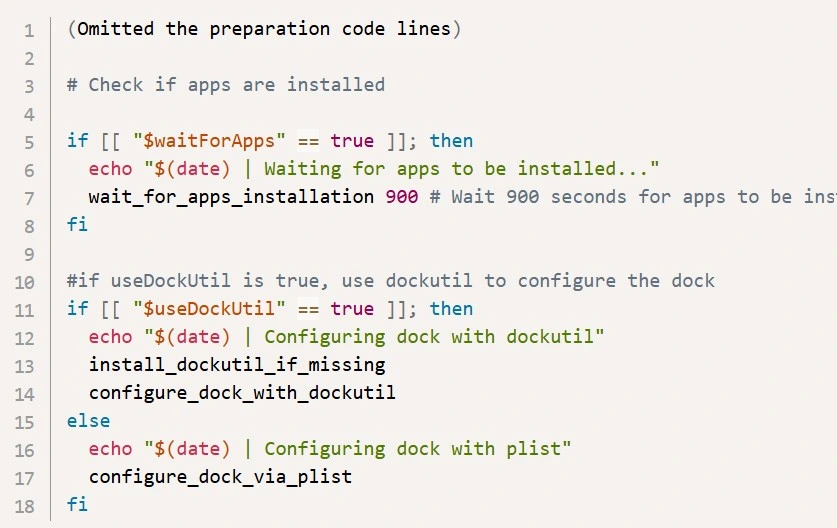
macOS Dock Configuration Deploy using Payloadless PKG
The following script modifies the desktop dock configuration for macOS endpoints. It can be deployed using a payload-less PKG. This snippet highlights the essential dock configuration settings.
(Omitted the preparation code lines)
# Check if apps are installed
if [[ “$waitForApps” == true ]]; then
echo “$(date) | Waiting for apps to be installed … “
wait_for_apps_installation 900 # Wait 900 seconds for apps to be ins
fi
#if useDockUtil is true, use dockutil to configure the dock
if [[ “$useDockUtil” == true ]]; then
echo “$(date) | Configuring dock with dockutil”
install_dockutil_if_missing
configure_dock_with_dockutil
else
echo “$(date) | Configuring dock with plist”
configure_dock_via_plist
fi
Need Further Assistance or Have Technical Questions?
Join the LinkedIn Page and Telegram group to get the latest step-by-step guides and news updates. Join our Meetup Page to participate in User group meetings. Also, Join the WhatsApp Community to get the latest news on Microsoft Technologies. We are there on Reddit as well.
Resource
LinkedIn Post of Intune support team and Intune support page
Author
Anoop C Nair has been Microsoft MVP for 10 consecutive years from 2015 onwards. He is a Workplace Solution Architect with more than 22+ years of experience in Workplace technologies. He is a Blogger, Speaker, and Local User Group Community leader. His primary focus is on Device Management technologies like SCCM and Intune. He writes about technologies like Intune, SCCM, Windows, Cloud PC, Windows, Entra, Microsoft Security, Career, etc.


Discussion