






New Grid and Category Views Coming to the Start Menu in Windows 11
Hi, Let’s discuss the New Grid and Category Views Coming to the Start Menu in Windows 11. As you all know, every update is crucial for our Windows features. We are excited to announce some new features for the Start menu, which is an important part of the Windows system and a gateway for many settings and applications.
Every Windows system has this feature, which has been there for many years. Every update changes the Start menu, and each version introduces features and design changes that are highly useful for users. Windows 11, version 24H2, adds Grid and Category views to make the interface more personalized and efficient.
These new start menu viewers are completely helpful for users to work with. The Start menu is a central hub for accessing apps, files, and settings, making navigation easy. Users can pin their favourite apps and organize them into categories for a personalized experience.
In the previous post, we also shared about the recommendations feature in the Start menu. Recently, Microsoft announced new views to the All page in the Start menu: Grid and Category view. So, in this post, let’s discuss the features of the new Start menu View options.

Table of Contents
New Grid and Category Views Coming to the Start Menu in Windows 11
We previously discussed various aspects of the Start Menu, including its features and newly introduced options such as grid view and category view. We also provided an overview of the Start Menu’s functionalities. Until now, the Start Menu only displayed the “All” view, which made it time-consuming for users to find applications. So, let’s discuss about the new view and how it works.
Note: Also, the start menu shows a name list view, which is a default option.
| Start Menu View Options | Info |
|---|---|
| Name list view | It is a default option, and it is displayed alphabetically without an Icon view. |
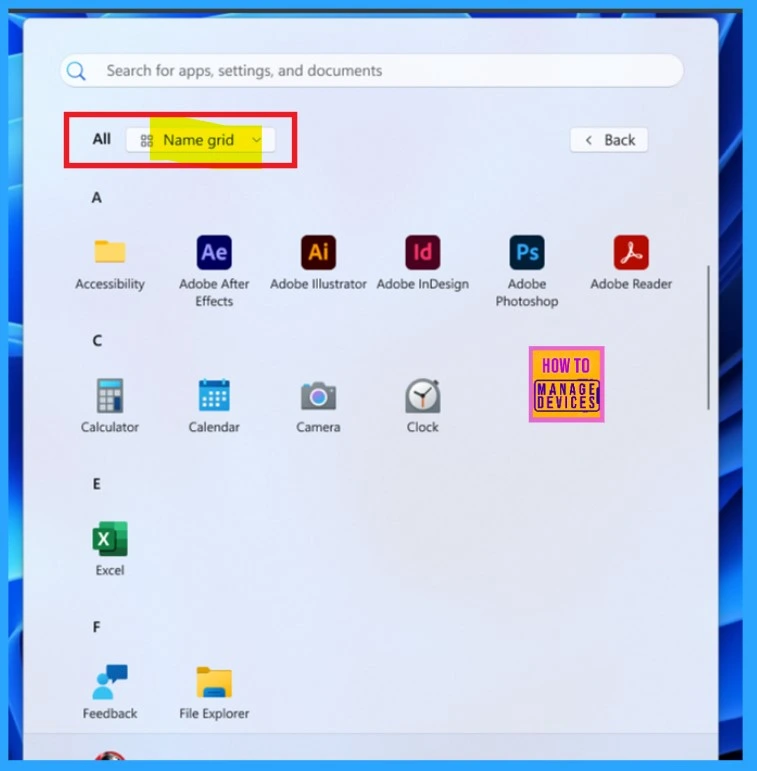
| Grid View | It allows a Grid view in alphabetical order with an icon view. |
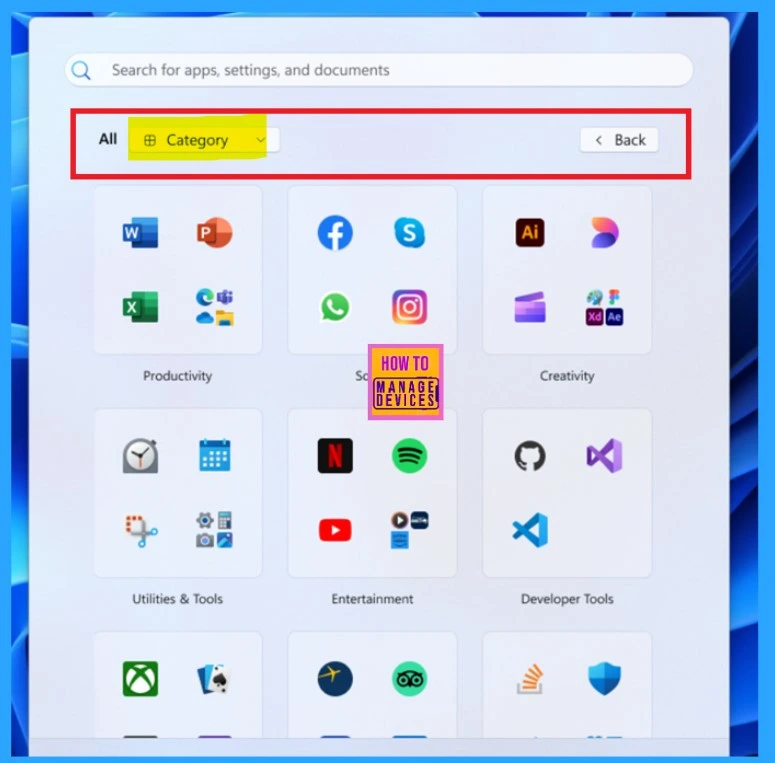
| Category View | The Category view option is displayed based on their usage. Also, it categorise through social, productivity, and entertainment sections. |
- 4 Methods to Enable Disable Most Used Apps List on Start Menu in Windows 11
- Start Menu Stop Working in Windows 11 Insider Preview Build
- Add or Remove All Program Lists from the Start Menu in Windows 11
Grid View
Recently, Microsoft introduced new Windows 11 Start Menu features, including a grid view and a category view. These options allow users to organize their apps in a grid format, making it easier to find applications alphabetically. This enhancement improves usability, as each app is displayed as an icon.
Category View
The new update of Microsoft Windows introduces a Start menu that organizes applications into categories. The Windows 11 Start menu categorises apps into social, productivity, and entertainment sections. This arrangement gives the menu a more organized look and features larger icons for a clean appearance.
- It helps users quickly find apps based on usage, particularly useful for those with many applications installed.
Resources
Announcing Windows 11 Insider Preview Build 22635.4950 (Beta Channel) | Windows Insider Blog
Need Further Assistance or Have Technical Questions?
Join the LinkedIn Page and Telegram group to get the latest step-by-step guides and news updates. Join our Meetup Page to participate in User group meetings. Also, Join the WhatsApp Community to get the latest news on Microsoft Technologies. We are there on Reddit as well.
Author
Anoop C Nair has been Microsoft MVP from 2015 onwards for 10 consecutive years! He is a Workplace Solution Architect with more than 22+ years of experience in Workplace technologies. He is also a Blogger, Speaker, and Local User Group Community leader. His primary focus is on Device Management technologies like SCCM and Intune. He writes about technologies like Intune, SCCM, Windows, Cloud PC, Windows, Entra, Microsoft Security, Career, etc.




Discussion