






Intune Guided Scenarios with Policy Set Templates Help Admins MEM
Let’s discuss Intune Guided Scenarios with Policy Set Templates Help Admins MEM. I learned more about Intune-guided scenarios from the Ignite session hosted by Paul Mayfield, Terrell Cox, and Micro-Scott.
A guided scenario is a personalized sequence of steps tailored to address a particular end-to-end use case. These scenarios are typically constructed based on the specific roles played by administrators, users, or devices within your organization.
They involve carefully coordinating profiles, settings, applications, and security controls to ensure a seamless user experience while upholding robust security measures. The meticulous orchestration of these elements aims to create an optimal balance between usability and protection.
Most of the screenshots below are taken from the demo and slides of the same ignite session.

More details about the session and recording are in the post section below.
| Index |
|---|
| Intune Guided Scenarios |
| Intune Guided Scenario |
| Session |
Ignite 2019 Coverage
- Microsoft Endpoint Management SCCM Intune Windows Updates
- Microsoft Endpoint Manager is the future of SCCM Intune MEMMI MEMCM
- iOS Android macOS Mobile Enrollment Options with Intune
- Basics of Windows Dynamic Update Explained Update Management
- WVD End User Experience Availability Updates
- MSIX Updates from Ignite Reliability Network Disk-space
- Microsoft Learning Certification Exams Updates
- Intune Reporting Strategies Advanced Reporting
- Intune Endpoint Security Policies Enhancements
- Intune Policy Sets Collection of Workflows
- Guided Scenarios with Policy Sets Templates
Intune Guided Scenarios
I feel Intune Guided Scenarios are very helpful to new Intune admins. They probably don’t know where Intune APP, Intune Apps, Configuration Profiles, etc., are.
They can complete the following jobs (scenarios) without extensive MEM Intune experience.
NOTE! – Are these guided scenarios there for Intune admins to play around with the new stuff? If so, try this in a pre-prod or staging environment.
Microsoft will create many similar Intune-guided scenario templates with future releases of Microsoft Endpoint Management and Microsoft Intune (MEMMI).
- Secure Office apps for mobile
- Deploy Edge for mobile
- Try out a cloud-managed PC
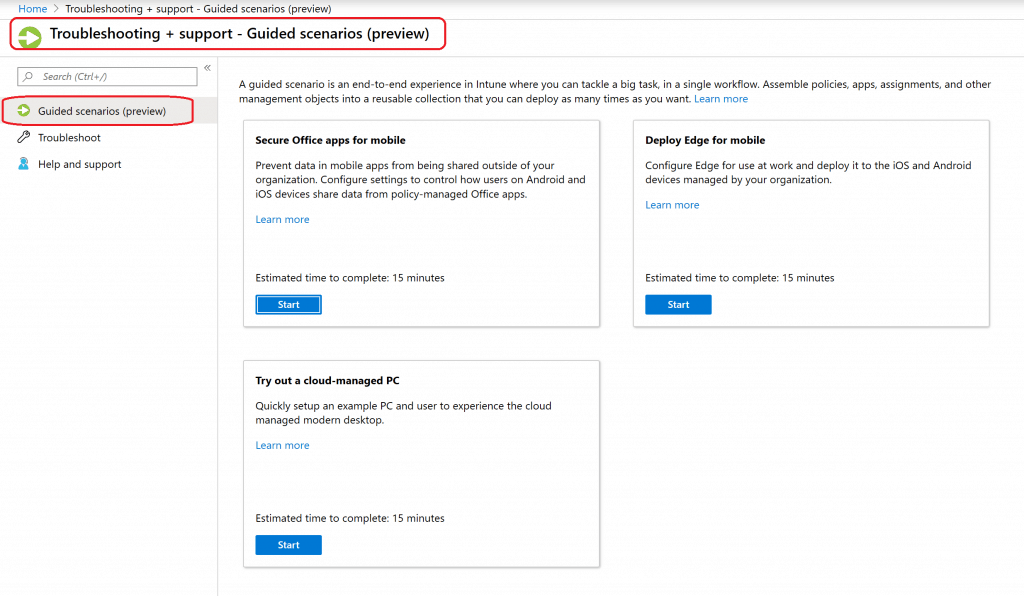
Intune Guided Scenario
During the creation of a guided scenario, Intune will automatically create a policy set based on pre-defined templates.
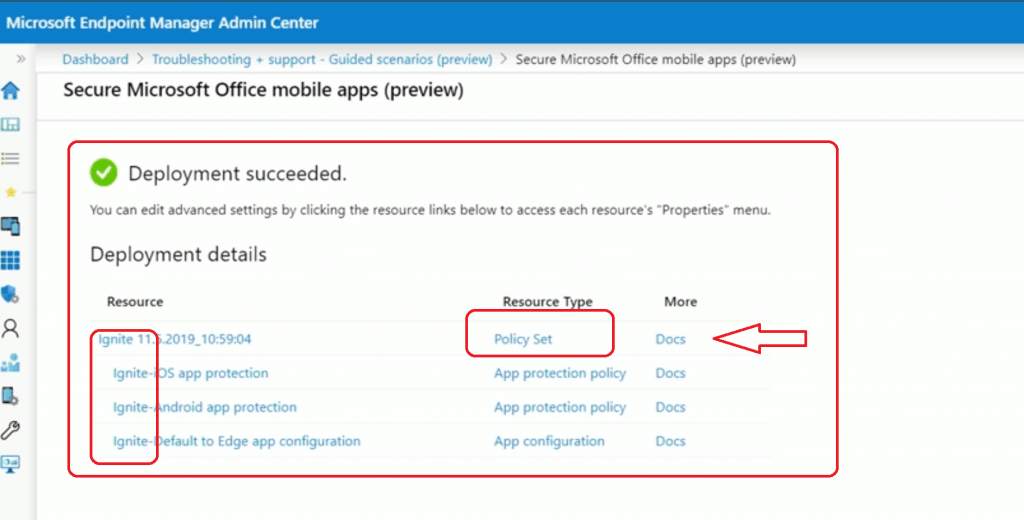
The result of the Intune-guided scenario is a policy set. You can edit the Intune policy set later.
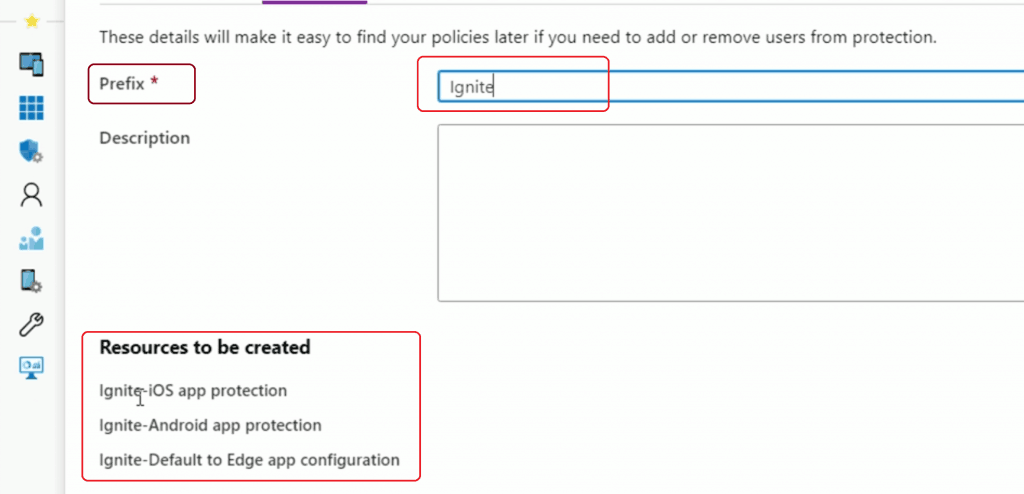
Create a Prefix because we will be creating many other resources, so it will be easy to search later as per the Microsoft Ignite session.
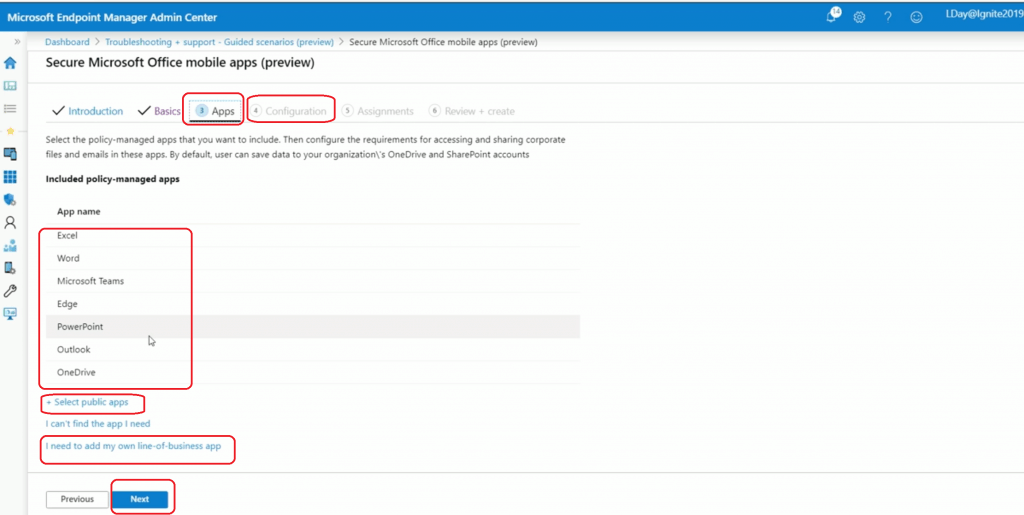
Select the apps you want to protect in the Intune Guided Scenario called – Secure Office apps for mobile. You can see the options to create new LOB applications (exciting scenarios).
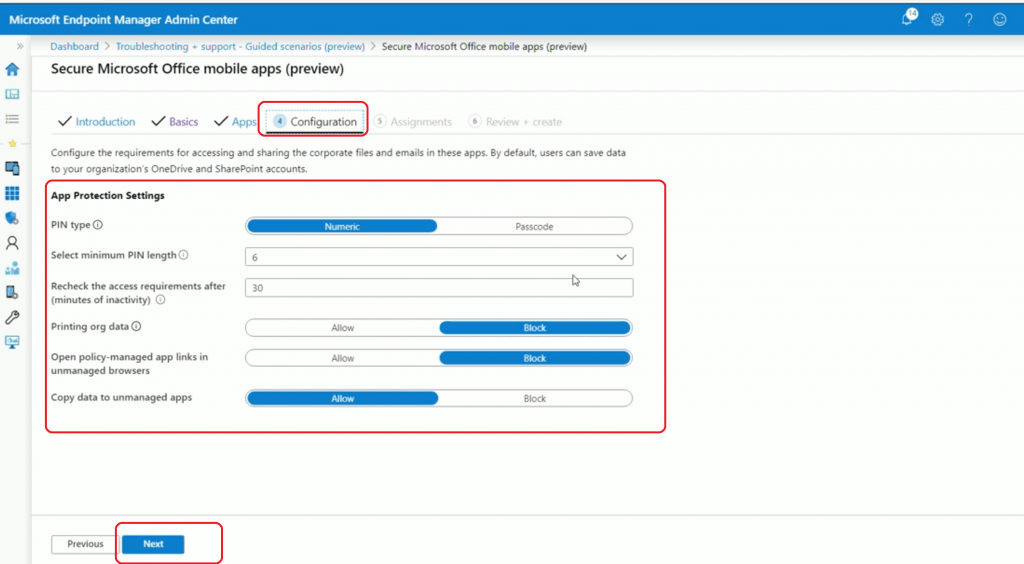
Intune App protection policy configurations are listed below.
Assignment options are available on the below screen.
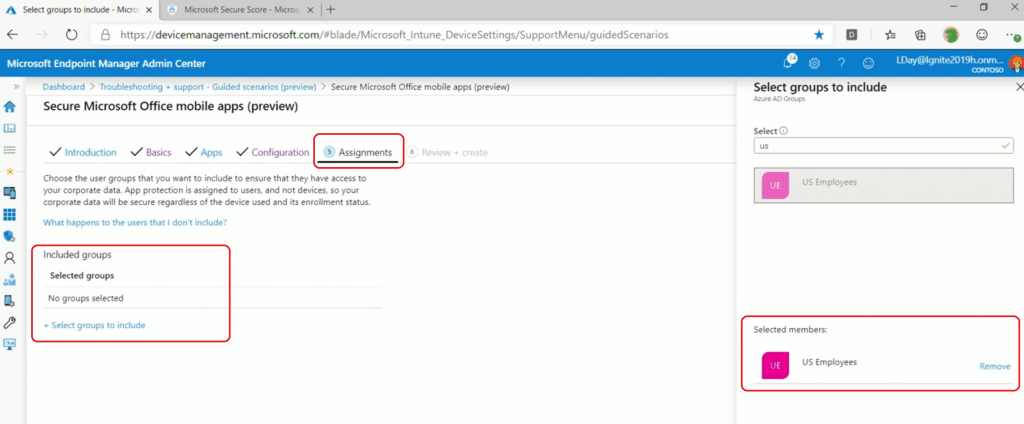
The Intune guided scenario experience is completed for the Intune Admin. Now, the admin can see that a policy set, app protection policies, etc., are created with the prefix Ignite!
Session
- Microsoft Endpoint Manager, including Microsoft Intune and Configuration Manager – https://myignite.techcommunity.microsoft.com/sessions/83532
Resources
- Intune guided scenarios overview – https://docs.microsoft.com/en-us/intune/fundamentals/guided-scenarios-overview
We are on WhatsApp.
To get the latest step-by-step guides and news updates, Join our Channel. Click here –HTMD WhatsApp.
Author
Anoop C Nair is Microsoft MVP! He is a Device Management Admin with more than 20 years of experience (calculation done in 2021) in IT. He is a Blogger, Speaker, and Local User Group HTMD Community leader. His main focus is on Device Management technologies like SCCM 2012, Current Branch, and Intune. He writes about ConfigMgr, Windows 11, Windows 10, Azure AD, Microsoft Intune, Windows 365, AVD, etc.


Discussion