






Windows Update for Business Renamed to Windows Update Client Policies
Hey there, let’s didcuss about Windows update for business renamed to Windows update client policies. Windows update has always been a powerful tool for enterprises, and the new name reflects the expanded capabilities that apply to any organization.
Windows Update Client Policies are a collection of configurable settings that enable administrators to manage how updates are delivered and installed on Windows devices within an organization. These policies can be controlled through Group Policy, Microsoft Intune, or registry edits.
Windows Update client policies enable businesses to take command of the updates their devices receive, shaping not only which Windows Updates are deployed but also shaping the user experience when these updates are installed. This ensures a customized solution, allowing organizations to maintain control over their systems while optimizing performance and user satisfaction.
Windows Update client policies establish the rules that control Windows Update behavior across devices. This post will provide more details about Windows Update for Business Renamed to Windows Update Client Policies.

Table of Contents
What is Windows Autopatch?
Windows Update for Business Renamed to Windows Update Client Policies
Windows Update for Business is a service designed for managing updates in enterprise environments, while Windows Update Client Policies are the settings that control how these updates behave. Microsoft has not rebranded Windows Update for Business, it continues to be an essential component of enterprise update strategies, working alongside other tools such as Windows Autopatch.
- Simplify Microsoft Edge Updates Management with Windows Autopatch
- New 3 Top Features Included in Windows Autopatch
- Fix Windows Autopatch Device Configuration Critical Alerts
Windows Autopatch Key Points
Windows Autopatch now provides the same services as the former Windows Update for Business deployment service and serves as the primary Windows Update management experience in Microsoft Intune. It has expanded to provide complete Windows Update management for Windows Education and Business Premium subscriptions.
Windows Update Client Policies
Microsoft has renamed Windows Update for Business as Windows Update client policies, maintaining all the same core functionality at no additional cost. This free service continues to give organizations control over update deployment for Windows devices.
Windows Update Client Policies are configurable settings that determine how a Windows device interacts with Windows Update. These settings can be adjusted through Group Policy, Intune, or registry keys, regardless of whether the device utilizes WUfB, Windows Server Update Service, or the public Windows Update service.
Note : Windows Update for Business will now be renamed to Windows Update client policies; however, this name change does not affect functionality. All current features and license entitlements remain unchanged.
Windows Autopatch A Centralized Update Management Solution in Intune
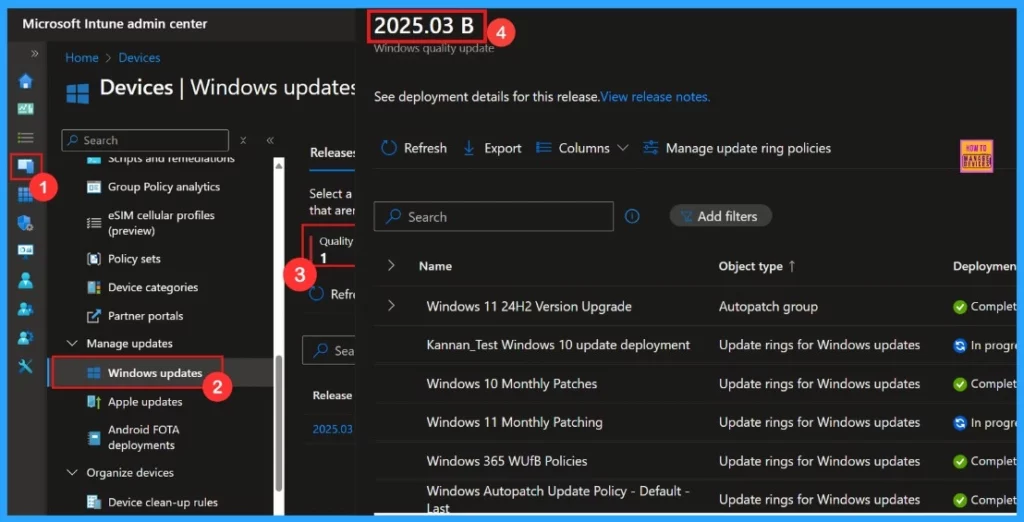
We can now manage updates for our devices in Intune with a unified dashboard, powered by Windows Autopatch. The unified dashboard offers flexibility and control over updates with four useful sections:
| Update Policies | Update Groups | Update Status | Update Reports |
|---|---|---|---|
| Select pre-defined policies or create custom update policies for update groups. | Organize our devices into customized Windows Autopatch groups based on criteria such as device type, location, department, or function, and apply preferred policies and schedules to each group. | Easily monitor and manage our devices’ update status, learning which are up to date, which are currently being updated, which require updates, and which are experiencing issues. | Customize and download a variety of report types to gain insights and analytics that help evaluate effectiveness, identify issues, and optimize processes. |
Autopatch Expanded Features and Capabilities for Education and Business
Microsoft has expanded Windows Autopatch to deliver even greater value for educational institutions and businesses, offering smarter, more flexible update management tailored to modern IT environments. Now organizations with Windows Education and Business Premium licenses can take advantage of:
- Automatic security updates
- Easy and safe update configuration
- Detailed reporting capabilities
- Flexible and intelligent Windows Autopatch Groups
Need Further Assistance or Have Technical Questions?
Join the LinkedIn Page and Telegram group to get the latest step-by-step guides and news updates. Join our Meetup Page to participate in User group meetings. Also, Join the WhatsApp Community to get the latest news on Microsoft Technologies. We are there on Reddit as well.
Resource
Why Windows Autopatch is the smart update solution-Blog post by Alan_Meeus
Author
Anoop C Nair has been Microsoft MVP from 2015 onwards for 10 consecutive years! He is a Workplace Solution Architect with more than 22+ years of experience in Workplace technologies. He is also a Blogger, Speaker, and Local User Group Community leader. His primary focus is on Device Management technologies like SCCM and Intune. He writes about technologies like Intune, SCCM, Windows, Cloud PC, Windows, Entra, Microsoft Security, Career, etc.


Discussion