






New Automatic Account Management Enable Account settings on Windows LAPS Policy in Intune
Let’s discuss about New Automatic Account Management Enable Account settings on Windows LAPS Policy in Intune. Microsoft introduced new settings on Windows LAPS policies on Windows 11 24H2 Devices. And also previously added 2 settings is updated.
Windows LAPS is a Windows built-in solution can help you secure the built-in local administrator account that is present on each Windows device. LAPS policies are designed to manage various settings through Microsoft Intune.
As you know that, Windows Local Administrator Password Solution (LAPS) bult-in tool that provide centralized management and enhanced security for local administrator accounts on Windows devices by Integrated with Microsoft Intune.
By introducing new settings, Intune improve the security of Windows 11 Device. Password Complexity and Post Authentication Actions settings in Intune Polies are updated with new options. In this blog post I will help you explore with this new update in Intune.

Table of Contents
New Automatic Account Management Enable Account settings on Windows LAPS Policy in Intune
As mentioned above some settings are introduced with Windows LAPS. With this new settings local administrator account can be easily managed. The following table shows new settings in Windows LAPS.
By default, each setting in LAPS policies is set to Not configured, which means the addition of these new settings won’t change the behavior of your existing policies. To make use of the new settings and options, you can create new profiles or edit your existing profiles.
| New Windows LAPS Settings |
|---|
| Automatic Account Management Enable Account |
| Automatic Account Management Enabled |
| Automatic Account Management Name Or Prefix |
| Automatic Account Management Randomize Name |
| Automatic Account Management Target |
| Passphrase Length |
Steps to Access LAPS Policy
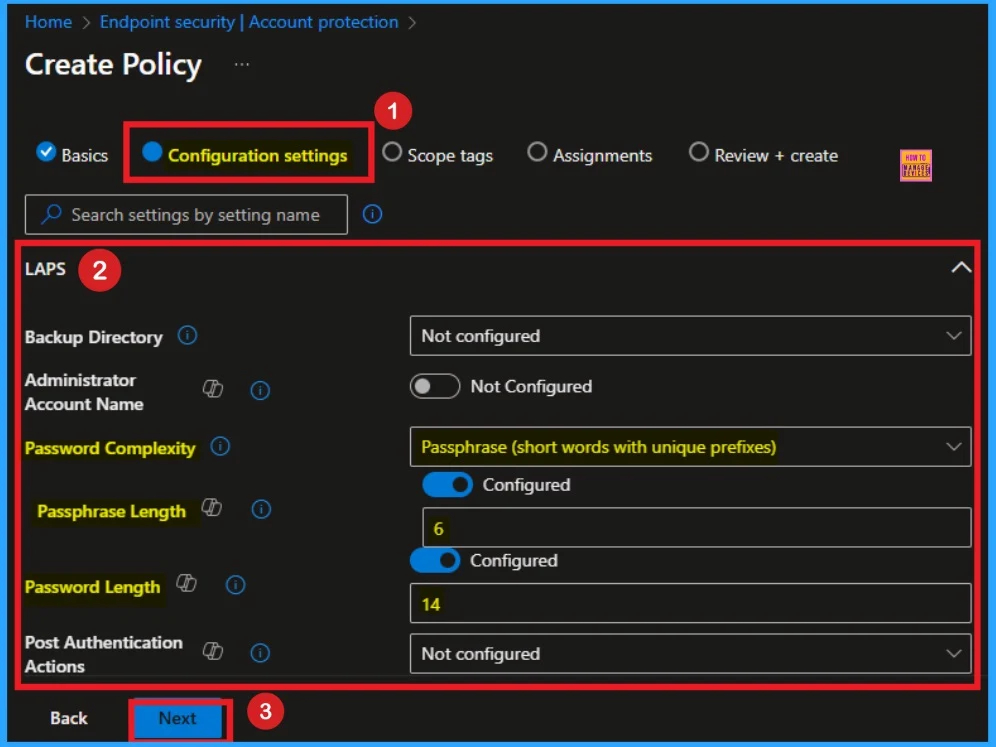
You can easily access LAPS policy on Microsoft Intune. To access this Open Intune Portal and Go to Endpoint Security > Account Protection > Create Policy. Select Windows as platform and Windows Local Administrator Password Solution profile type. On the Basic tab enter a valid name and Description.
Then click on the Next button. On the Configuration tab you can easily access the new available settings ad updated options. The below screenshot will help you.
- Windows LAPS Integration with Local Device MaximumPasswordAge Policy
- Windows LAPs Smart-Card-only Policy Integration
- Enable Windows LAPS Managed Account in WinRE or Safemode
Settings Have New Options Available
As per the Update, there some options available on LAPS settings. Password Complexity and Post Authentication Actions settings are updated some new options available on each settings.
New Options on Password Complexity
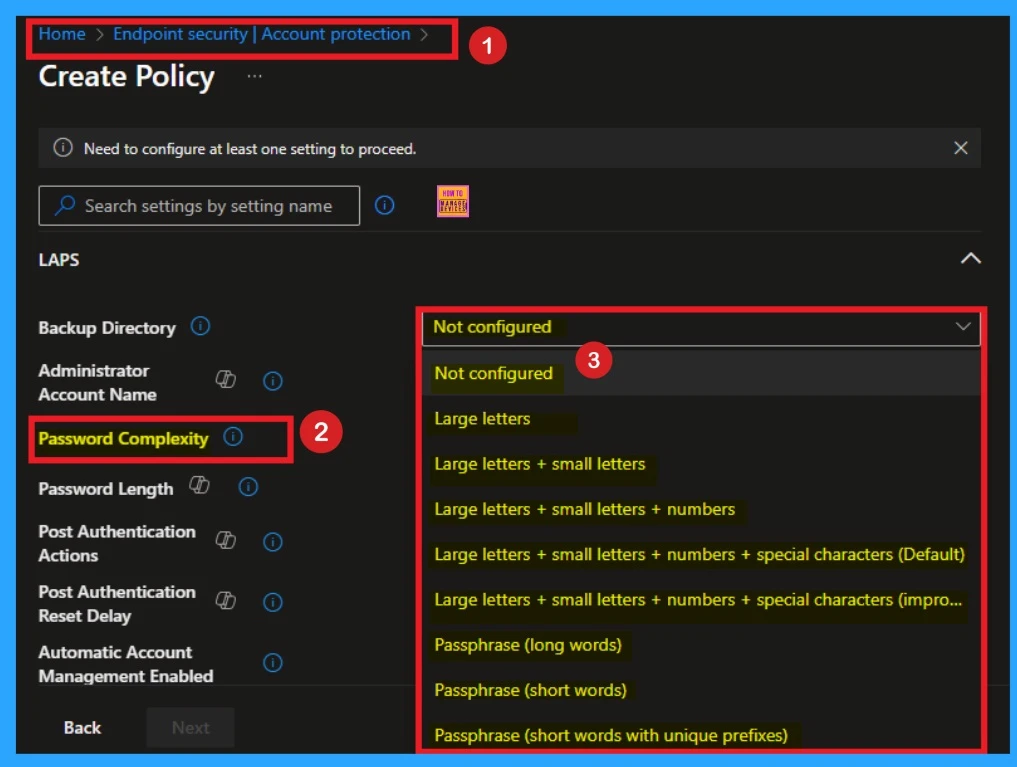
PasswordComplexity Setting in LAPS Policy is used to define the complexity of the password for managed local administrator accounts. This settings is now updated with new options and it is available on Intune Portal. The below table shows the new options.
- Passphrase (long words)
- Passphrase (short words)
- Passphrase (short words with unique prefixes)
Post Authentication Actions
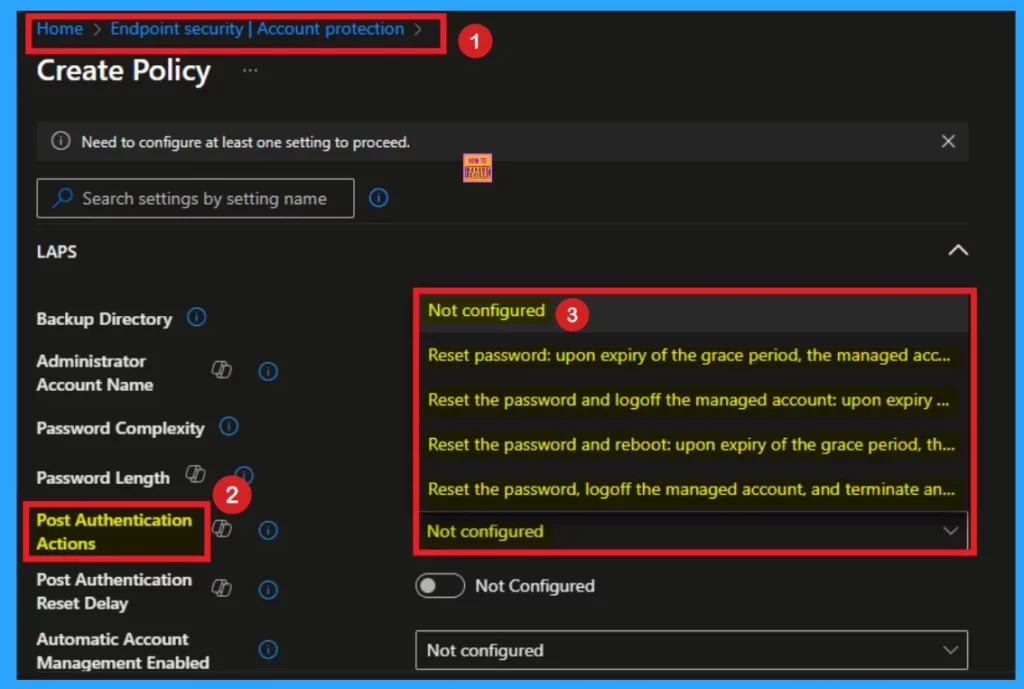
Post Authentication Actions settings specifies actions to take after the expiration of a configured grace period. These actions help limit the time a LAPS password can be used before being reset. The below list shows the New Options.
- Reset the password, logoff the managed account, and terminate any remaining processes: upon expiration of the grace period, the managed account password is reset, any interactive logon sessions using the managed account are logged off, and any remaining processes are terminated.
Need Further Assistance or Have Technical Questions?
Join the LinkedIn Page and Telegram group to get the latest step-by-step guides and news updates. Join our Meetup Page to participate in User group meetings. Also, Join the WhatsApp Community to get the latest news on Microsoft Technologies. We are there on Reddit as well.
Resource
New settings for Windows LAPS policy
Author
Anoop C Nair has been Microsoft MVP from 2015 onwards for 10 consecutive years! He is a Workplace Solution Architect with more than 22+ years of experience in Workplace technologies. He is also a Blogger, Speaker, and Local User Group Community leader. His primary focus is on Device Management technologies like SCCM and Intune. He writes about technologies like Intune, SCCM, Windows, Cloud PC, Windows, Entra, Microsoft Security, Career, etc.


Discussion