






Learn How Windows 11 Hotpatching Works using Windows Autopatch and Intune
Let’s discuss Learn How Windows 11 Hotpatching Works using Windows Autopatch and Intune. Microsoft introduced general availability of Hotpatch Updates for Windows 11 Enterprise. It is available on the Client Version 24H2 for x64 (AMD/Intel) CPU devices.
With the Hotpatch update, Intune improves the protection of your organization from cyberattacks, while minimizing user disruptions. Hotpatch update help you to stay protected and productive as a Windows user.
As you know that hotpatch updates provides many advanatages to Windows 11 Enterprise, Version 24H2 for x64. Hotpatch updates allow security patches to be applied without requiring a system reboot. With hotpatches devices receive the same level of security as traditional updates, ensuring consistent protection.
In this blog post i will help you to know more about Hotpatch updates allow security patches to be applied without requiring a system reboot. Benefits of hotpatch updates and working of hotpatch technology also discussed in this post.


Table of Contents
Learn How Windows 11 Hotpatching Works using Windows Autopatch and Intune
Hotpatch updates are an industry changer for security in Windows 11. Hotpatches helps you to keep your device protected from the moment an update is released. Hotpatch updates patch the in-memory code of running processes. Security updates are deployed quickly and seamlessly reducing your exposure cyberattacks.
- New Windows Autopatch Report In Intune Enhances Patch Visibility And Risk Management
- How to Implement Windows 11 Hotpatching using Intune
- Feature Comparison of Windows Server 2025 Vs 2022 Vs 2019 Hotpatching High Security and Faster Storage
- Easy Guide to Configure Multiple Display Mode for Windows 11 24H2 using Intune
Benefits of Hotpatch Updates
Windows 11 Enterprise version 24H2 Hotpatch Updates has many benefits. Hotpatching offers numerous enhancements when it comes to keeping Windows client devices up to date. The below table shows the benefits.
| Benefits | Details |
|---|---|
| Provide Immediate Protection | It provide immediate protection against vulnerabilities |
| Consistent Security | Devices receive the same level of security patching as the monthly standard security updates released on the second Tuesday of every month. |
| Minimized Disruption | Users can continue their work without interruptions while hotpatch updates are installed. Hotpatch updates don’t require the PC to restart for the remainder of the quarter. |
Hotpatch Technology Works
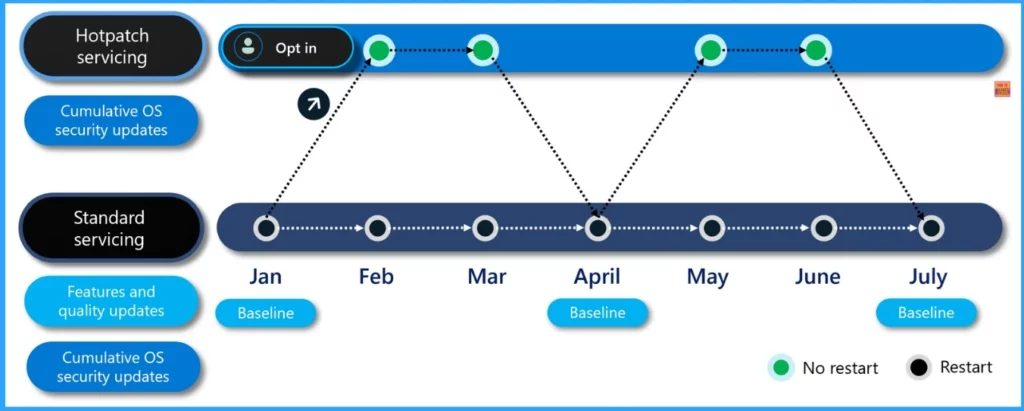
With Microsoft Intune portal, you ca create a hotpatch-enabled quality update policy in Windows Autopatch. All eligible Windows 11 Enterprise, version 24H2 devices managed by this policy will be offered hotpatch updates in a quarterly cycle. Same ring deployment schedule is followed by hotpatch update as standard updates.
Devices receiving the hotpatch update will see a different KB number tracking the hotpatch release and a different OS version than devices receiving the standard update that requires a restart.
How to Get Started With Hotpatch
To get started with hotpatching for Windows client devices, you will need to some requirements. First of all, you need a Microsoft subscription that includes Windows 11 Enterprise E3, E5, or F3, Windows 11 Education A3 or A5, or a Windows 365 Enterprise subscription.
- Devices running Windows 11 Enterprise, version 24H2 (Build 26100.2033 or later) and with the current baseline update installed
- An x64 CPU including AMD64 and Intel (Note: Arm®64 devices are still in public preview)
- Microsoft Intune to manage deployment of hotpatch updates with a hotpatch-enabled Windows quality update policy
- Virtualization-based Security (VBS) enabled
Hotpatch for Arm64 Devices
For Arm64 devices, hotpatch updates are still in public preview, so there is an additional prerequisite. Follow the registry key to Disable CHPE support.
Path: HKLM\SYSTEM\CurrentControlSet\Control\Session Manager\Memory Management
DWORD Key value: HotPatchRestrictions=1
A new DisableCHPE CSP will be provided as an alternative to manually setting the HotPatchRestrictions registry key. Restart the device to ensure the operating system is enforcing the setting. You only need to set this once. This new CSP will be available shortly after the April 2025 security update. Devices must disable CHPE to be eligible for hotpatch updates.
Hotpatch Update Deployment Using Windows Autopatch
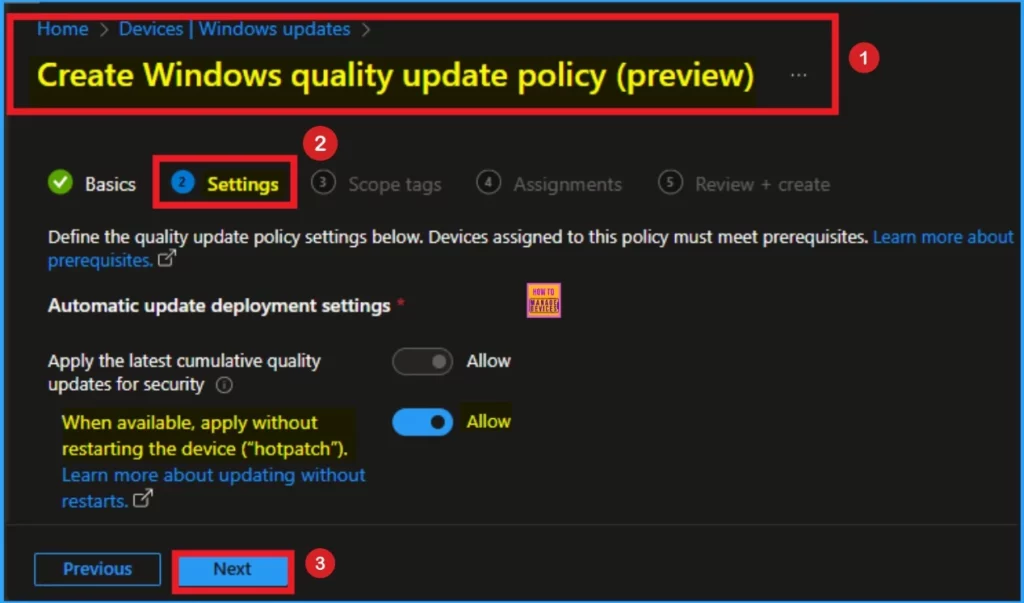
After you meet the prerequisites for hotpatch updates, you can opt devices in (or out) for automated hotpatch update deployment using Windows Autopatch. Using Microsoft Intune you can access hotpatch update deployment using Windows Autopatch.
- Open Microsoft Intune admin center
- Navigate to Devices > Windows updates > Create Windows quality update policy
- Toggle it to allow
Need Further Assistance or Have Technical Questions?
Join the LinkedIn Page and Telegram group to get the latest step-by-step guides and news updates. Join our Meetup Page to participate in User group meetings. Also, Join the WhatsApp Community to get the latest news on Microsoft Technologies. We are there on Reddit as well.
Resource
Hotpatch for Windows client now available
Author
Anoop C Nair has been Microsoft MVP for 10 consecutive years from 2015 onwards. He is a Workplace Solution Architect with more than 22+ years of experience in Workplace technologies. He is a Blogger, Speaker, and Local User Group Community leader. His primary focus is on Device Management technologies like SCCM and Intune. He writes about technologies like Intune, SCCM, Windows, Cloud PC, Windows, Entra, Microsoft Security, Career, etc.


Discussion