






How to Prepare for VBS Enclave Support Ending on Windows 11 23H2 and Windows Server 2022
Let’s discuss the VBS Enclave Support Ending on Windows 11 23H2 and Server 2022. VBS enclaves are being deprecated on Windows 11 version 23H2 and earlier, as well as Windows Server 2022 and earlier. However, Microsoft will continue to support VBS enclaves on Windows 11 version 24H2 and later, and Windows Server 2025 and later.
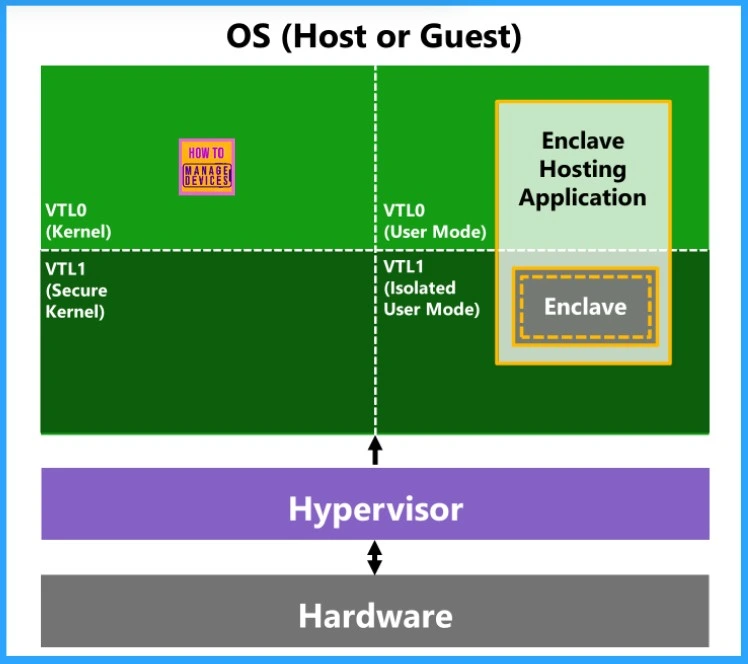
A Virtualization-based Security (VBS) Enclave is a secure area inside a running application where sensitive data and code can be safely handled. It uses VBS technology to protect this area by placing it in a special, secure part of the computer’s memory. This helps keep important tasks or information safe from the rest of the application and the system.
In this post, you’ll find all the important details about the end of support for VBS Enclaves on Windows 11 version 23H2 and Windows Server 2022. It explains what VBS Enclaves are, why Microsoft is deprecating them, which versions will still support them, and what steps you should take if your applications rely on this feature.
If your applications rely on VBS enclaves, it’s recommended to migrate to these supported versions. If upgrading isn’t possible, review your security model and keep an eye on Microsoft’s updates for alternative solutions. This change was announced in April 2025.

Table of Contents
What are VBS Enclaves?
VBS (Virtualization-Based Security) Enclaves are secure memory areas inside applications that protect sensitive data and code using virtualization technology.
Which Windows Versions are Affected by this Change?
VBS Enclaves are now deprecated on Windows 11 version 23H2 and earlier, as well as Windows Server 2022 and earlier. This means these platforms will no longer receive support or updates for VBS Enclaves. However, the feature remains supported on newer versions—specifically, Windows 11 version 24H2 and later, and Windows Server 2025 and later.
When was this Deprecation Announced?
VBS Enclave Support Ending on Windows 11 23H2 and Server 2022
Existing VBS Enclave apps will not stop working right away. However, since the feature is deprecated, it may be removed in future updates. It’s not recommended to continue using VBS Enclaves on unsupported versions, as they won’t receive updates or fixes and may eventually stop working.
| Status | Windows Versions |
|---|---|
| Deprecated | Windows 11 version 23H2 and earlier Windows Server 2022 and earlier |
| Still Supported | Windows 11 version 24H2 and later Windows Server 2025 and later |
- Microsoft Maps App To Be Deprecated And Removed From Microsoft Store By July 2025
- Time to Migrate Windows UWP Map Control and Windows Maps Platform APIs for Windows Client Support Ending Soon
- How to Configure Offline Maps Download Over Metered Connection Policy using Intune
What Should I Do If My App Uses VBS Enclaves?
If your application relies on VBS Enclaves, it’s important to plan an upgrade to a supported version such as Windows 11 version 24H2 or Windows Server 2025. If upgrading isn’t an option right now, review your current security setup and explore alternative solutions.
| Feature | Details and Mitigatio | Deprecation Announced |
|---|---|---|
| VBS enclaves (Windows 11, version 23H2 and earlier) | VBS enclaves are being deprecated. Support will continue for Windows 11, version 24H2 and later. April 2025 | April 2025 |
| VBS enclaves (Windows Server 2022 and earlier) | VBS enclaves are being deprecated. Support will continue for Windows Server 2025 and later. | April 2025 |
Mitigation Guidance
If your applications use VBS Enclaves, it’s a good idea to move to supported versions like Windows 11 version 24H2 or Windows Server 2025. If you’re not able to upgrade right away, take time to review your current security setup and look for other ways to protect your data. Also, keep checking Microsoft’s updates for any new tools or technologies that might replace VBS Enclaves in the future.
- Check for Offline Maps Updates in Windows
- Enable Offline Maps Auto Update using Intune Setting Catalog Policy
Need Further Assistance or Have Technical Questions?
Join the LinkedIn Page and Telegram group to get the latest step-by-step guides and news updates. Join our Meetup Page to participate in User group meetings. Also, Join the WhatsApp Community to get the latest news on Microsoft Technologies. We are there on Reddit as well.
Resources
Deprecated features in the Windows client | Microsoft Learn
Author
Anoop C Nair has been Microsoft MVP from 2015 onwards for 10 consecutive years! He is a Workplace Solution Architect with more than 22+ years of experience in Workplace technologies. He is also a Blogger, Speaker, and Local User Group Community leader. His primary focus is on Device Management technologies like SCCM and Intune. He writes about technologies like Intune, SCCM, Windows, Cloud PC, Windows, Entra, Microsoft Security, Career, etc.




Discussion