






Microsoft Intune Vs Jamf macOS Device Management Enhancements
Let’s compare Microsoft Intune Vs. Jamf macOS Device Management Enhancements. What are the different macOS device management options with Jamf and Microsoft Intune?
Andy Cerat & Neil Johnson had a great session in Ignite 2019, and they discussed the following topics.
Microsoft Intune is adding many more features to its stack. However, Jamf macOS Device Management has been around for many years and is more mature than Microsoft Intune.
I hope, Parallels will also develop a SaaS solution to manage macOS devices without any on-prem infrastructure. They have a pretty good macOS management solution with tight integration with SCCM.

More Details – SCCM Mac Management – How To Take A Decision In 10 Minutes
Intune Vs Jamf
Following are the key messages from Microsoft about macOS device management.
- Microsoft is committed to macOS.
- Microsoft Endpoint Manager (MEM) Intune is ready for Mac in the Enterprise
- Still investing in Jamf partnership for macOS device management
NOTE! – Microsoft is rolling out a change to choose Jamf targeting by user groups. Today it’s always-on options with Jamf. The new targeting change will help split it by BYOD and CYOD options.
Intune Vs Jamf macOS Management
I have seen many questions related to Intune Vs. Jamf macOS device management options. Which type of management should you go with, Jamf or Intune?
Microsoft announced that Intune is fully ready to manage macOS devices. However, as you can see in the slide below, there is still some room for a Jamf partnership. Are you confused?
I feel Intune will soon be ready to support all macOS device management scenarios. However, there could be some special scenarios where we would need Jamf for complex application deployment, etc.
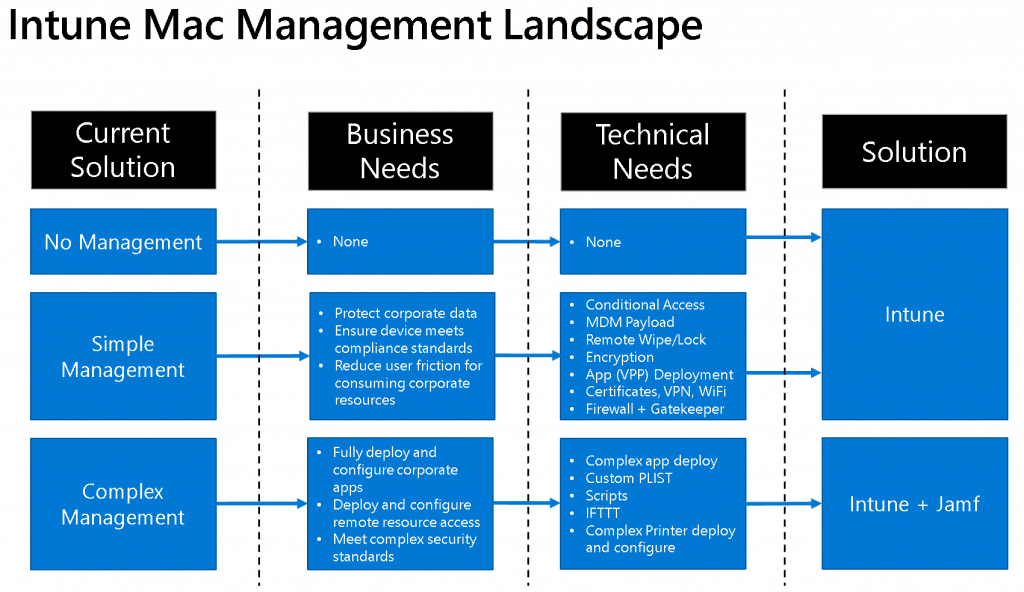
| Current Solution | Business Needs | Technical Needs | Solution |
|---|---|---|---|
| No Management | None | None | – |
| Simple Management | > Protect corporate data > Ensure device meets compliance standards > Reduce user friction for consuming corporate resources | . Conditional Access . MDM Payload . Remote Wipe/Lock . Encryption . App (VPP) Deployment · Certificates, VPN, WiFi · Firewall + Gatekeeper | Intune |
| Complex Management | > Fully deploy and configure corporate apps > Deploy and configure remote resource access > Meet complex security standards | . Complex app deploy . Custom PLIST . Scripts . IFTTT . Complex Printer deploy and configure | Intune + Jamf |
Intune Vs Jamf Device Management for Mac Devices
macOS Device Management solutions Intune Vs Jamf. macOS device management is not implemented in many organizations as per my experience. This makes many Mac devices vulnerable to cyber attacks.
The main three players in the industry for Mac device management are Parallels, Jamf, and Microsoft. I don’t think Parallel is very interested in developing its solution to manage macOS devices. Parallel’s Mac management solution works well with Microsoft’s on-prem device management solution, SCCM.
Microsoft’s Unified Endpoint Management solution, Intune, can manage Mac Devices. Microsoft is adding many enhancements to its solution, Microsoft Endpoint Manager Intune.
Jamf is also an exclusive cloud-based solution for managing various Apple devices like MacOS, iPhone, and iPadOS. All these devices, including Apple TV, can be managed from a single pane of glass console.
Microsoft started Mac management with very basic features, but with every monthly release, Microsoft is enhancing its capabilities to manage macOS management.
Intune macOS Simple Management
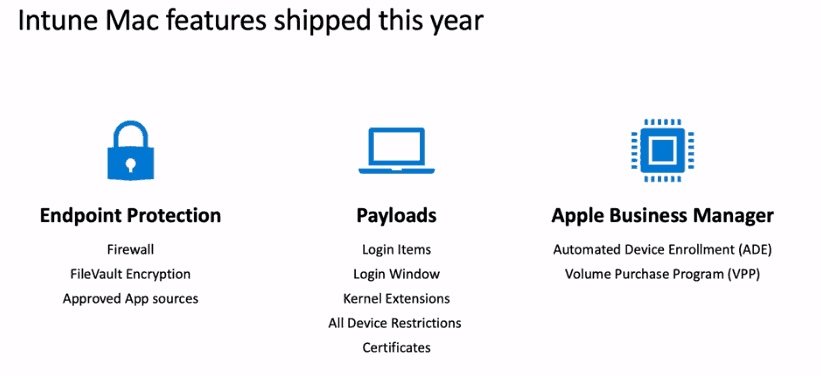
Following are the features Microsoft considers simple management features for macOS device management.
- Conditional Access
- MDM Payload
- Remote Wipe/Lock
- Encryption
- App (VPP) Deployment
- Certificates, VPN, and WiFi
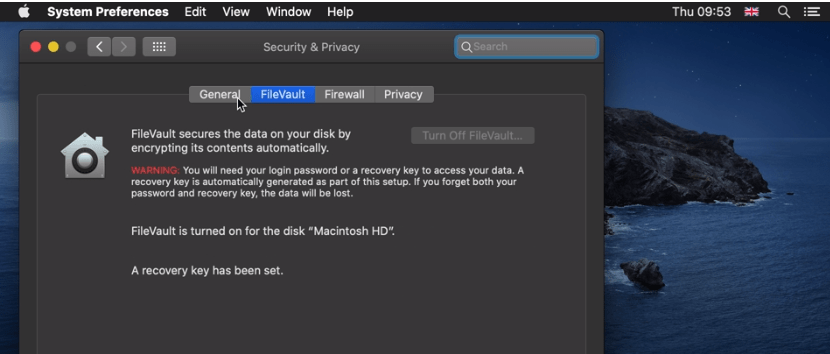
- Firewall + Gatekeeper ( FileVault, Key Recovery, and Firewall)
- Scripts (Coming soon, Q1 2020)
- Custom PLIST (Coming soon – Dec 2019)
- Microsoft Edge Deployment
Jamf macOS Complex Management
Following are the features Microsoft considers complex macOS device management features that should be handled via Jamf.
- Complex Mac application deployment scenarios
- Custom PLIST
- macOS Scripts deployment scenarios
- IFTTT
- Complex Printer deploy and configure
Ignite Session
- macOS device management with Microsoft Intune
- (3) Manage and secure iOS and macOS devices and apps, including Office 365 ProPlus, with Microsoft Intune – YouTube
Latest Policies Added to Intune MacOS support
Let’s check the Intune settings catalog MacOS support policies introduced in April 2022.
The Settings Catalog has new macOS settings you can configure (Devices > Configuration profiles > Create profile > macOS for platform >Settings catalog (preview) for profile type):
Accounts > Mobile Accounts:
- Ask For Secure Token Auth Bypass
- Create At Login
- Expiry Delete Disused Seconds
- Warn On Create
- Warn On Create Allow Never
App Management > Autonomous Single App Mode:
- Bundle Identifier
- Team Identifier
App Management > NS Extension Management:
- Allowed Extensions
- Denied Extension Points
- Denied Extensions
App Store:
- Disable Software Update Notifications
- Restrict Store Software Update Only
- restrict-store-disable-app-adoption
Authentication > Directory Service:
- AD Allow Multi-Domain Auth
- AD Allow Multi-Domain Auth Flag
- AD Create Mobile Account At Login
- AD Create Mobile Account At Login Flag
- AD Default User Shell
- AD Default User Shell Flag
- AD Domain Admin Group List
- AD Domain Admin Group List Flag
- AD Force Home Local
- AD Force Home Local Flag
- AD Map GGID Attribute
- AD Map GGID Attribute Flag
- AD Map GID Attribute
- AD Map GID Attribute Flag
- AD Map UID Attribute
- AD Map UID Attribute Flag
- AD Mount Style
- AD Namespace
- AD Namespace Flag
- AD Organizational Unit
- AD Packet Encrypt
- AD Packet Encrypt Flag
- AD Packet Sign
- AD Packet Sign Flag
- AD Preferred DC Server
- AD Preferred DC Server Flag
- AD Restrict DDNS
- AD Restrict DDNS Flag
- AD Trust Change Pass Interval Days
- AD Trust Change Pass Interval Days Flag
- AD Use Windows UNC Path
- AD Use Windows UNC Path Flag
- AD Warn User Before Creating MA Flag
- Client ID
- Description
- Password
- User Name
Authentication > Identification:
- Prompt
- Prompt Message
Login > Login Window Login Items:
- Disable Login Items Suppression
Media Management Disc Burning:
- Burn Support
Parental Controls > Parental Controls Application Restrictions:
- Family Controls Enabled
Parental Controls > Parental Controls Content Filter:
- Allowlist Enabled
- Filter Allowlist
- Filter Blocklist
- Site Allowlist
- Address
- Page Title
- Use Content Filter
Parental Controls > Parental Controls Dictionary:
- Parental Control
Parental Controls > Parental Controls Game Center:
- GK Feature Account Modification Allowed
System Configuration > File Provider:
- Allow Managed File Providers To Request Attribution
System Configuration > Screensaver:
- Ask For Password
- Ask For Password Delay
- Login Window Idle Time
- Login Window Module Path
User Experience > Finder:
- Prohibit Burn
- Prohibit Connect To
- Prohibit Eject
- Prohibit Go To Folder
- Show External Hard Drives On Desktop
- Show Hard Drives On Desktop
- Show Mounted Servers On Desktop
- Show Removable Media On Desktop
- Warn On Empty Trash
User Experience > Managed Menu Extras:
- AirPort
- Battery
- Bluetooth
- Clock
- CPU
- Delay Seconds
- Displays
- Eject
- Fax
- HomeSync
- iChat
- Ink
- IrDA
- Max Wait Seconds
- Picard
- PPP
- PPPoE
- Remote Desktop
- Script Menu
- Spaces
- Sync
- Text Input
- TimeMachine
- Universal Access
- User
- Volume
- VPN
- WWAN
User Experience > Notifications:
- Alert Type
- Badges Enabled
- Critical Alert Enabled
- Notifications Enabled
- Show In Lock Screen
- Show In Notification Center
- Sounds Enabled
User Experience > Time Machine:
- Auto Backup
- Backup All Volumes
- Backup Size MB
- Backup Skip System
- Base Paths
- Mobile Backups
- Skip Paths
Xsan:
- San Auth Method
Xsan > Xsan Preferences:
- Deny DLC
- Deny Mount
- Only Mount
- Prefer DLC
- Use DLC
The following settings are also in the Settings Catalog. Previously, they were only available in Templates:
App Management > Associated Domains:
- Enable Direct Downloads
Networking > Content Caching:
- Allow Cache Delete
- Allow Personal Caching
- Allow Shared Caching
- Auto Activation
- Auto Enable Tethered Caching
- Cache Limit
- Data Path
- Deny Tethered Caching
- Display Alerts
- Keep Awake
- Listen to Ranges
- Listen Ranges Only
- Listen With Peers And Parents
- Local Subnets Only
- Log Client Identity
- Parent Selection Policy
- Parents
- Peer Filter Ranges
- Peer Listen Ranges
- Peer Local Subnets Only
- Port
- Public Range
Restrictions:
- Allow Activity Continuation
- Allow Adding Game Center Friends
- Allow AirDrop
- Allow Auto Unlock
- Allow Camera
- Allow Cloud Address Book
- Allow Cloud Bookmarks
- Allow Cloud Calendar
- Allow Cloud Desktop And Documents
- Allow Cloud Document Sync
- Allow Cloud Keychain Sync
- Allow Cloud Mail
- Allow Cloud Notes
- Allow Cloud Photo Library
- Allow Cloud Private Relay
- Allow Cloud Reminders
- Allow Content Caching
- Allow Diagnostic Submission
- Allow Dictation
- Allow Erase Content And Settings
- Allow Fingerprint For Unlock
- Allow Game Center
- Allow iTunes File Sharing
- Allow Multiplayer Gaming
- Allow Music Service
- Allow Passcode Modification
- Allow Password AutoFill
- Allow Password Proximity Requests
- Allow Password Sharing
- Allow Remote Screen Observation
- Allow Screen Shot
- Allow Spotlight Internet Results
- Allow Wallpaper Modification
- Enforced Fingerprint Timeout
- Enforced Software Update Delay
- Implemented Software Update Major OS Deferred Install Delay
- Implemented Software Update Minor OS Deferred Install Delay
- Implemented Software Update Non-OS Deferred Install Delay
- Force Classroom Automatically Join Classes
- Force Classroom Request Permission To Leave Classes
- Force Classroom Unprompted App And Device Lock
- Force Delayed App Software Updates
- Force Delayed Major Software Updates
- Force Delayed Software Updates
- Safari Allow Autofill
Resource
- New iOS Android macOS Device Management Options with Intune
- Privacy gets a boost with Apple User Enrollment in Microsoft Endpoint Manager support.
We are on WhatsApp. To get the latest step-by-step guides and news updates, Join our Channel. Click here –HTMD WhatsApp.
Author
Anoop C Nair is Microsoft MVP! He is a Device Management Admin with more than 20 years of experience (calculation done in 2021) in IT. He is a Blogger, Speaker, and Local User Group HTMD Community leader. His main focus is on Device Management technologies like SCCM 2012, Current Branch, and Intune. He writes about ConfigMgr, Windows 11, Windows 10, Azure AD, Microsoft Intune, Windows 365, AVD, etc.


microsoft is making the best moves in tech
Microsoft has a lot of staff with MacBooks now in their organisation.
If you take a look at what Microsoft use in-house it’s JAMF to managed them.
The Price of JAMF and the good integration it has with Microsoft Conditional Access makes it a good choice over the limitation and slowness of Intune. Intune is just such a slow system that can’t really manage there devices well.
JAMF is like Intune and SCCM in a modern console that actually works well together.
The Application control and packaging is amazing in JAMF. Microsoft and many other MDM product just don’t even come close to how you can compile your business app for deployment which is a real pig on MacOS..
Hi Anoop,
Any documents to move from Jamf to Intune?