






How to Customize Win32 App Installations with PowerShell Scripts in Microsoft Intune
Let’s discuss how to Customize Win32 App Installations with PowerShell Scripts in Microsoft Intune. Microsoft Intune is set to enhance app deployment flexibility with a new customization option for Win32 app installations through Enterprise Application Management (EAM).
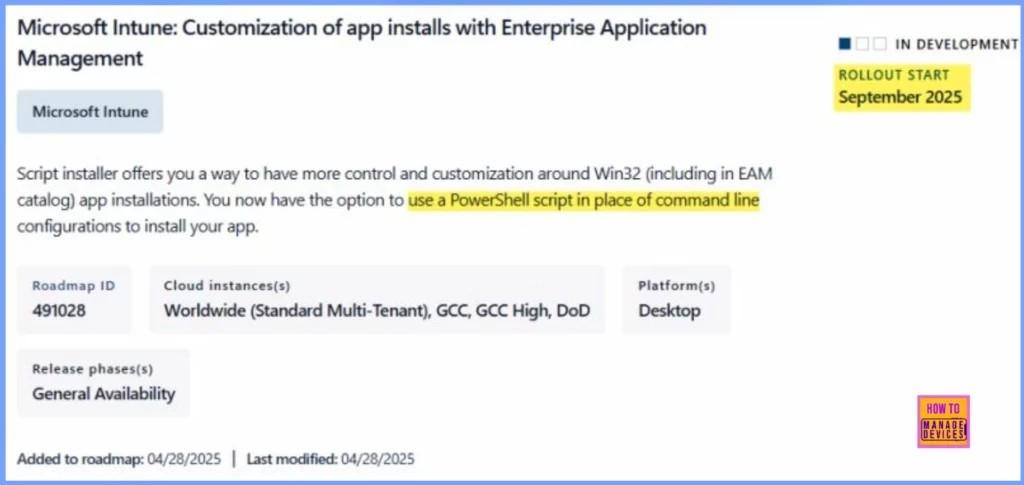
Starting September 2025, administrators will be able to use PowerShell scripts in place of traditional command-line configurations. This new Script installer feature enables more control over installation logic, prerequisites, error handling, and environment-specific configurations.
Whether managing apps from the EAM catalog or deploying custom Win32 packages, this update helps streamline complex deployments while aligning smoothly with existing Intune, Entra ID, and SCCM environments.
This post explains how you can customize Win32 app installations in Microsoft Intune using PowerShell scripts. With the new Script installer option in Enterprise Application Management, IT admins no longer need to rely only on command lines.


Table of Contents
What is this Update About?
Microsoft Intune is introducing a new Script installer option for Win32 app deployments, it including those in the Enterprise Application Management (EAM) catalog.
What Does the Script Installer Do?
It allows IT admins to use PowerShell scripts instead of command-line commands to install Win32 apps. This provides more flexibility and control over the installation process.
When will It be Available?
This feature is currently in development, with rollout planned to begin in September 2025 across Worldwide, GCC, GCC High, and DoD cloud instances, for desktop platforms.
Where is the Script Installer Feature Available?
The Script installer option is available when deploying Win32 apps through the Enterprise Application Management (EAM) workflow in Microsoft Intune.
What Does Enterprise Application Management (EAM) Do?
EAM simplifies the lifecycle management of both third-party and custom in-house applications—covering deployment, updates, and retirement.
How Does the Script Installer Enhance EAM?
By allowing PowerShell-based installations, the Script installer makes app deployments smarter and more flexible, enabling advanced customization, logic handling, and automation during installation.
How to Customize Win32 App Installations with PowerShell Scripts in Microsoft Intune
The Script installer is a new feature within Microsoft Intune that allows IT admins to use PowerShell scripts instead of traditional command-line instructions to install Win32 apps, including those available in the Enterprise Application Management (EAM) catalog.
| Property | Details |
|---|---|
| Roadmap ID | 491028 |
| Cloud Instance(s) | Worldwide (Standard Multi-Tenant), GCC, GCC High, DoD |
| Platform(s) | Desktop |
| Release Phase(s) | General Availability |
| Rollout Start | September 2025 |
- Intune Policy Assignment Classification Easy Secrets of using Graph API with PowerShell
- Intune LOB and Win32 Apps Together Co-Exist with New Windows Autopilot
- Network Requirements for PowerShell Scripts and Win32 Apps Coming to the Microsoft Intune
Overcoming Command-Line Limitations with PowerShell in Intune Win32 App Deployments
Previously, when deploying Win32 apps through Intune, admins had to rely on static command-line configurations to perform installations. This method worked fine for simple deployments, but it became limiting when dealing with:
- Conditional installation logic (e.g., only install if a certain app isn’t already present)
- Pre-install checks or prerequisite handling
- Custom system tweaks (like modifying registry keys or checking system architecture)
- Logging and error tracking
With the Script installer, these scenarios can now be handled easily using PowerShell, which is far more versatile than command-line strings.
Key Capabilities of using PowerShell Scripts for App Installations in Intune
Let’s discuss the key capabilities of using PowerShell scripts for app installation in Intune. The below list shows the Key Capabilities of using PowerShell Scripts for App Installations in Intune.
- Customize how apps are installed based on the device’s current setup, such as installed software or system variables.
- Identify and manage installation errors effectively using scripted logic, reducing the chances of incomplete or failed installs.
- Capture installation details in specified locations or route logs to a centralized system for auditing and troubleshooting.
- Validate device compatibility by checking system specs, OS version, or required components before running the installer.
- Perform necessary actions after the install, like modifying settings, cleaning up leftover files, or initiating follow-up processes.
Need Further Assistance or Have Technical Questions?
Join the LinkedIn Page and Telegram group to get the latest step-by-step guides and news updates. Join our Meetup Page to participate in User group meetings. Also, Join the WhatsApp Community to get the latest news on Microsoft Technologies. We are there on Reddit as well.
Resources
Microsoft 365 Roadmap | Microsoft 365
Author
Anoop C Nair has been Microsoft MVP from 2015 onwards for 10 consecutive years! He is a Workplace Solution Architect with more than 22+ years of experience in Workplace technologies. He is also a Blogger, Speaker, and Local User Group Community leader. His primary focus is on Device Management technologies like SCCM and Intune. He writes about technologies like Intune, SCCM, Windows, Cloud PC, Windows, Entra, Microsoft Security, Career, etc.


Discussion