






Microsoft Plans to Retire Device Metadata on Windows by End of 2025
Microsoft Plans to Retire Device Metadata on Windows by End of 2025. Microsoft is phasing out the use of Device Metadata in Windows, starting May 2025. This change affects how Windows shows device names, icons, and support info.
If you are involved in managing drivers or device settings, now is the time to start switching to the new method. Device metadata is basic information about the hardware connected to your Windows computer like the device name, manufacturer, model, and drivers.
Since Windows 7, Windows has used device metadata packages to help recognize and display devices properly. These packages are stored in special files called .devicemetadata-ms, which include XML files with the device details.
In this post, you will learn about Microsoft’s plan to retire Device Metadata in Windows by the end of 2025. Device Metadata is the information Windows uses to show a device’s name, icon and support details. Microsoft will stop using this older system and switch to the newer Driver Package Container Metadata.

Table of Contents
What is Happening to Device Metadata?
Microsoft has deprecated Device Metadata and plans to remove it in a future Windows update. The current metadata format will no longer be supported.
When will Device Metadata be Removed?
The deprecation was announced in May 2025, and removal will happen in a future Windows release.
Will My Existing Device Metadata Packages Be Removed?
No, your existing device metadata packages will stay on your machine and will not be removed automatically. They will remain intact unless you choose to delete them manually.
Microsoft Plans to Retire Device Metadata on Windows by End of 2025
When you upgrade to Windows 11 version 24H2 or a later release, your existing device metadata packages will be preserved during the upgrade process. They will remain intact on your system and continue to function as before, without any issues or the need for reinstallation.
| Feature | Details and Mitigation | Deprecation Announced |
|---|---|---|
| Device metadata | Device metadata is deprecated and will be removed in a future release of Windows. | May 2025 |
- How to Prepare for VBS Enclave Support Ending on Windows 11 23H2 and Windows Server 2022
- Time to Migrate Windows UWP Map Control and Windows Maps Platform APIs for Windows Client Support Ending Soon
- How to Configure Offline Maps Download Over Metered Connection Policy using Intune
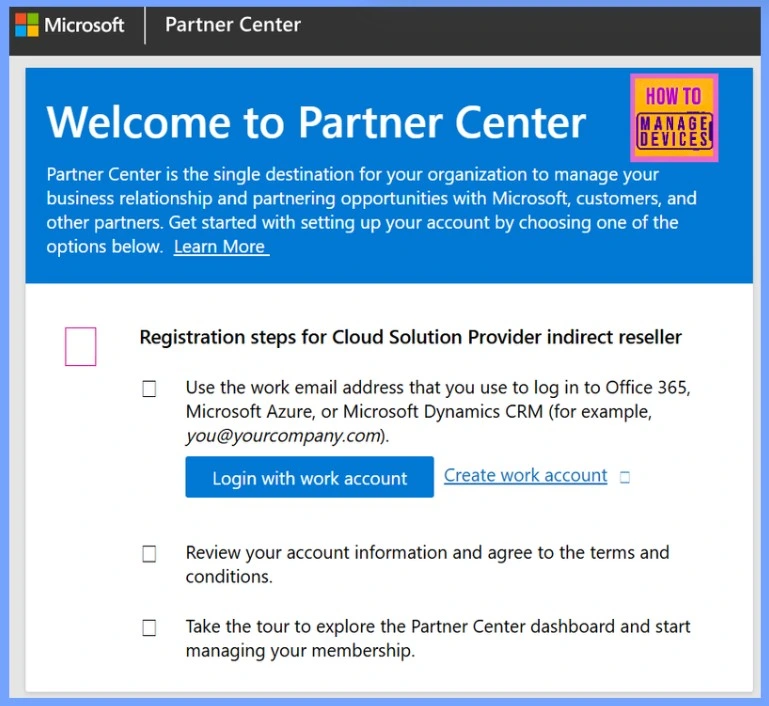
How to View and Download Previously Signed Device Metadata Packages as a Microsoft Partner
Let’s discuss how to view and download previously signed device metadata packages as a Microsoft partner. To view and download your previously signed device metadata packages, follow these steps.
- Sign in to your Partner Center account.
- Navigate to the Device Metadata section.
- Find the package under the Previously Signed Device Metadata area.
- Click the down arrow next to the package to expand the details.
- Click Download signed file to save it to your system.
Driver Package Container Metadata
Instead of Device Metadata, you should use Driver Package Container Metadata. This new system bundles driver files, metadata, and device details into a modern, unified package for Windows, streamlining the way device information is managed and deployed.
Driver Package Container Metadata allows OEMs and IHVs to customize how their physical devices appear in Windows. It provides control over details like:
- Manufacturer name
- Device model name
- Supported functions
- A photo-realistic device icon
Without this metadata, Windows tries to guess this information using internal logic, which may not display the device as the OEM or IHV intends. This feature is supported starting with Windows 11 version 24H2 (KB5052093, Build 26100.3323). If installed on older versions, the driver package will install, but the metadata won’t be applied.
- Prevent All Accessing Dangerous Websites Policy using Intune
- Turn off Data Execution Prevention for Explorer using Intune
Need Further Assistance or Have Technical Questions?
Join the LinkedIn Page and Telegram group to get the latest step-by-step guides and news updates. Join our Meetup Page to participate in User group meetings. Also, Join the WhatsApp Community to get the latest news on Microsoft Technologies. We are there on Reddit as well.
Resources
Deprecated features in the Windows client | Microsoft Learn
Author
Anoop C Nair has been Microsoft MVP from 2015 onwards for 10 consecutive years! He is a Workplace Solution Architect with more than 22+ years of experience in Workplace technologies. He is also a Blogger, Speaker, and Local User Group Community leader. His primary focus is on Device Management technologies like SCCM and Intune. He writes about technologies like Intune, SCCM, Windows, Cloud PC, Windows, Entra, Microsoft Security, Career, etc.




Discussion