






How to Detect Android Enterprise Rooted Devices using Intune Compliance Policy
Let’s discuss how to Detect Android Enterprise Rooted Devices using Intune Compliance Policy. Microsoft going to launch new feature on Android devices called Enterprise Rooted Device. This feature helps to detect if a corporate-owned Android Enterprise device has been rooted.
Did you know what is Enterprise Rooted Device? An Enterprise Rooted Device refers to an Android device used in a corporate environment that has been rooted. It allows users to bypass security restrictions, install custom software, and make deep system changes.
Microsoft dedicated to bring new features on Android Enterprise Device. Recently one feature introduced called Custom Naming Templates for Android Enterprise Devices in Intune. This feature allow administrators to define specific naming conventions for corporate-owned Android devices during enrollment.
Like this you can Detect Android Enterprise Rooted Devices while this feature is available. This is a developting feature that will coming soon on Intune. In this blog post I will help you to know more about Detect Android Enterprise Rooted Devices.

Table of Contents
Detect Android Enterprise Rooted Devices using Intune Compliance Policy
With this feature, detect if a corporate-owned Android Enterprise device is rooted. If Microsoft Intune detects that a device is rooted, you can have it marked as noncompliant. The below screenshot shows applicable OS and platform.
| OS | Platform |
|---|---|
| Android | Corporate-Owned Android Enterprise Device |
- Learn How to Streamline Android OS Updates using Intune
- Set up Factory Reset Protection on Android Corporate Devices using Intune
- How to Simplify Shared Android Devices with Entra Shared Mode and Intune
How to Detect Rooted Corporate-Owned Android Enterprise Devices
After this feature available you can easily Detect Rooted Corporate-Owned Android Enterprise Devices using Intune. Using Intune compliances Policy you can easily detect rooted devices in Android. The following are the steps to access this feature.
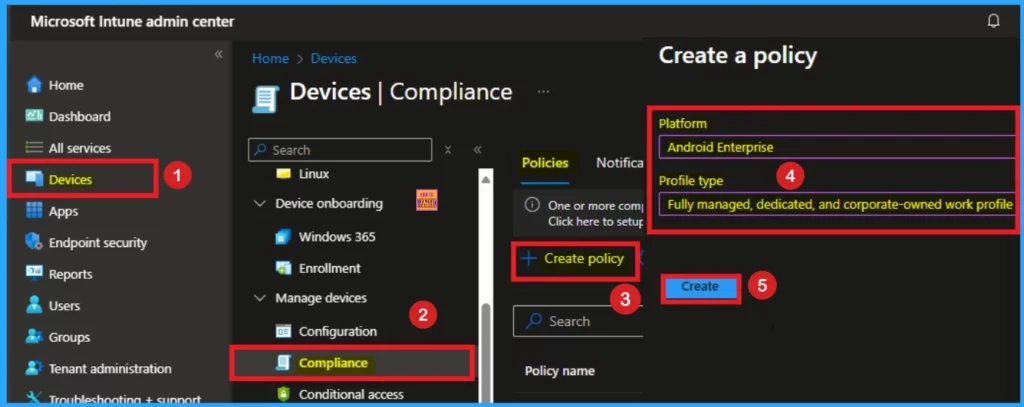
- Open Microsoft Intune Admin center
- Navigate to Devices > Compliance policies.
- Click Create policy and select Android Enterprise as Platform
- Select Fully managed, dedicated, and corporate-owned work profile as Profile Type
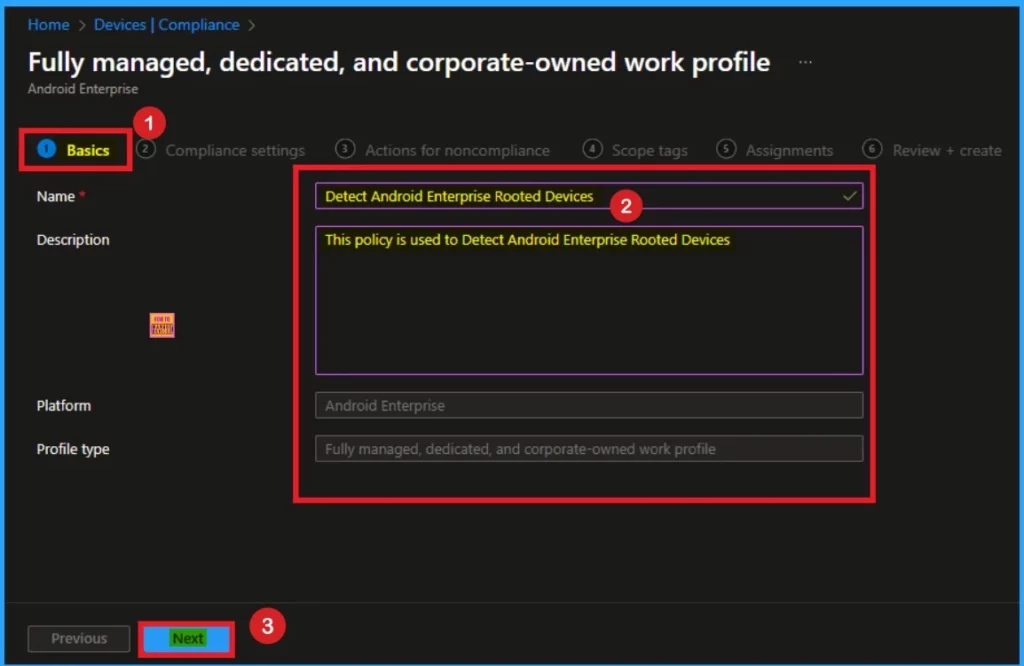
Basic Tab
On the Basic Tab Enter the Name and Description to identify the compliance policy to detect Android Enterprise Rooted Devices. After adding this details you can click on the Next button.
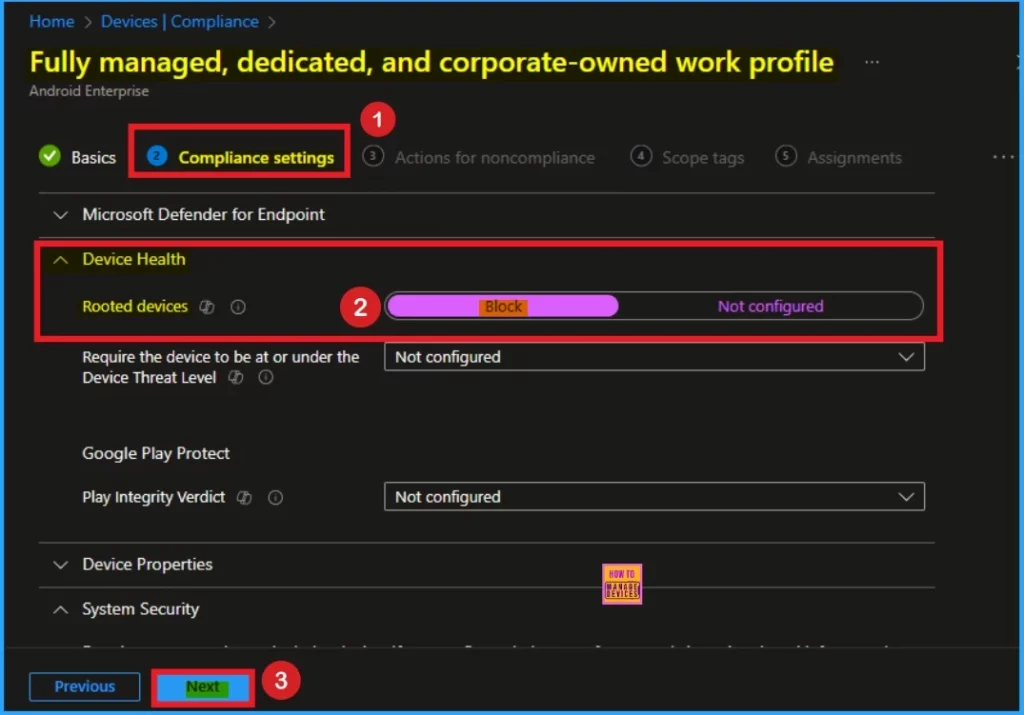
Compliance Settings Tab
On the Compliance Settings tab you can easily detect Rooted devices. Click on the drop down arrow near Device Health. Block the toggle near Rooted Devices and Click on the Next Button.
Actions For Non-Compliances
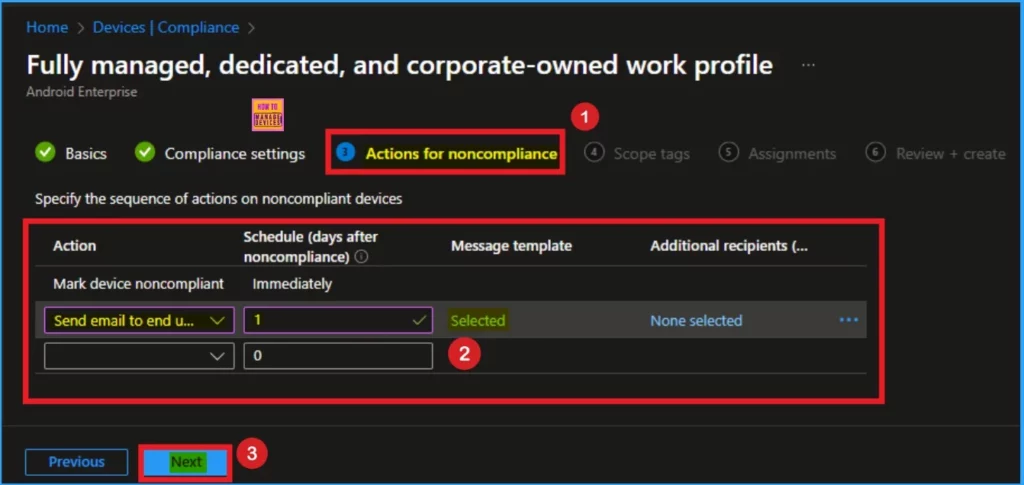
On the Actions For Non-Compliances you can set Noncompliance actions. You can Notify users or block users with this feature. Here I choose Send Email to End User option. Here Message Template is selected as Noncompliance Notifications for Email. Click on the Next button.
Need Further Assistance or Have Technical Questions?
Join the LinkedIn Page and Telegram group to get the latest step-by-step guides and news updates. Join our Meetup Page to participate in User group meetings. Also, Join the WhatsApp Community to get the latest news on Microsoft Technologies. We are there on Reddit as well.
Resources
Detect rooted corporate-owned Android Enterprise devices
Author
Anoop C Nair has been a Microsoft MVP for 10 consecutive years from 2015 onwards. He is a Workplace Solution Architect with more than 22+ years of experience in Workplace technologies. He is a Blogger, Speaker, and Local User Group Community leader. His primary focus is on Device Management technologies like SCCM and Intune. He writes about technologies like Intune, SCCM, Windows, Cloud PC, Windows, Entra, Microsoft Security, Career, etc.



Discussion