






How to Troubleshoot SyncML 500 Errors in Microsoft Intune Compliance Policy Reports
Today we are discussing on a new topic related How to Troubleshoot SyncML 500 Errors in Microsoft Intune Compliance Policy Reports. As you all know, in Intune errors are very common, especially SyncML(500) Error that especially happens in the compliance policy.
A compliance policy is like a rules that a company sets to keep its devices safe and secure. These policies include requirements such as having a device PIN or password, enabling disk encryption. When setting up compliance rules for Windows devices, IT admins might sometimes see an error code called 2016345612 SyncML(500).
This is a common issue but it is very problematic. This usually happens under the firewall settings. The SyncML(500) error happens when a Windows device tries to check in with Microsoft Intune to report its security status, but something goes wrong during the process.
This is usually caused by a small issue with the system not being ready yet. This error often appears in the Firewall section of the report because the device couldn’t tell if the firewall was turned on at the time it was checked. So in this post lets discuss a small overview of this issue.

Table of Contents
How to Troubleshoot SyncML 500 Errors in Microsoft Intune Compliance Policy Reports
Above, we discussed a lot of things about Microsoft Intune Compliance Policies Troubleshooting SyncML(500) Error. The SyncML(500) error is a common and temporary issue that can show up in Intune reports, usually under the Firewall section.
- It happens when a device is starting up and the Intune service starts working before the firewall or antivirus has fully turned on.
- How to Detect Android Enterprise Rooted Devices using Intune Compliance Policy
- Check New Intune Device Compliance Policy Report
- Intune Compliance Report for Device Settings
SyncML(500) Error
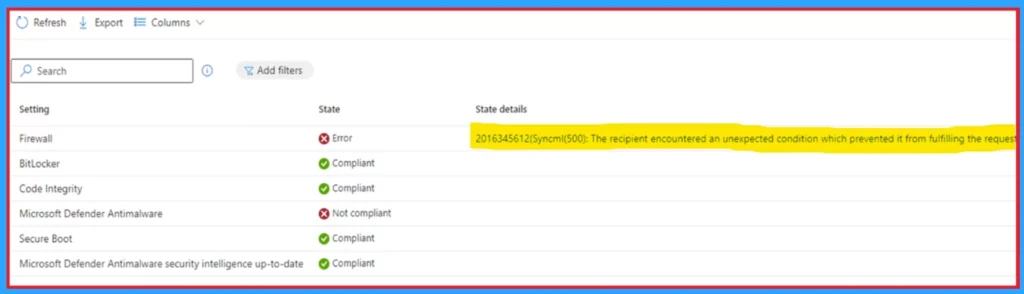
In the below screenshot you can see that Firewall state s is error and in the status dettails it indicating the SyncML(500) Error such as “2016345612(Syncml(500): The recipient encountered an unexpected condition which prevented it from fulfilling the request)”.
This issue is very common above discuss that this happens under the Firewall always. Because device tries to report its status to Intune before the firewall is fully running. When system services such as the firewall or antivirus may not have finished loading, but the Intune agent has already started checking compliance. In this situation the report shows the SyncML(500) Error.
How to Solve the Issue
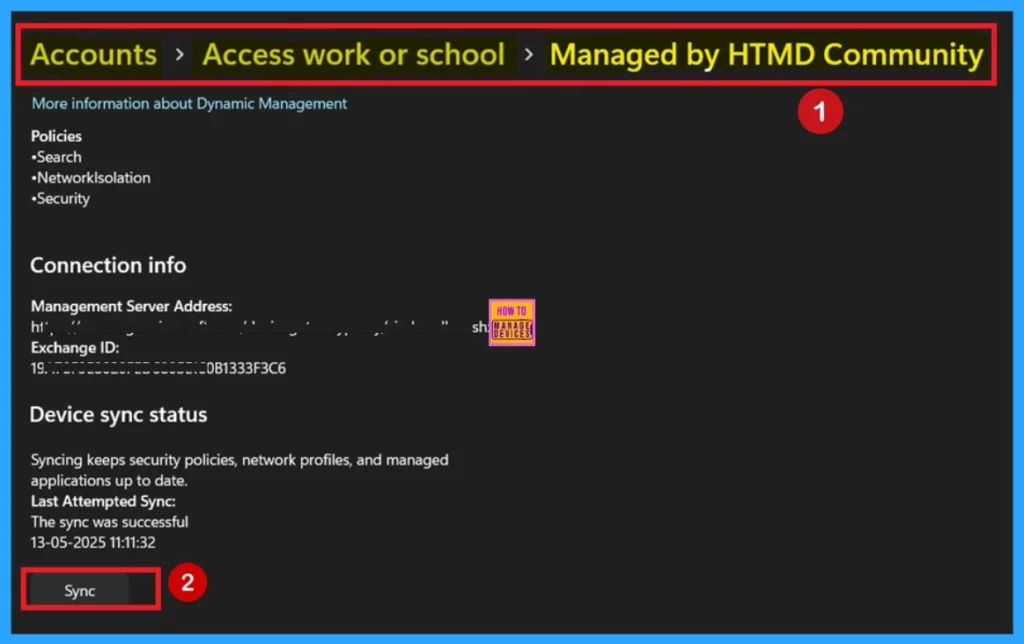
We clearely mentioned that this is very common issue and iyt can be solved very easily and always rember that This error does not affect device compliance. Intune gives a 7-day period for the device to sync and fix the issue. First go to Settings > Accounts > Access work or school > Your account > Info > Sync.
This will force the device to sync with Intune and solve the error.
| Other Fixing Methods | Info |
|---|---|
| Using the Intune Company Portal app | You can also open the app and run a compliance check from there. |
| Admin method (remote sync) | IT admins can go to the Intune admin center, find the device under Devices > Windows > select the device > Overview, and click Sync to do it remotely. |
Need Further Assistance or Have Technical Questions?
Join the LinkedIn Page and Telegram group to get the latest step-by-step guides and news updates. Join our Meetup Page to participate in User group meetings. Also, Join the WhatsApp Community to get the latest news on Microsoft Technologies. We are there on Reddit as well.
Reference
Understanding Microsoft Intune compliance policies reporting SyncML(500) errors
Author
Anoop C Nair has been Microsoft MVP for 10 consecutive years from 2015 onwards. He is a Workplace Solution Architect with more than 22+ years of experience in Workplace technologies. He is a Blogger, Speaker, and Local User Group Community leader. His primary focus is on Device Management technologies like SCCM and Intune. He writes about technologies like Intune, SCCM, Windows, Cloud PC, Windows, Entra, Microsoft Security, Career, etc.


Discussion