






Quick and Simple FAQ Guide to Windows 11 Client Hotpatching
Hi, today we are discussing Quick and Simple FAQ Guide to Windows 11 Client Hotpatching. Hotpatch for Client Know Better Eligibility and availability of Hotpatch Updates. As we all know the importance oh Hotpatch nowadays. You know the first hotpatch update is now ready for Windows 11 Enterprise and Education version 24H2.
With the Hotpatching will help your Device get important security updates without needing to restart. This procedure and these updates work just like regular security updates, but they’re applied in the background directly in memory, so users aren’t interrupted so it won’t restart the system.
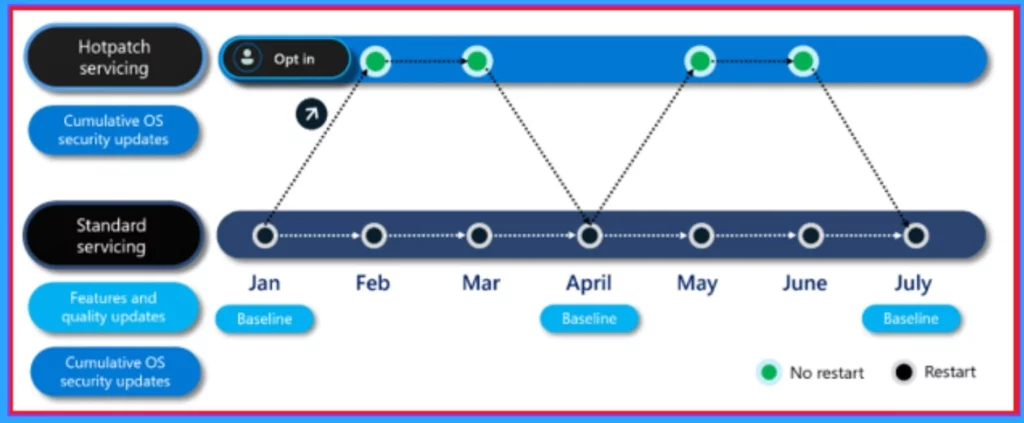
Hotpatch updates take 3-month cycle for every update and you know every 3 months your device gets a big update called a baseline update, and you’ll need to restart your computer once for it to install. In the next 2 months, your device will get small hotpatch updates in that cases we dont need to restart our sysytem.
When we are using Hotpatch we always know about that our device must be using the Windows 11 Enterprise and Education version 24H2 managed in the MS Intune. So in this post lets discuss some basic important knowledge about the Hotpatch.

Table of Contents
What are Hotpatch Updates?
What is Standard Updates?
What is the Hotpatch Update Cycle?
When will Hotpatch Updates for Windows Client become Available?
What Eligibility Requirements Do I Need To Meet To Access And Manage Hotpatching For Windows Client?
What if Some Devices In My Hotpatch Policy Aren’t Eligible For Hotpatch Updates?
How is Hotpatching Different For Windows 11 Enterprise, Version 24H2 And Windows Server 2025?
Can I Use Hotpatch Updates on Arm64 Devices?
Yes you can, but it’s in preview. You need to turn off CHPE to get hotpatch updates on Arm64 devices.
Is the Requirement to Disable CHPE on Arm64 Devices Temporary?
What’s The Impact of Disabling CHPE On End-User Experience on Arm64 Devices?
What Are The Best Ways To Disable CHPE On Arm64 Devices?
How Can I Tell Which Of My Devices Installed A Hotpatch Update?
Devices that get a hotpatch update will show a special KB number and a message like The latest security update was installed without a restart in Windows Update.
What If I Restart A Device After Receiving a Hotpatch Update?
A device remains on the hotpatch update KB/OS version after a restart and won’t receive new features until the next quarterly cumulative baseline update as part of the regular servicing track. It means It will keep the hotpatch update. It won’t get new features until the next full update in the baseline month.
What If I Rely on Regular Restarts to Reset and Refresh Systems, Maintain System Performance, or Reduce Support Calls?
You can still restart anytime you want. Hotpatching just gives you more flexibility by not requiring a restart right away. With hotpatching, you can keep your usual restart routine while enjoying faster compliance. It ensures critical updates are applied quickly, giving you the flexibility to plan restarts at your convenience, without the urgency of immediate patching.
Do Hotpatch Updates Apply to Common Windows OS Binaries Loaded in Third-Party Processes or Only Microsoft Processes?
How Can I Find Out If a Hotpatch Update Was Applied to The Specific DLL?
Check the memory dump using tools like Process Explorer. Some DLLs will show if they’ve been hotpatched.
Are There Kernel-Mode Hotpatch Updates?
What Does A Failure To Apply Hotpatch Look Like?
It looks like a regular update failure and its like low disk space or download issues. Check system logs for “hotpatch” errors.
Can Users Switch Between Hotpatch And Standard Windows Monthly Updates?
What Does Hotpatching Look Like From A Forensic Perspective?
Can I Get Security Alerts Through Event Tracing For Windows About Hotpatch Events?
Do I Need To Test Hotpatch Updates If I Already Test Monthly Updates?
Hotpatch updates are scheduled for testing eight times a year, while standard monthly updates should be tested twelve times annually. Always remeber that no hotpatch updates are released in January, April, July, or October, so testing during those months applies only to standard updates.
Quick and Simple FAQ Guide to Windows 11 Client Hotpatching
Above we discuss an overview of Hotpatch and its important to Know About Hotpatch Update Cycle. Devices running Windows 11 version 24H2 that are set up to use hotpatch updates follow a quarterly update cycle. So, devices stay protected with security updates every month, but only need to restart once every 3 months when they get the full update with new features.
| Hotpatch Update Cycle | Info |
|---|---|
| Baseline month | Every 3 months (January, April, July, October), they get a full update that includes all the latest security fixes, new features, and improvements. This update requires a restart to complete. |
| Subsequent two months | In the two months after that, devices receive hotpatch updates. These are smaller updates with just security fixes, and they don’t need a restart. |
- New Icon for Microsoft Intune Along with Hotpatch EPM Autopatch and macOS Highlights
- Learn How Windows 11 Hotpatching Works using Windows Autopatch and Intune
- Feature Comparison of Windows Server 2025 Vs 2022 Vs 2019 Hotpatching High Security and Faster Storage
- Configure Automatic Remediation for Windows Hotpatch Devices using Intune
How to Configure Devices to Receive Hotpatch Updates
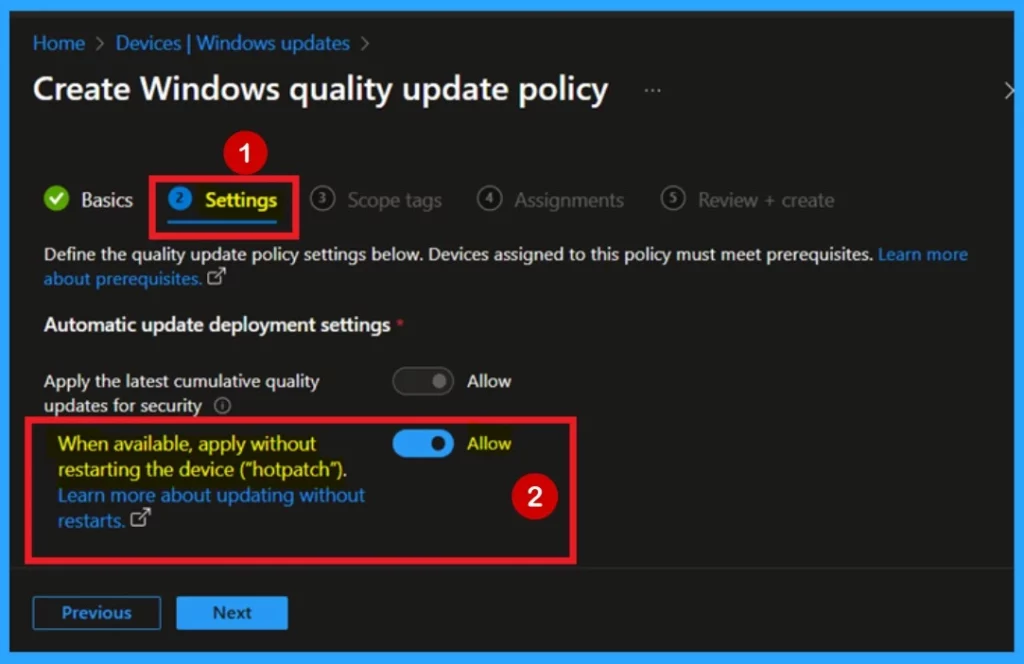
If your devices are eligible for hotpatch updates, you can easily enable or disable automatic deployment through Windows Autopatch. Just go to the Microsoft Intune admin center, then navigate to Devices > Windows updates > Create Windows quality update policy > Basics>Settings.
In the Automatic update deployment settings, find the option labeled “When available, apply without restarting the device (hotpatch)” and switch it to Allow. To access this hotpatch option, you’ll need to either create a new quality update policy or use an existing one, and make sure your device groups are included in that policy.
Need Further Assistance or Have Technical Questions?
Join the LinkedIn Page and Telegram group to get the latest step-by-step guides and news updates. Join our Meetup Page to participate in User group meetings. Also, Join the WhatsApp Community to get the latest news on Microsoft Technologies. We are there on Reddit as well.
Reference
Hotpatch for client: Frequently asked question
Author
Anoop C Nair has been Microsoft MVP for 10 consecutive years from 2015 onwards. He is a Workplace Solution Architect with more than 22+ years of experience in Workplace technologies. He is a Blogger, Speaker, and Local User Group Community leader. His primary focus is on Device Management technologies like SCCM and Intune. He writes about technologies like Intune, SCCM, Windows, Cloud PC, Windows, Entra, Microsoft Security, Career, etc.


Discussion