






MEMCM ConfigMgr 1912 New TP Variables Collect Client Logs
Let’s see the features introduced in the MEMCM ConfigMgr 1912 Technical Preview version.
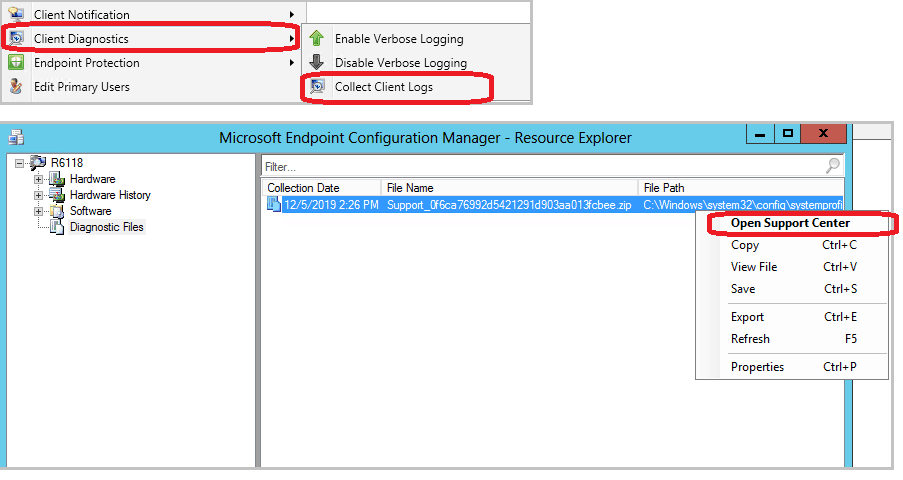
The recent update (1912) for the Technical Preview Branch of Microsoft Endpoint Configuration Manager introduces a new feature that allows you to initiate a client notification action from the Configuration Manager console to prompt a client device to upload its client logs to the site server.
These logs are returned to the site using an on-demand software inventory file collection. Additionally, Resource Explorer provides various options for accessing the collected log files.
| Index |
|---|
| SCCM CMPivot Search |
| Collect the SCCM Client Logs |
| ConfigMgr 1912 – Management Insights Rules |
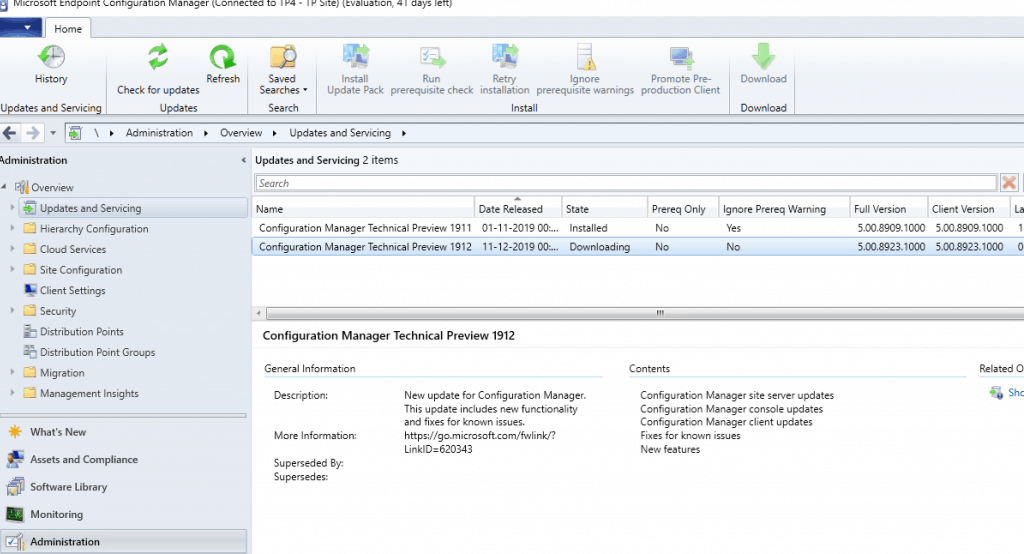
- ConfigMgr 1912 Technical Preview Full Version = 5.00. 8923.1000 (MEMCM production version numbers anoopcnair.com/sccm-version-numbers-build-number-client/)
- ConfigMgr 1912 Technical Preview Client Version = 5.00.8923.1000
What are the New Task Sequence Enhancements of MEMCM 1912 TP?
MEMCM 1912 TP comes with Bootstrap, a task sequence immediately after client registration. The following are new task sequence variables:
1. TSSecureBoot
> NA: The associated registry value doesn’t exist, which means the device
doesn’t support a secure boot
> Enabled: The device has secure boot enabled
> Disabled: The device has a secure boot disabled
2. SMSTSRunCommandLineAsUser
> True: User context
> False: Any further Run Command Line steps run in the context that you
configured on the step
3. SMSTSRunPowerShellAsUser
> True: User context
> False: Any further Run Command Line steps run in the context that you
configured on the step
SCCM CMPivot Search
You can search CMPivot entities and see entity properties similar to Task Sequence search options.


Collect the SCCM Client Logs
Collect the SCCM client logs from the SCCM collection.
- Go to either the Devices or Device Collections node in the Assets and Compliance workspace.
- Right-click on a device or a device collection.
- Select Client Diagnostics, then select Collect Client Logs.
ConfigMgr 1912 – Management Insights Rules
New management insight rules from Microsoft Services. I don’t know exactly the significance of Microsoft services in this context. More details about Management Insights.
Following are the new rules included in the 1912 version of MEMCM.
- Reduce the number of applications and packages on distribution points
- Update all sites to the same version
- Heartbeat Discovery is disabled
- Long-running collection queries enabled for incremental updates
- Secondary site installation issues
- Active Directory System Discovery is configured to run too frequently
- Active Directory Security Group Discovery is configured to run too frequently
- Active Directory User Discovery is configured to run too frequently
- Collections limited to All Systems or All Users
Resources
We are on WhatsApp. To get the latest step-by-step guides and news updates, Join our Channel. Click here –HTMD WhatsApp.
Author
Anoop C Nair is Microsoft MVP! He is a Device Management Admin with more than 20 years of experience (calculation done in 2021) in IT. He is a Blogger, Speaker, and Local User Group HTMD Community leader. His main focus is on Device Management technologies like SCCM 2012, Current Branch, and Intune. He writes about ConfigMgr, Windows 11, Windows 10, Azure AD, Microsoft Intune, Windows 365, AVD, etc.




Discussion