






Deploy Microsoft Edge Patches with SCCM Software Updates|ConfigMgr Part 1
Let’s see how to enable and deploy Microsoft Edge patches with Configuration Manager Software Updates. I have already published a post that explains how to Deploy Microsoft Edge Browser (client installation) to Windows 10 devices.
Microsoft released the stable version of Microsoft Edge (Chromium version) on 15 January 2020. It also published patches for the browser. This post will show installing Microsoft Edge patches on Windows 10 devices.
The SCCM team created an out-of-the-box experience for creating an SCCM application for a new Edge browser (Chrome-based) deployment (Deploy Microsoft Edge Browser).
The new Edge browser is an independent application installed on Windows 7 and Windows 10 devices, similar to the Google Chrome or Safari browsers.

| Index |
|---|
| Full Synchronize Software Updates |
| Enable Microsoft Edge Patches |
| Full WSUS Sync – Edge Patches |
| Next… |
NOTE! – Are you looking for Microsoft’s recommended policies for Microsoft Edge? If so, you can refer to the following URL https://www.microsoft.com/en-us/edge/business/download
Full Synchronize Software Updates
Don’t you have Microsoft Edge product software update under products in Software Update Point Component properties and WSUS? Here are the steps to get it.
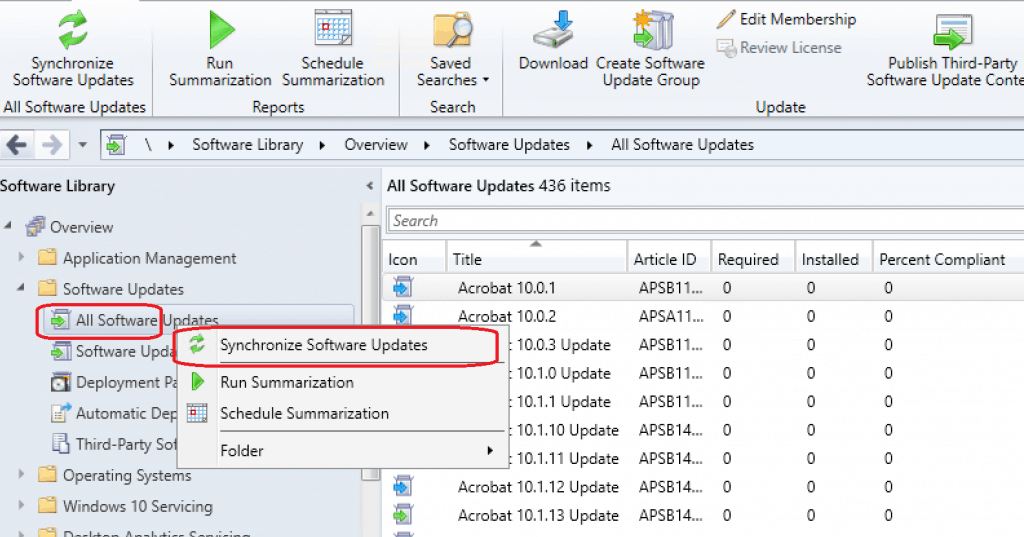
- Navigate to \Software Library\Overview\Software Updates\All Software Updates
- Right-click on the All Software Updates node and select “Synchronize Software Updates.“
- Click on Yes to initiate the WSUS full Sync.
- Confirm whether the Sync is completed successfully via WsyncMgr.log
Enable Microsoft Edge Patches
Once the WSUS sync is completed successfully, you can follow the below steps to enable Microsoft Edge patches.
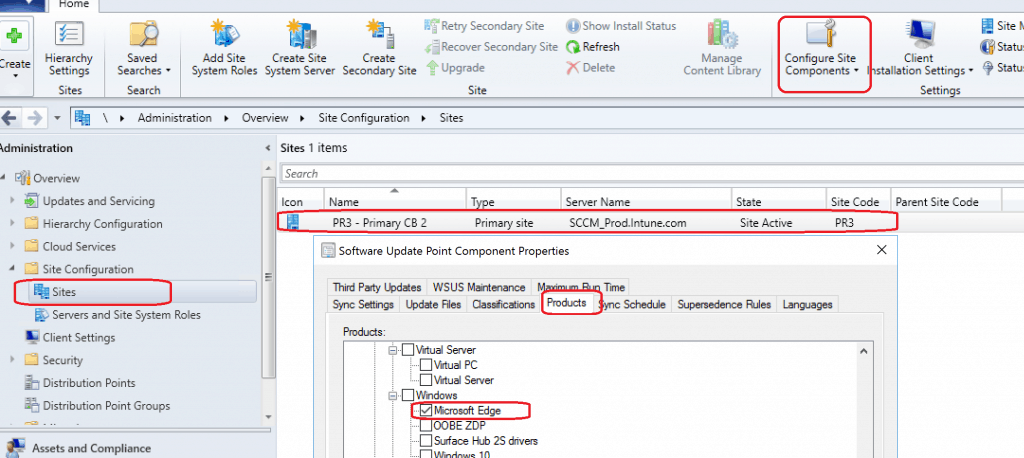
- Navigate to \Administration\Overview\Site Configuration\Sites
- Click on Site “PR3 – Primary CB2” – Configure Site Components –Software Update Point Component
- Click on Products
- Select Microsoft Edge from the Windows group of products
- Click OK
Full WSUS Sync – Edge Patches
To complete the process, return to “All Software Updates” and initiate a FULL WSUS Sync!
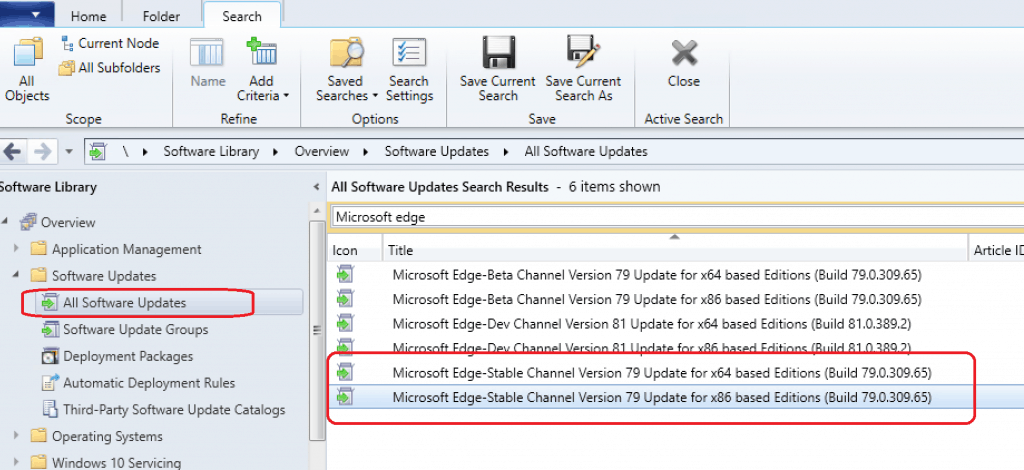
You can see all Microsoft Edge browser patches/updates once the WSUS sync is completed.
The following are the Microsoft Edge stable version updates delivered through SCCM/WSUS! You can also verify from “\Software Library\Overview\Microsoft Edge Management\All Microsoft Edge Updates.“
- Microsoft Edge-Stable Channel Version 79 Update for x64-based Editions (Build 79.0.309.65)
- Microsoft Edge-Stable Channel Version 79 Update for x86-based Editions (Build 79.0.309.65)
The following are some WSyncMgr.log entries to confirm the synchronization of Microsoft Edge metadata.
Synchronizing update 8bd626e6-e1ce-4531-919f-b007ab210d14 - Microsoft Edge-Stable Channel Version 79 Update for x64 based Editions (Build 79.0.309.65)
Synchronizing update ad975267-7648-4700-b40f-8d62ee9490a2 - Microsoft Edge-Stable Channel Version 79 Update for x86 based Editions (Build 79.0.309.65)
Synchronizing update 1c50a3ad-eb26-4934-a69f-c829d145e829 - Microsoft Edge-Dev Channel Version 81 Update for x86 based Editions (Build 81.0.389.2)
Synchronizing update dbb5401f-aec3-4d43-a8d4-17ffccf609a0 - Microsoft Edge-Dev Channel Version 81 Update for x64 based Editions (Build 81.0.389.2)
Synchronizing update 30d1c7d8-3954-4d0d-9ef8-523b179782b3 - Microsoft Edge-Beta Channel Version 79 Update for x64 based Editions (Build 79.0.309.65)
Synchronizing update 1797ed85-34f7-4fbd-9376-43aeaaabc62f - Microsoft Edge-Beta Channel Version 79 Update for x86 based Editions (Build 79.0.309.65)
Next…
In Part 2, I will cover a step-by-step client-side process guide to deploying Microsoft Edge patches with Configuration Manager (MEMCM).
Until next time, you can refer to SCCM Patching Software Update Process Guide to deploy Microsoft Edge patches to Windows devices.
Resources
- Download the stable version of Microsoft Edge (Chromium)
- Deploy Google Chrome Update with SCCM Step-by-Step Guide
- SCCM Patching Software Update Process Guide
- SCCM Third-Party Software Updates Setup Step-by-Step Guide Post 1
- Microsoft Edge Chromium Patching Software Update Process
- New Microsoft Edge Browser Deployment with Intune MEM
We are on WhatsApp. To get the latest step-by-step guides and news updates, Join our Channel. Click here –HTMD WhatsApp.
Author
Anoop C Nair is Microsoft MVP! He is a Device Management Admin with more than 20 years of experience (calculation done in 2021) in IT. He is a Blogger, Speaker, and Local User Group HTMD Community leader. His main focus is on Device Management technologies like SCCM 2012, Current Branch, and Intune. He writes about ConfigMgr, Windows 11, Windows 10, Azure AD, Microsoft Intune, Windows 365, AVD, etc.




Nice article, but where is the part 2 for Edge updates?