






IIS Troubleshooting Tips for SCCM Admins|MP DP IIS Error Codes
It is really quick to segregate the IIS HTTP Error Codes, which will be useful when troubleshooting SCCM/ConfigMgr/MEMCM Management Point and Distribution Point – server-related communication issues. In this post, you will find more IIS Troubleshooting Tips.
IIS is integral to SCCM/Configuration Manager server roles like MP, DP, and SUP. Most of the traditional SCCM client and server communication. The most modern touch is via the fast channel and Message Processing Engine (MSP).
- ConfigMgr Best Practices Related to IIS for SCCM SUP WSUS Setup
- Configuration Manager Default IIS Configurations DP Troubleshooting Issues
| Index |
|---|
| IIS Troubleshooting Tips for SCCM Admins| MP DP IIS Error Cheat Codes |
| Informational |
| Success |
| Redirection |
| Client Error |
| Server Error |
IIS Troubleshooting Tips for SCCM Admins| MP DP IIS Error Cheat Codes
The following are the IIS cheat codes I recently saw on Twitter. I thought this made full sense and wanted to share it in this post—all the credits go to the publisher of this slide.

1. Informational
Request received continuing process.

This class of status code indicates a provisional response, consisting only of the status line and optional headers, and is terminated by an empty line.
Since HTTP/1.0 did not define any 1xx status codes, servers must not send a 1xx response to an HTTP/1.0 client except under experimental conditions.
2. Success
This class of status codes indicates the action requested by the client was received, understood, accepted, and processed successfully.
Call to HttpSendRequestSync succeeded for port 80 with status code 200, text: OK  $$<SMS_MP_CONTROL_MANAGER>
Http test request succeeded.~  $$<SMS_MP_CONTROL_MANAGER>
CCM_POST /ccm_system/request - 80 - 10.10.10.43 ccmhttp 200 0 0 295
The HttpSendRequestSync call for port 80 succeeded with a status code of 200. The text response was “OK.” The HTTP test request also succeeded. (IIS Troubleshooting Tips for SCCM Admins|MP DP IIS Error Codes)
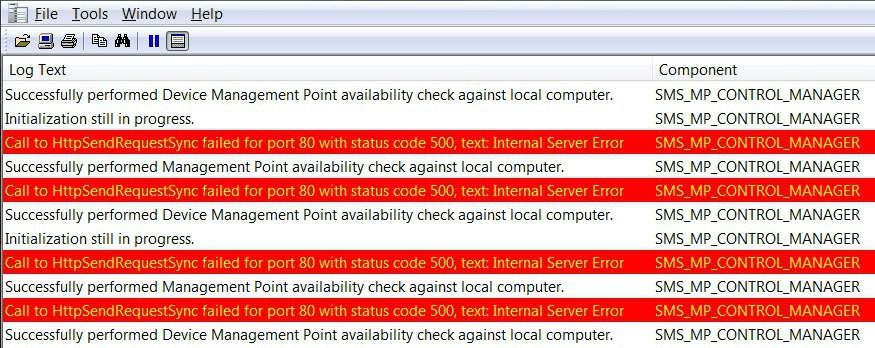
| Log Text | Component |
|---|---|
| Successfully performed Device Management Point availability check against local computer | SMS_MP_CONTROL_MANAGER |
| Initialization is still in progress. | SMS_MP_CONTROL_MANAGER |
| Call to HttpSendRequestSync failed for port 80 with status code 500, text: Internal Server Error | SMS_MP_CONTROL_MANAGER |
| Successfully performed Management Point availability check against the local computer. | SMS_MP_CONTROL_MANAGER |
| Call to HttpSendRequestSync failed for port 80 with status code 500, text: Internal Server Error | SMS_MP_CONTROL_MANAGER |
| Successfully performed Device Management Point availability check against local computer | SMS_MP_CONTROL_MANAGER |
| Initialization still in progress. | SMS_MP_CONTROL_MANAGER |
| Call to HttpSendRequestSync failed for port 80 with status code 500, text: Internal Server Error | SMS_MP_CONTROL_MANAGER |
| Successfully performed Management Point availability check against local computer. | SMS_MP_CONTROL_MANAGER |
| Call to HttpSendRequestSync failed for port 80 with status code 500, text: Internal Server Error | SMS_MP_CONTROL_MANAGER |
| Successfully performed Management Point availability check against the local computer. | SMS_MP_CONTROL_MANAGER |
3. Redirection
The client must take additional action to complete the request.
This class of status codes indicates that the user agent needs to take further action to fulfil the request. If the method used in the second request is GET or HEAD, the user agent may carry out the required effort without interaction with the user.
A user agent should not automatically redirect a request more than five times since such redirections usually indicate an infinite loop.
4. Client Error
The 4xx class of status code is intended for cases where the client seems to have erred. Except when responding to a HEAD request, the server should include an entity explaining the error situation and whether it is a temporary or permanent condition.
These status codes apply to any request method. User agents should display any included entity to the user. These are typically the most common error codes encountered while online.
5. Server Error
The server failed to fulfil a valid request.
Response status codes beginning with the digit “5” indicate cases where the server is aware that it has encountered an error or is otherwise incapable of performing the request.
Except when responding to a HEAD request, the server should include an entity explaining the error situation and indicating whether it is temporary or permanent. Likewise, user agents should display any incorporated entity to the user. These response codes apply to any request method.
Call to HttpSendRequestSync failed for port 80 with status code 500, text: Internal Server Error
BITS_POST /CCM_Incoming/{BC2132F2-8FFF-445D-884B-958EAE0B5C24} - 80 -10.10.10.136 Microsoft+BITS/7.5 500 0 126 236
Resources – IIS Troubleshooting Tips
We are on WhatsApp. To get the latest step-by-step guides and news updates, Join our Channel. Click here –HTMD WhatsApp.
Author
Anoop C Nair is Microsoft MVP! He is a Device Management Admin with more than 20 years of experience (calculation done in 2021) in IT. He is a Blogger, Speaker, and Local User Group HTMD Community leader. His main focus is on Device Management technologies like SCCM 2012, Current Branch, and Intune. He writes about ConfigMgr, Windows 11, Windows 10, Azure AD, Microsoft Intune, Windows 365, AVD, etc.




Discussion