






Intune MAM App Protection Policies for Screenshot Protection Settings
Exciting News! Intune MAM App Protection Policies for Screenshot Protection settings. Application Protection Policies (APP) in Microsoft Intune help keep company data safe, even on personal phones or laptops.
These policies work by allowing access to company data only through trusted apps on iOS, Android, and Windows devices. IT teams can block actions like copying data to other apps, taking screenshots, or saving files to unapproved locations. At the same time, personal data stays private. The company cannot see or control anything else on the device.
One of our recent posts shows how Windows Autopilot just got better with the Intune 2506 release. Enterprise App Catalog apps can now be used as blocking apps during provisioning. This means IT admins can ensure key apps are installed before users access their devices, making the setup process more secure and consistent right from day one.
In this post, you will get all the details about how Microsoft Intune Application Protection Policies (APP) now offer broader data security across platforms. These policies help protect company data on personal devices by allowing access only through approved apps on iOS, Android, and Windows.

Table of Contents
What are Application Protection Policies (APP) in Microsoft Intune?
Which Platforms Support APP?
The APP is supported across iOS, Android, and Windows platforms.
Can Users still Access Work Data if they’re on a Personal Device?
As long as the app is managed by Intune and the user signs in with their work account, they can securely access work data without the need for full device management.
What kind of Restrictions can IT Admins Apply with APP?
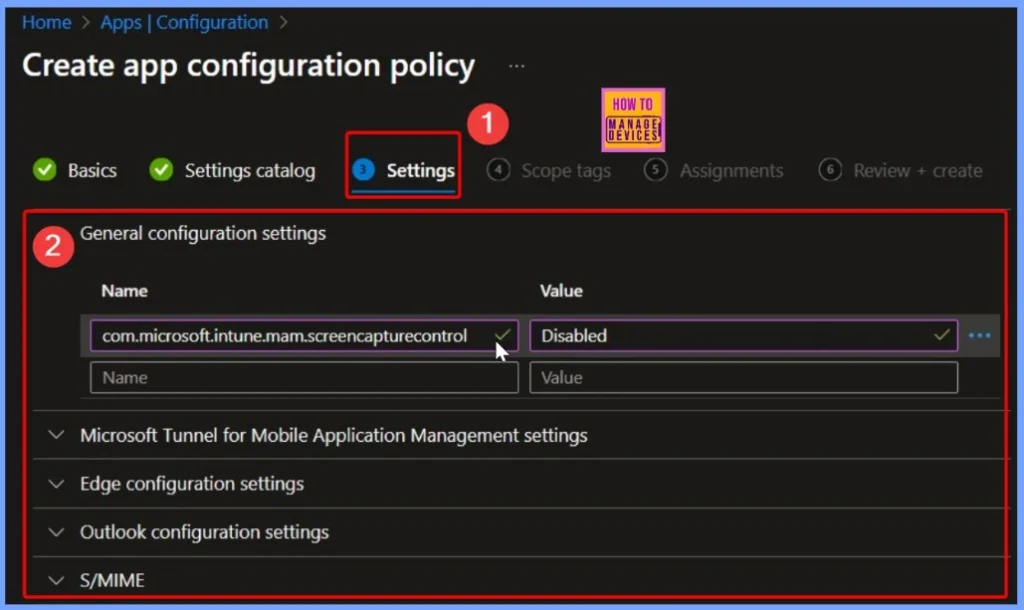
IT admins can block actions like: Copying and pasting data to unauthorized apps, Taking screenshots and Saving files to personal or unapproved storage apps
Intune MAM App Protection Policies for Screenshot Protection Settings
With features like blocking copy/paste, preventing screenshots, and restricting file sharing to unauthorised apps, APP ensures that sensitive information stays secure. At the same time, users can feel confident knowing their personal data remains private and untouched by the organization.
- Receive data from
- Select one of the following options to specify the sources org users can receive data from
- All sources: Org users can open data from any account, document, location or application into the org context.
- No sources: Org users cannot open data from external accounts, documents, locations or applications into the org context.
- Send org data to
- Select one of the following options to specify the destinations org users can send data to:
- All destinations: Org users can send org data to any account, document, location or application.
- No destinations: Org users cannot send org data to external accounts, documents, locations or applications from the org context.
- Allow cut, copy, and paste for
- Select one of the following options to specify the sources and destinations org users can cut or copy or paste org data:
- Any destination and any source: Org users can paste data from and cut/copy data to any account, document, location or application.
- No destination or source: Org users cannot cut, copy or paste data to or from external accounts, documents, locations or applications from or into the org context.
| Feature | Details |
|---|---|
| Supported Platform | iOS, Android, and Windows |
| Device Type | Personal (BYOD) and corporate devices |
| Access Control | Allows access to corporate data only through managed apps |
| Data Protection | Restricts copy/paste, screenshots, and sharing to unauthorized apps |
| User Privacy | Organization cannot access personal data or control the device |
| Use Case | Secure company data access without full device management |
- Issue with Microsoft Intune App Protection Policies Not Targeting Newly Added Apps
- Create Intune App Protection Policies for iOS iPadOS
- How to Create App Protection Policies for Windows MAM Devices
- Intune App Protection Policies for Android and iOS Devices
- Enforce Users to use Intune Approved Apps with App Protection Policies using Conditional Access Policies
Intune Expands Partner Application Ecosystem
Microsoft has enhanced the Intune App Protection ecosystem by expanding its list of supported partner applications. The Mobile Application Management (MAM) SDK empowers independent software vendors (ISVs) to integrate Intune’s data protection and management capabilities directly into their apps.
- As of this month, the supported app list has grown to 126 apps, including:
- 4 Android-only apps
- 39 iOS-exclusive apps
- 83 apps supporting both platforms
| Latest Supported Applications in Intune App Protection |
|---|
| 4CEE Connect |
| Applications Manager – Intune |
| Datasite for Intune |
| DealCloud |
| FacilyLife |
| FileOrbis for Intune |
| Intapp 2.0 |
| Lemur Pro for Intune |
| Mijn InPlanning |
| Mobile Helix Link for Intune |
| Nitro PDF Pro |
| Outreach Mobile |
| PagerDuty for Intune |
| SMART TeamWorks |
Need Further Assistance or Have Technical Questions?
Join the LinkedIn Page and Telegram group to get the latest step-by-step guides and news updates. Join our Meetup Page to participate in User group meetings. Also, join the WhatsApp Community to get the latest news on Microsoft Technologies. We are there on Reddit as well. You can see these details have been discussed in Reddit and other social media forums.
Author
Anoop C Nair has been Microsoft MVP for 10 consecutive years from 2015 onwards. He is a Workplace Solution Architect with more than 22+ years of experience in Workplace technologies. He is a Blogger, Speaker, and Local User Group Community leader. His primary focus is on Device Management technologies like SCCM and Intune. He writes about technologies like Intune, SCCM, Windows, Cloud PC, Windows, Entra, Microsoft Security, Career, etc.


Discussion