






Learn How to Remove Management Point Role|SCCM|ConfigMgr
I have published the install configuration manager Management point guide in the previous post. In this post, you shall learn how to remove/reinstall management points (Remove Management Point Role).
A management point provides policy and content location information to clients and receives configuration data from them. The SCCM clients use a service location process to locate site system servers. SCCM clients can communicate with these servers.
A management point serves a crucial site system role by providing policy and service location information to clients and receiving configuration data from them. Configuration Manager disrupts communication between the site server and the assigned clients when a management point is removed.
When you remove a configuration manager Management point, the clients can’t access the policies of any SCCM deployments (OSD, Application, etc.). There are no other impacts on the existing clients.

Related Post – FIX SCCM Management Point Issues Internal Server Error 500
Remove Management Point Role
Let’s see how to remove/uninstall a ConfigMgr Management point. The following are the steps you need to follow:
- Navigate – \Administration\Overview\Site Configuration\Servers and Site System Roles
- Right Click on Management Point and Select Remove
- Click on Yes to confirm the removal of the MP role from the site system server
Prerequisite
Before removing the management point role on a site system server, ensure the SCCM remote site server computer account is part of the Local Administrators group.
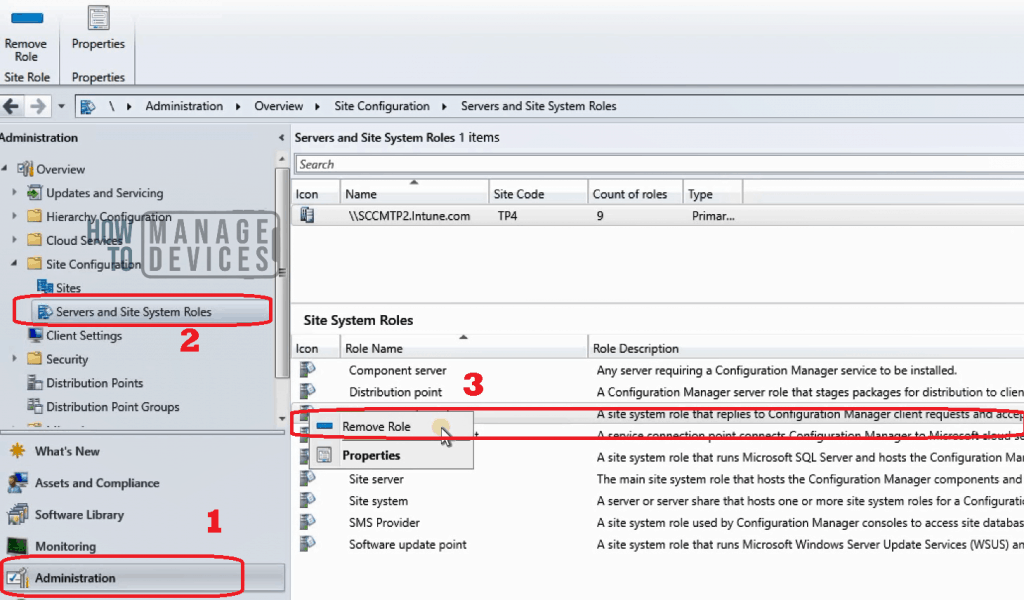
Initiate the Management Point Removal Process
You can review the MPSetup.log log file to know the status of the successful completion of the Management Point role removal process (Remove Management Point Role)
SMSMP Setup Started….
Parameters: C:\Program Files\Microsoft Configuration Manager\bin\x64\rolesetup.exe /deinstall /siteserver:SCCMTP2 SMSMP 0
Deinstalling the SMSMP
CreateProcess: (null), C:\Windows\system32\WindowsPowerShell\v1.0\PowerShell.exe -ExecutionPolicy RemoteSigned -File "C:\Program Files\Microsoft Configuration Manager\bin\x64\MBAMRecoveryServiceInstaller.ps1" -Uninstall
CreateProcess: 0
Enabling MSI logging.  mp.msi will log to C:\Program Files\Microsoft Configuration Manager\logs\mpMSI.log
Deinstalling SMSMP, with product code {2CE4402E-4914-43D3-8256-571707890236}
Remove IIS Components Related to Management Point
You can review the MPMSI.log log file to know the status of Management point removal from IIS and other components’ perspectives.
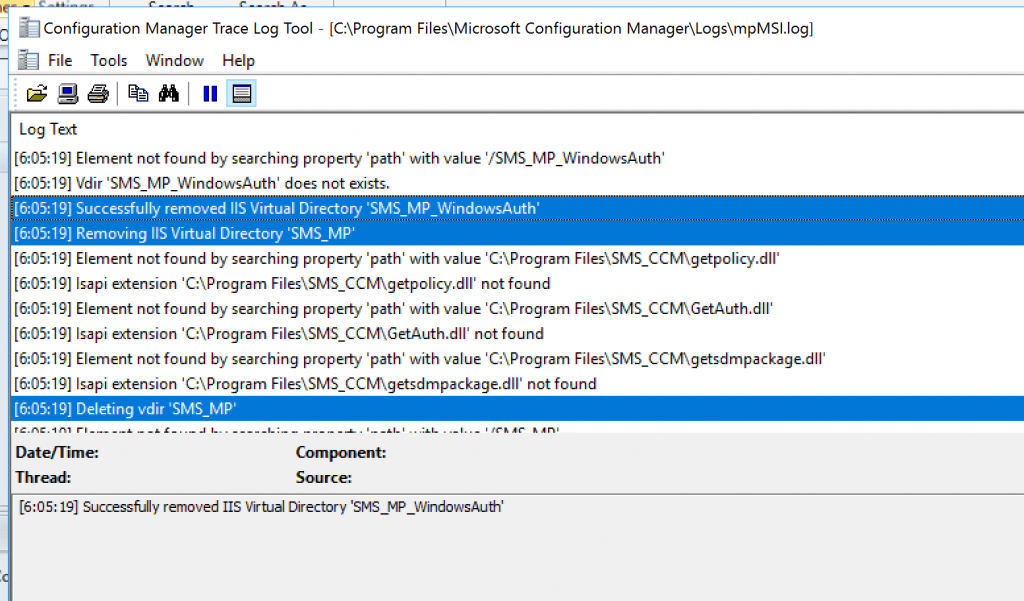
Let’s check that the IIS components and web roles are removed when uninstalling the SCCM MP role from a server. The mpMSI.log file provides more details.
[6:05:19] IIS7 is installed. Removing application 'ConfigMgr Management Point'.
[6:05:19] Successfully removed application 'ConfigMgr Management Point' with IIS7.
[6:05:19] Removing IIS Virtual Directory 'SMS_MP_WindowsAuth'
[6:05:19] Element not found by searching property 'path' with value 'C:\Program Files\SMS_CCM\getpolicy.dll'
[6:05:19] Isapi extension 'C:\Program Files\SMS_CCM\getpolicy.dll' not found
[6:05:19] Deleting vdir 'SMS_MP_WindowsAuth'
[6:05:19] Element not found by searching property 'path' with value '/SMS_MP_WindowsAuth'
[6:05:19] Vdir 'SMS_MP_WindowsAuth' does not exists.
[6:05:19] Deleting vdir 'SMS_MP_WindowsAuth'
[6:05:19] Element not found by searching property 'path' with value '/SMS_MP_WindowsAuth'
[6:05:19] Vdir 'SMS_MP_WindowsAuth' does not exists.
[6:05:19] Successfully removed IIS Virtual Directory 'SMS_MP_WindowsAuth'
[6:05:19] Removing IIS Virtual Directory 'SMS_MP'
[6:05:19] Element not found by searching property 'path' with value 'C:\Program Files\SMS_CCM\getpolicy.dll'
[6:05:19] Isapi extension 'C:\Program Files\SMS_CCM\getpolicy.dll' not found
[6:05:19] Element not found by searching property 'path' with value 'C:\Program Files\SMS_CCM\GetAuth.dll'
[6:05:19] Isapi extension 'C:\Program Files\SMS_CCM\GetAuth.dll' not found
[6:05:19] Element not found by searching property 'path' with value 'C:\Program Files\SMS_CCM\getsdmpackage.dll'
[6:05:19] Isapi extension 'C:\Program Files\SMS_CCM\getsdmpackage.dll' not found
[6:05:19] Deleting vdir 'SMS_MP'
[6:05:19] Element not found by searching property 'path' with value '/SMS_MP'
[6:05:19] Vdir 'SMS_MP' does not exists.
[6:05:19] Deleting vdir 'SMS_MP'
[6:05:19] Element not found by searching property 'path' with value '/SMS_MP'
[6:05:19] Vdir 'SMS_MP' does not exists.
[6:05:19] Successfully removed IIS Virtual Directory 'SMS_MP'
[6:05:19] Removing IIS Virtual Directory 'CMUserService_WindowsAuth'
[6:05:19] Deleting vdir 'CMUserService_WindowsAuth'
[6:05:19] Element not found by searching property 'path' with value '/CMUserService_WindowsAuth'
[6:05:19] Vdir 'CMUserService_WindowsAuth' does not exists.
[6:05:19] Deleting vdir 'CMUserService_WindowsAuth'
[6:05:19] Element not found by searching property 'path' with value '/CMUserService_WindowsAuth'
[6:05:19] Vdir 'CMUserService_WindowsAuth' does not exists.
[6:05:19] Successfully removed IIS Virtual Directory 'CMUserService_WindowsAuth'
[6:05:19] Removing IIS Virtual Directory 'CMUserService'
[6:05:19] Deleting vdir 'CMUserService'
[6:05:19] Element not found by searching property 'path' with value '/CMUserService'
[6:05:19] Vdir 'CMUserService' does not exists.
[6:05:19] Deleting vdir 'CMUserService'
[6:05:19] Element not found by searching property 'path' with value '/CMUserService'
[6:05:19] Vdir 'CMUserService' does not exists.
[6:05:19] Successfully removed IIS Virtual Directory 'CMUserService'
[6:05:19] Removing IIS Virtual Directory 'CCM_STS'
[6:05:19] Deleting vdir 'CCM_STS'
[6:05:19] Element not found by searching property 'path' with value '/CCM_STS'
[6:05:19] Vdir 'CCM_STS' does not exists.
[6:05:19] Deleting vdir 'CCM_STS'
[6:05:19] Element not found by searching property 'path' with value '/CCM_STS'
[6:05:19] Vdir 'CCM_STS' does not exists.
[6:05:19] Successfully removed IIS Virtual Directory 'CCM_STS'
[6:05:19] Removing IIS Virtual Directory 'CCM_System_TokenAuth'
[6:05:19] Element not found by searching property 'path' with value 'C:\Program Files\SMS_CCM\ccmisapi.dll'
[6:05:19] Isapi extension 'C:\Program Files\SMS_CCM\ccmisapi.dll' not found
[6:05:19] Deleting vdir 'CCM_System_TokenAuth'
[6:05:20] Element not found by searching property 'path' with value '/CCM_System_TokenAuth'
[6:05:20] Vdir 'CCM_System_TokenAuth' does not exists.
[6:05:20] Deleting vdir 'CCM_System_TokenAuth'
[6:05:20] Element not found by searching property 'path' with value '/CCM_System_TokenAuth'
[6:05:20] Vdir 'CCM_System_TokenAuth' does not exists.
[6:05:20] Successfully removed IIS Virtual Directory 'CCM_System_TokenAuth'
[6:05:20] Removing IIS Virtual Directory 'CCM_System_WindowsAuth'
[6:05:20] Element not found by searching property 'path' with value 'C:\Program Files\SMS_CCM\ccmisapi.dll'
[6:05:20] Isapi extension 'C:\Program Files\SMS_CCM\ccmisapi.dll' not found
[6:05:20] Deleting vdir 'CCM_System_WindowsAuth'
[6:05:20] Element not found by searching property 'path' with value '/CCM_System_WindowsAuth'
[6:05:20] Vdir 'CCM_System_WindowsAuth' does not exists.
[6:05:20] Deleting vdir 'CCM_System_WindowsAuth'
[6:05:20] Element not found by searching property 'path' with value /CCM_System_WindowsAuth'
[6:05:20] Vdir 'CCM_System_WindowsAuth' does not exists.
[6:05:20] Successfully removed IIS Virtual Directory 'CCM_System_WindowsAuth'
[6:05:20] Removing IIS Virtual Directory 'CCM_System'
[6:05:20] Element not found by searching property 'path' with value 'C:\Program Files\SMS_CCM\ccmisapi.dll'
[6:05:20] Isapi extension 'C:\Program Files\SMS_CCM\ccmisapi.dll' not found
[6:05:20] Deleting vdir 'CCM_System'
[6:05:20] Element not found by searching property 'path' with value '/CCM_System'
[6:05:20] Vdir 'CCM_System' does not exists.
[6:05:20] Deleting vdir 'CCM_System'
[6:05:20] Element not found by searching property 'path' with value '/CCM_System'
[6:05:20] Vdir 'CCM_System' does not exists.
[6:05:20] Successfully removed IIS Virtual Directory 'CCM_System'
[6:05:20] Removing IIS Virtual Directory 'CCM_Incoming'
[6:05:21] Disabling BITS
[6:05:25] Deleting vdir 'CCM_Incoming'
[6:05:25] Element not found by searching property 'path' with value '/CCM_Incoming'
[6:05:25] Vdir 'CCM_Incoming' does not exists.
[6:05:25] Deleting vdir 'CCM_Incoming'
[6:05:25] Element not found by searching property 'path' with value '/CCM_Incoming'
[6:05:25] Vdir 'CCM_Incoming' does not exists.
[6:05:25] Successfully removed IIS Virtual Directory 'CCM_Incoming'
[6:05:25] Removing IIS Virtual Directory 'CCM_CLIENT'
[6:05:25] Element not found by searching property 'path' with value 'C:\Program Files\SMS_CCM\ccmclientisapi.dll'
[6:05:25] Isapi extension 'C:\Program Files\SMS_CCM\ccmclientisapi.dll' not found
[6:05:25] Deleting vdir 'CCM_CLIENT'
[6:05:25] Element not found by searching property 'path' with value '/CCM_CLIENT'
[6:05:25] Vdir 'CCM_CLIENT' does not exists.
[6:05:25] Deleting vdir 'CCM_CLIENT'
[6:05:25] Element not found by searching property 'path' with value '/CCM_CLIENT'
[6:05:25] Vdir 'CCM_CLIENT' does not exists.
[6:05:25] Successfully removed IIS Virtual Directory 'CCM_CLIENT'
[6:05:25] Deleting vdir 'CCM_Outgoing'
[6:05:25] Element not found by searching property 'path' with value '/CCM_Outgoing'
[6:05:25] Vdir 'CCM_Outgoing' does not exists.
[6:05:25] Deleting vdir 'CCM_Outgoing'
6:05:25] Element not found by searching property 'path' with value '/CCM_Outgoing'
[6:05:25] Vdir 'CCM_Outgoing' does not exists.
Remove Registry Entries of Management Point
After removing IIS components, MPMSI shall initiate removing registry entries related to Management Point. For more details, see the mpMSI.log file.
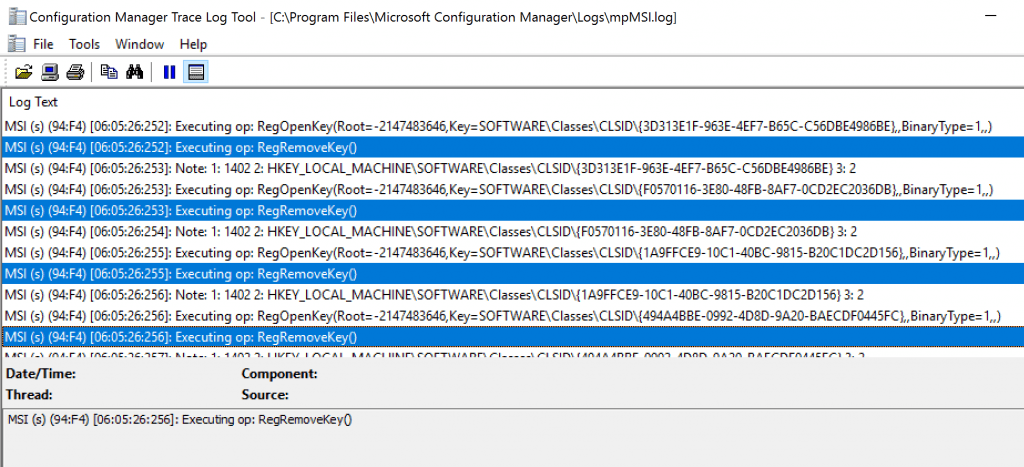
MSI (s) (94:F4) [06:05:26:254]: Note: 1: 1402 2: HKEY_LOCAL_MACHINE\SOFTWARE\Classes\CLSID{F0570116-3E80-48FB-8AF7-0CD2EC2036DB} 3: 2
MSI (s) (94:F4) [06:05:26:255]: Executing op: RegOpenKey(Root=-2147483646,Key=SOFTWARE\Classes\CLSID{1A9FFCE9-10C1-40BC-9815-B20C1DC2D156},,BinaryType=1,,)
MSI (s) (94:F4) [06:05:26:255]: Executing op: RegRemoveKey()
Completed the Removal of Management Point
You can review the MPSetup.log and mpMSI.log to verify that the process called “Remove Management Point Role” has been completed.
SMSMP deinstall exited with return code: 0
Deinstallation was successful.
Removing MP Registry.
~RoleSetup().
Resources – Remove Management Point Role
- More details Management point
- SCCM Logs and Quick Tips to Read Logs
- IIS Troubleshooting Tips for SCCM Admins|MP DP IIS Error Codes
We are on WhatsApp. To get the latest step-by-step guides and news updates, Join our Channel. Click here –HTMD WhatsApp.
Author
Anoop C Nair is Microsoft MVP! He is a Device Management Admin with more than 20 years of experience (calculation done in 2021) in IT. He is a Blogger, Speaker, and Local User Group HTMD Community leader. His main focus is on Device Management technologies like SCCM 2012, Current Branch, and Intune. He writes about ConfigMgr, Windows 11, Windows 10, Azure AD, Microsoft Intune, Windows 365, AVD, etc.




Hi Anoop,
I am really happy that you are driving your blogs which are very famous & especially very helpful for us.
Can you help me to the best approach to upgrade Primary in CIO SCCM which is currently on 2012 R2 and upgrade to Windows 2019 without causing disruption services with minimal downtime?
Regards,
Syed
Hi Anoop,
I am really happy that you are driving your blogs which are very famous & especially very helpful for us.
Can you help me decommission the process for MP/DP SCCM Site server in my infra? If in case you have any checklist for this task please provide me the link.
Regards,
Syed